---
title: "GitHub"
description: "Modeling GitHub permissions"
canonical: "https://openfga.dev/docs/modeling/advanced/github"
content_type: "documentation"
last_updated: "2026-08-24T10:26:12.000Z"
---
# Modeling GitHub permissions with OpenFGA
This tutorial explains how to model GitHub's Organization permission model using [OpenFGA](https://openfga.dev/docs/fga.md). [This article](https://docs.github.com/en/free-pro-team@latest/github/setting-up-and-managing-organizations-and-teams/managing-access-to-your-organizations-repositories) from the GitHub docs has links to all other articles we are going to be exploring in this document.
**What you will learn**
- Indicate [relationships](https://openfga.dev/docs/concepts.md#what-is-a-relationship) between a group of **[users](https://openfga.dev/docs/concepts.md#what-is-a-user)** and an **[object](https://openfga.dev/docs/concepts.md#what-is-an-object)**. See [Modeling User Groups](https://openfga.dev/docs/modeling/user-groups.md) for more details.
Used here to indicate that all members of an organization are repository admins on the organization.
- Modeling **concentric relationship** to have a certain [relation](https://openfga.dev/docs/concepts.md#what-is-a-relation) on an object imply another relation on the same object. See [Modeling Concepts: Concentric Relationships](https://openfga.dev/docs/modeling/building-blocks/concentric-relationships.md) for more.
Used here to indicate that maintainers of a repository are also writers of that repository.
- Using [**the union operator**](https://openfga.dev/docs/configuration-language.md#the-union-operator) condition to indicate that a user might have a certain relation with an object if they match any of the criteria indicated.
Used here to indicate that a user can be a reader on a repository, or can have the reader relationship implied through triager.
- Model [**parent-child objects**](https://openfga.dev/docs/modeling/parent-child.md) to indicate that a user having a relationship with a certain object implies having a relationship with another object in OpenFGA.
Used here to indicate that a repository admin on a GitHub organization, is an admin on all repositories that organization owns.
## Before you start
In order to understand this guide correctly you must be familiar with some OpenFGA concepts and know how to develop the things that we will list below.
### OpenFGA conceptsIt would be helpful to have an understanding of some concepts of OpenFGA before you start.
#### Modeling concentric relationships
You need to know how to update the authorization model to allow having nested relations such as all writers are readers. [Learn more →](https://openfga.dev/docs/modeling/building-blocks/concentric-relationships.md)
#### Modeling object-to-object relationships
You need to know how to create relationships between objects and how that might affect a user's relationships to those objects. [Learn more →](https://openfga.dev/docs/modeling/building-blocks/object-to-object-relationships.md)
Used here to indicate that users who have repo admin access on an organization, have admin access to all repositories owned by that organization.
#### Concepts & configuration language
- Some [OpenFGA Concepts](https://openfga.dev/docs/concepts.md)
- [Configuration Language](https://openfga.dev/docs/configuration-language.md)
## What you will be modeling
GitHub is a system to develop and collaborate on code.
In this tutorial, you will build a subset of the GitHub permission model (detailed below) in OpenFGA, using some scenarios to validate the model.
> Note: For brevity, this tutorial will not model all of GitHub's permissions. Instead, it will focus on modeling for the scenarios outlined below
### Requirements
GitHub's permission model is represented in [their documentation](https://docs.github.com/en/organizations/managing-access-to-your-organizations-repositories/repository-roles-for-an-organization#repository-roles-for-organizations).
In this tutorial, you will be focusing on a subset of these permissions.
Requirements:
- Users can be admins, maintainers, writers, triagers or readers of repositories (each level inherits all access of the level lower than it. e.g. admins inherit maintainer access and so forth)
- Teams can have members
- Organizations can have members
- Organizations can own repositories
- Users can have repository admin access on organizations, and thus have admin access to all repositories owned by that organization
### Defined scenarios
There will be the following users:
- Anne
- Beth
- Charles, a member of the contoso/engineering team
- Diane, a member of the contoso/protocols team
- Erik, a member of the contoso org
And these requirements:
- members of the contoso/protocols team are members of the contoso/engineering team
- members of the contoso org are repo\_admins on the org
- repo admins on the org are admins on all the repos the org owns
There will be a:
- contoso/tooling repository, owned by the contoso org and of which Beth is a writer and Anne is a reader and members of the contoso/engineering team are admins
## Modeling GitHub's permissions
### 01. Permissions For Individuals In An Org
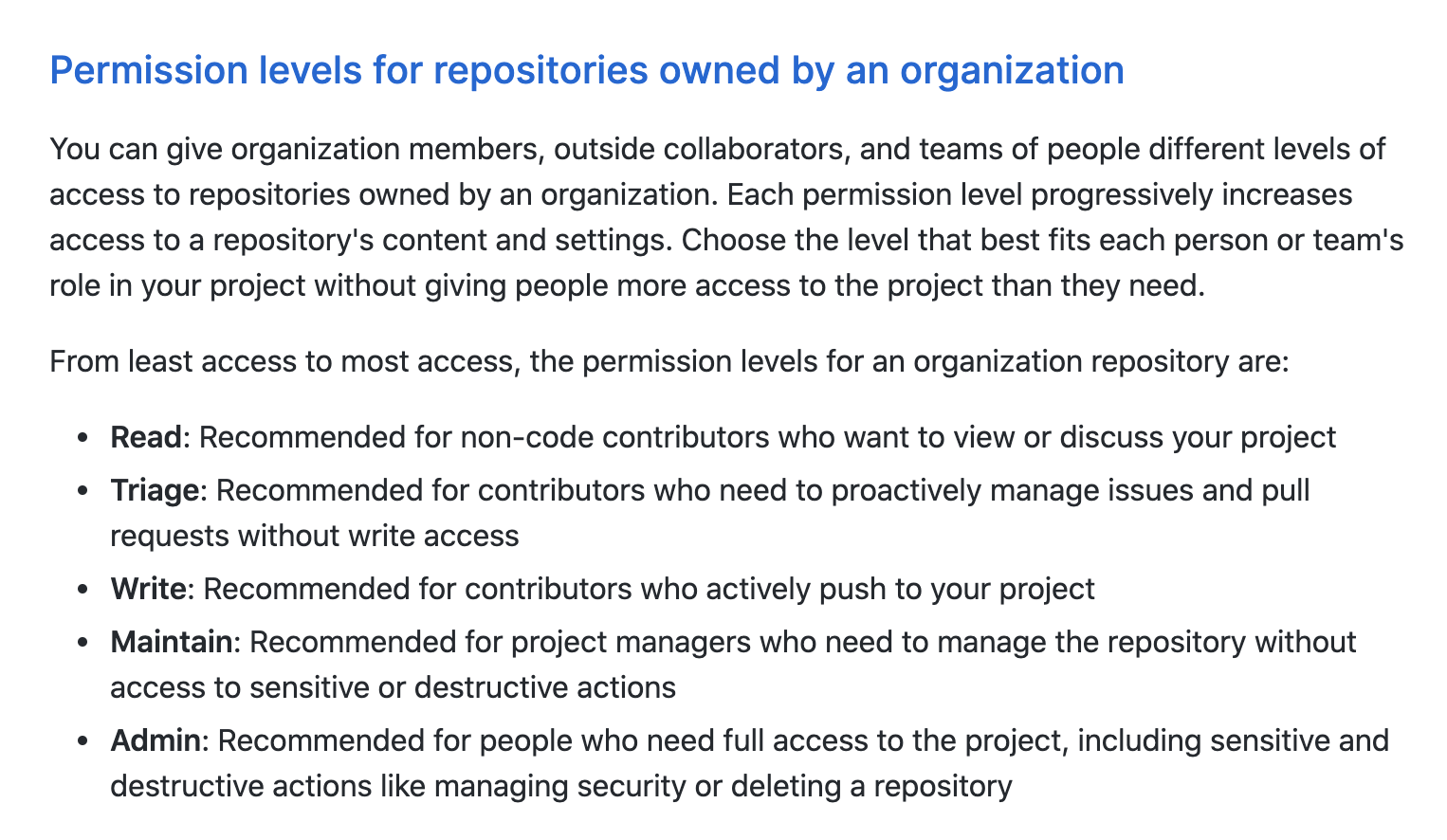
GitHub has [5 different permission levels for repositories](https://docs.github.com/en/free-pro-team@latest/github/setting-up-and-managing-organizations-and-teams/repository-permission-levels-for-an-organization):
At the end of this section we want to end up with the following permissions represented:
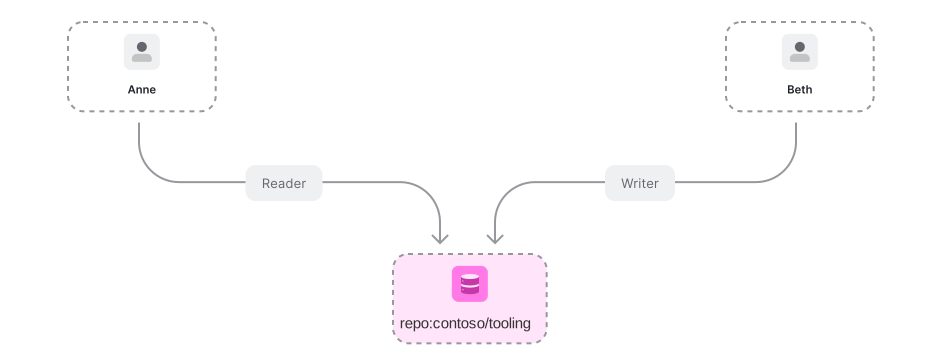
To represent permissions in OpenFGA we use [relations](https://openfga.dev/docs/concepts.md#what-is-a-relation). For repository permissions we need to create the following [authorization model](https://openfga.dev/docs/concepts.md#what-is-an-authorization-model):
```
model
schema 1.1
type user
type repo
relations
define reader: [user]
define triager: [user]
define writer: [user]
define maintainer: [user]
define admin: [user]
```
The OpenFGA service determines if a [user](https://openfga.dev/docs/concepts.md#what-is-a-user) has access to an [object](https://openfga.dev/docs/concepts.md#what-is-an-object) by [checking](https://openfga.dev/docs/concepts.md#what-is-a-check-request) if the user has a relation to that object. Let us examine one of those relations in detail:
```
model
schema 1.1
type user
type repo
relations
define reader: [user]
```
info
Objects of type "repo" have users related to them as "reader" if those users belong to the userset of all users related to the repo as "reader"
If we want to say `anne` is a reader of repository **repo:contoso/tooling** we create this [relationship tuple](https://openfga.dev/docs/concepts.md#what-is-a-relationship-tuple):
- Node.js
- Go
- .NET
- Python
- Java
- curl
- CLI
- Pseudocode
Initialize the SDK
```
// ApiTokenIssuer, ApiAudience, ClientId and ClientSecret are optional.
// import the SDK
const { OpenFgaClient } = require('@openfga/sdk');
// Initialize the SDK with no auth - see "How to setup SDK client" for more options
const fgaClient = new OpenFgaClient({
apiUrl: process.env.FGA_API_URL, // required, e.g. https://api.fga.example
storeId: process.env.FGA_STORE_ID,
authorizationModelId: process.env.FGA_MODEL_ID, // Optional, can be overridden per request
});
```
```
const options = {
authorizationModelId: "01HVMMBCMGZNT3SED4Z17ECXCA",
};
await fgaClient.write({
writes: [
{"user":"user:anne","relation":"reader","object":"repo:contoso/tooling"}
],
}, options);
```
Initialize the SDK
```
// ApiTokenIssuer, ApiAudience, ClientId and ClientSecret are optional.
import (
"os"
. "github.com/openfga/go-sdk"
. "github.com/openfga/go-sdk/client"
)
func main() {
// Initialize the SDK with no auth - see "How to setup SDK client" for more options
fgaClient, err := NewSdkClient(&ClientConfiguration{
ApiUrl: os.Getenv("FGA_API_URL"), // required, e.g. https://api.fga.example
StoreId: os.Getenv("FGA_STORE_ID"), // optional, not needed for `CreateStore` and `ListStores`, required before calling for all other methods
AuthorizationModelId: os.Getenv("FGA_MODEL_ID"), // Optional, can be overridden per request
})
if err != nil {
// .. Handle error
}
}
```
```
options := ClientWriteOptions{
AuthorizationModelId: openfga.PtrString("01HVMMBCMGZNT3SED4Z17ECXCA"),
}
body := ClientWriteRequest{
Writes: []ClientTupleKey{
{
User: "user:anne",
Relation: "reader",
Object: "repo:contoso/tooling",
},
},
}
data, err := fgaClient.Write(context.Background()).
Body(body).
Options(options).
Execute()
if err != nil {
// .. Handle error
}
_ = data // use the response
```
Initialize the SDK
```
// ApiTokenIssuer, ApiAudience, ClientId and ClientSecret are optional.
// import the SDK
using OpenFga.Sdk.Client;
using OpenFga.Sdk.Client.Model;
using OpenFga.Sdk.Model;
using Environment = System.Environment;
namespace Example;
class Example {
public static async Task Main() {
// Initialize the SDK with no auth - see "How to setup SDK client" for more options
var configuration = new ClientConfiguration() {
ApiUrl = Environment.GetEnvironmentVariable("FGA_API_URL"), ?? "http://localhost:8080", // required, e.g. https://api.fga.example
StoreId = Environment.GetEnvironmentVariable("FGA_STORE_ID"), // optional, not needed for `CreateStore` and `ListStores`, required before calling for all other methods
AuthorizationModelId = Environment.GetEnvironmentVariable("FGA_MODEL_ID"), // Optional, can be overridden per request
};
var fgaClient = new OpenFgaClient(configuration);
}
}
```
```
var options = new ClientWriteOptions {
AuthorizationModelId = "01HVMMBCMGZNT3SED4Z17ECXCA",
};
var body = new ClientWriteRequest() {
Writes = new List() {
new() {
User = "user:anne",
Relation = "reader",
Object = "repo:contoso/tooling"
}
},
};
var response = await fgaClient.Write(body, options);
```
Initialize the SDK
```
# ApiTokenIssuer, ApiAudience, ClientId and ClientSecret are optional.
import asyncio
import os
import json
from openfga_sdk.client import ClientConfiguration, OpenFgaClient
async def main():
configuration = ClientConfiguration(
api_url = os.environ.get('FGA_API_URL'), # required, e.g. https://api.fga.example
store_id = os.environ.get('FGA_STORE_ID'), # optional, not needed for `CreateStore` and `ListStores`, required before calling for all other methods
authorization_model_id = os.environ.get('FGA_MODEL_ID'), # Optional, can be overridden per request
)
# Enter a context with an instance of the OpenFgaClient
async with OpenFgaClient(configuration) as fga_client:
api_response = await fga_client.read_authorization_models()
await fga_client.close()
asyncio.run(main())
```
```
options = {
"authorization_model_id": "01HVMMBCMGZNT3SED4Z17ECXCA"
}
body = ClientWriteRequest(
writes=[
ClientTuple(
user="user:anne",
relation="reader",
object="repo:contoso/tooling",
),
],
)
response = await fga_client.write(body, options)
```
Initialize the SDK
```
// ApiTokenIssuer, ApiAudience, ClientId and ClientSecret are optional.
import dev.openfga.sdk.api.client.OpenFgaClient;
import dev.openfga.sdk.api.configuration.ClientConfiguration;
public class Example {
public static void main(String[] args) throws Exception {
var config = new ClientConfiguration()
.apiUrl(System.getenv("FGA_API_URL")) // If not specified, will default to "https://localhost:8080"
.storeId(System.getenv("FGA_STORE_ID")) // Not required when calling createStore() or listStores()
.authorizationModelId(System.getenv("FGA_AUTHORIZATION_MODEL_ID")); // Optional, can be overridden per request
var fgaClient = new OpenFgaClient(config);
}
}
```
```
var options = new ClientWriteOptions()
.authorizationModelId("01HVMMBCMGZNT3SED4Z17ECXCA");
var body = new ClientWriteRequest()
.writes(List.of(
new ClientTupleKey()
.user("user:anne")
.relation("reader")
._object("repo:contoso/tooling")
));
var response = fgaClient.write(body, options).get();
```
Set FGA\_API\_URL according to the service you are using (e.g. https\://api.fga.example)
```
Set FGA_API_URL according to the service you are using (e.g. https://api.fga.example)
```
```
curl -X POST $FGA_API_URL/stores/$FGA_STORE_ID/write \
-H "Authorization: Bearer $FGA_API_TOKEN" \ # Not needed if service does not require authorization
-H "content-type: application/json" \
-d '{
"writes": {
"tuple_keys": [
{
"user": "user:anne",
"relation": "reader",
"object": "repo:contoso/tooling"
}
]
},
"authorization_model_id": "01HVMMBCMGZNT3SED4Z17ECXCA"
}'
```
Set FGA\_API\_URL according to the service you are using (e.g. https\://api.fga.example)
```
Set FGA_API_URL according to the service you are using (e.g. https://api.fga.example)
```
```
fga tuple write --store-id=${FGA_STORE_ID} --model-id=01HVMMBCMGZNT3SED4Z17ECXCA user:anne reader repo:contoso/tooling
```
```
write([
{
"user":"user:anne",
"relation":"reader",
"object":"repo:contoso/tooling"
}
])
```
We can now [ask](https://openfga.dev/docs/concepts.md#what-is-a-check-request) OpenFGA "is `anne` a reader of repository **repo:contoso/tooling**?"
- Node.js
- Go
- .NET
- Python
- Java
- CLI
- curl
- Pseudocode
- Playground
Initialize the SDK
```
// ApiTokenIssuer, ApiAudience, ClientId and ClientSecret are optional.
// import the SDK
const { OpenFgaClient } = require('@openfga/sdk');
// Initialize the SDK with no auth - see "How to setup SDK client" for more options
const fgaClient = new OpenFgaClient({
apiUrl: process.env.FGA_API_URL, // required, e.g. https://api.fga.example
storeId: process.env.FGA_STORE_ID,
authorizationModelId: process.env.FGA_MODEL_ID, // Optional, can be overridden per request
});
```
```
// Run a check
const { allowed } = await fgaClient.check({
user: 'user:anne',
relation: 'reader',
object: 'repo:contoso/tooling',
}, {
authorizationModelId: '01HVMMBCMGZNT3SED4Z17ECXCA',
});
// allowed = true
```
Initialize the SDK
```
// ApiTokenIssuer, ApiAudience, ClientId and ClientSecret are optional.
import (
"os"
. "github.com/openfga/go-sdk"
. "github.com/openfga/go-sdk/client"
)
func main() {
// Initialize the SDK with no auth - see "How to setup SDK client" for more options
fgaClient, err := NewSdkClient(&ClientConfiguration{
ApiUrl: os.Getenv("FGA_API_URL"), // required, e.g. https://api.fga.example
StoreId: os.Getenv("FGA_STORE_ID"), // optional, not needed for `CreateStore` and `ListStores`, required before calling for all other methods
AuthorizationModelId: os.Getenv("FGA_MODEL_ID"), // Optional, can be overridden per request
})
if err != nil {
// .. Handle error
}
}
```
```
options := ClientCheckOptions{
AuthorizationModelId: openfga.PtrString("01HVMMBCMGZNT3SED4Z17ECXCA"),
}
body := ClientCheckRequest{
User: "user:anne",
Relation: "reader",
Object: "repo:contoso/tooling",
}
data, err := fgaClient.Check(context.Background()).
Body(body).
Options(options).
Execute()
// data = { allowed: true }
```
Initialize the SDK
```
// ApiTokenIssuer, ApiAudience, ClientId and ClientSecret are optional.
// import the SDK
using OpenFga.Sdk.Client;
using OpenFga.Sdk.Client.Model;
using OpenFga.Sdk.Model;
using Environment = System.Environment;
namespace Example;
class Example {
public static async Task Main() {
// Initialize the SDK with no auth - see "How to setup SDK client" for more options
var configuration = new ClientConfiguration() {
ApiUrl = Environment.GetEnvironmentVariable("FGA_API_URL"), ?? "http://localhost:8080", // required, e.g. https://api.fga.example
StoreId = Environment.GetEnvironmentVariable("FGA_STORE_ID"), // optional, not needed for `CreateStore` and `ListStores`, required before calling for all other methods
AuthorizationModelId = Environment.GetEnvironmentVariable("FGA_MODEL_ID"), // Optional, can be overridden per request
};
var fgaClient = new OpenFgaClient(configuration);
}
}
```
```
var options = new ClientCheckOptions {
AuthorizationModelId = "01HVMMBCMGZNT3SED4Z17ECXCA"
};
var body = new ClientCheckRequest {
User = "user:anne",
Relation = "reader",
Object = "repo:contoso/tooling",
};
var response = await fgaClient.Check(body, options);
// response.Allowed = true
```
Initialize the SDK
```
# ApiTokenIssuer, ApiAudience, ClientId and ClientSecret are optional.
import asyncio
import os
import json
from openfga_sdk.client import ClientConfiguration, OpenFgaClient
async def main():
configuration = ClientConfiguration(
api_url = os.environ.get('FGA_API_URL'), # required, e.g. https://api.fga.example
store_id = os.environ.get('FGA_STORE_ID'), # optional, not needed for `CreateStore` and `ListStores`, required before calling for all other methods
authorization_model_id = os.environ.get('FGA_MODEL_ID'), # Optional, can be overridden per request
)
# Enter a context with an instance of the OpenFgaClient
async with OpenFgaClient(configuration) as fga_client:
api_response = await fga_client.read_authorization_models()
await fga_client.close()
asyncio.run(main())
```
```
options = {
"authorization_model_id": "01HVMMBCMGZNT3SED4Z17ECXCA",
}
body = ClientCheckRequest(
user="user:anne",
relation="reader",
object="repo:contoso/tooling",
)
response = await fga_client.check(body, options)
# response.allowed = true
```
Initialize the SDK
```
// ApiTokenIssuer, ApiAudience, ClientId and ClientSecret are optional.
import dev.openfga.sdk.api.client.OpenFgaClient;
import dev.openfga.sdk.api.configuration.ClientConfiguration;
public class Example {
public static void main(String[] args) throws Exception {
var config = new ClientConfiguration()
.apiUrl(System.getenv("FGA_API_URL")) // If not specified, will default to "https://localhost:8080"
.storeId(System.getenv("FGA_STORE_ID")) // Not required when calling createStore() or listStores()
.authorizationModelId(System.getenv("FGA_AUTHORIZATION_MODEL_ID")); // Optional, can be overridden per request
var fgaClient = new OpenFgaClient(config);
}
}
```
```
var options = new ClientCheckOptions()
.authorizationModelId("01HVMMBCMGZNT3SED4Z17ECXCA");
var body = new ClientCheckRequest()
.user("user:anne")
.relation("reader")
._object("repo:contoso/tooling");
var response = fgaClient.check(body, options).get();
// response.getAllowed() = true
```
Set FGA\_API\_URL according to the service you are using (e.g. https\://api.fga.example)
```
Set FGA_API_URL according to the service you are using (e.g. https://api.fga.example)
```
```
fga query check --store-id=$FGA_STORE_ID --model-id=01HVMMBCMGZNT3SED4Z17ECXCA user:anne reader repo:contoso/tooling
# Response: {"allowed":true}
```
Set FGA\_API\_URL according to the service you are using (e.g. https\://api.fga.example)
```
Set FGA_API_URL according to the service you are using (e.g. https://api.fga.example)
```
```
curl -X POST $FGA_API_URL/stores/$FGA_STORE_ID/check \
-H "Authorization: Bearer $FGA_API_TOKEN" \ # Not needed if service does not require authorization
-H "content-type: application/json" \
-d '{
"authorization_model_id": "01HVMMBCMGZNT3SED4Z17ECXCA",
"tuple_key": {
"user": "user:anne",
"relation": "reader",
"object": "repo:contoso/tooling"
}
}'
# Response: {"allowed": true}
```
```
check(
user = "user:anne", // check if the user `user:anne`
relation = "reader", // has an `reader` relation
object = "repo:contoso/tooling", // with the object `repo:contoso/tooling`
);
Reply: true
```
```
is user:anne related to repo:contoso/tooling as reader?
# Response: A green path from the user to the object indicating that the response from the API is `{"allowed":true}`
```
We could also say that `beth` is a writer of the same repository:
- Node.js
- Go
- .NET
- Python
- Java
- curl
- CLI
- Pseudocode
Initialize the SDK
```
// ApiTokenIssuer, ApiAudience, ClientId and ClientSecret are optional.
// import the SDK
const { OpenFgaClient } = require('@openfga/sdk');
// Initialize the SDK with no auth - see "How to setup SDK client" for more options
const fgaClient = new OpenFgaClient({
apiUrl: process.env.FGA_API_URL, // required, e.g. https://api.fga.example
storeId: process.env.FGA_STORE_ID,
authorizationModelId: process.env.FGA_MODEL_ID, // Optional, can be overridden per request
});
```
```
const options = {
authorizationModelId: "01HVMMBCMGZNT3SED4Z17ECXCA",
};
await fgaClient.write({
writes: [
{"user":"user:beth","relation":"writer","object":"repo:contoso/tooling"}
],
}, options);
```
Initialize the SDK
```
// ApiTokenIssuer, ApiAudience, ClientId and ClientSecret are optional.
import (
"os"
. "github.com/openfga/go-sdk"
. "github.com/openfga/go-sdk/client"
)
func main() {
// Initialize the SDK with no auth - see "How to setup SDK client" for more options
fgaClient, err := NewSdkClient(&ClientConfiguration{
ApiUrl: os.Getenv("FGA_API_URL"), // required, e.g. https://api.fga.example
StoreId: os.Getenv("FGA_STORE_ID"), // optional, not needed for `CreateStore` and `ListStores`, required before calling for all other methods
AuthorizationModelId: os.Getenv("FGA_MODEL_ID"), // Optional, can be overridden per request
})
if err != nil {
// .. Handle error
}
}
```
```
options := ClientWriteOptions{
AuthorizationModelId: openfga.PtrString("01HVMMBCMGZNT3SED4Z17ECXCA"),
}
body := ClientWriteRequest{
Writes: []ClientTupleKey{
{
User: "user:beth",
Relation: "writer",
Object: "repo:contoso/tooling",
},
},
}
data, err := fgaClient.Write(context.Background()).
Body(body).
Options(options).
Execute()
if err != nil {
// .. Handle error
}
_ = data // use the response
```
Initialize the SDK
```
// ApiTokenIssuer, ApiAudience, ClientId and ClientSecret are optional.
// import the SDK
using OpenFga.Sdk.Client;
using OpenFga.Sdk.Client.Model;
using OpenFga.Sdk.Model;
using Environment = System.Environment;
namespace Example;
class Example {
public static async Task Main() {
// Initialize the SDK with no auth - see "How to setup SDK client" for more options
var configuration = new ClientConfiguration() {
ApiUrl = Environment.GetEnvironmentVariable("FGA_API_URL"), ?? "http://localhost:8080", // required, e.g. https://api.fga.example
StoreId = Environment.GetEnvironmentVariable("FGA_STORE_ID"), // optional, not needed for `CreateStore` and `ListStores`, required before calling for all other methods
AuthorizationModelId = Environment.GetEnvironmentVariable("FGA_MODEL_ID"), // Optional, can be overridden per request
};
var fgaClient = new OpenFgaClient(configuration);
}
}
```
```
var options = new ClientWriteOptions {
AuthorizationModelId = "01HVMMBCMGZNT3SED4Z17ECXCA",
};
var body = new ClientWriteRequest() {
Writes = new List() {
new() {
User = "user:beth",
Relation = "writer",
Object = "repo:contoso/tooling"
}
},
};
var response = await fgaClient.Write(body, options);
```
Initialize the SDK
```
# ApiTokenIssuer, ApiAudience, ClientId and ClientSecret are optional.
import asyncio
import os
import json
from openfga_sdk.client import ClientConfiguration, OpenFgaClient
async def main():
configuration = ClientConfiguration(
api_url = os.environ.get('FGA_API_URL'), # required, e.g. https://api.fga.example
store_id = os.environ.get('FGA_STORE_ID'), # optional, not needed for `CreateStore` and `ListStores`, required before calling for all other methods
authorization_model_id = os.environ.get('FGA_MODEL_ID'), # Optional, can be overridden per request
)
# Enter a context with an instance of the OpenFgaClient
async with OpenFgaClient(configuration) as fga_client:
api_response = await fga_client.read_authorization_models()
await fga_client.close()
asyncio.run(main())
```
```
options = {
"authorization_model_id": "01HVMMBCMGZNT3SED4Z17ECXCA"
}
body = ClientWriteRequest(
writes=[
ClientTuple(
user="user:beth",
relation="writer",
object="repo:contoso/tooling",
),
],
)
response = await fga_client.write(body, options)
```
Initialize the SDK
```
// ApiTokenIssuer, ApiAudience, ClientId and ClientSecret are optional.
import dev.openfga.sdk.api.client.OpenFgaClient;
import dev.openfga.sdk.api.configuration.ClientConfiguration;
public class Example {
public static void main(String[] args) throws Exception {
var config = new ClientConfiguration()
.apiUrl(System.getenv("FGA_API_URL")) // If not specified, will default to "https://localhost:8080"
.storeId(System.getenv("FGA_STORE_ID")) // Not required when calling createStore() or listStores()
.authorizationModelId(System.getenv("FGA_AUTHORIZATION_MODEL_ID")); // Optional, can be overridden per request
var fgaClient = new OpenFgaClient(config);
}
}
```
```
var options = new ClientWriteOptions()
.authorizationModelId("01HVMMBCMGZNT3SED4Z17ECXCA");
var body = new ClientWriteRequest()
.writes(List.of(
new ClientTupleKey()
.user("user:beth")
.relation("writer")
._object("repo:contoso/tooling")
));
var response = fgaClient.write(body, options).get();
```
Set FGA\_API\_URL according to the service you are using (e.g. https\://api.fga.example)
```
Set FGA_API_URL according to the service you are using (e.g. https://api.fga.example)
```
```
curl -X POST $FGA_API_URL/stores/$FGA_STORE_ID/write \
-H "Authorization: Bearer $FGA_API_TOKEN" \ # Not needed if service does not require authorization
-H "content-type: application/json" \
-d '{
"writes": {
"tuple_keys": [
{
"user": "user:beth",
"relation": "writer",
"object": "repo:contoso/tooling"
}
]
},
"authorization_model_id": "01HVMMBCMGZNT3SED4Z17ECXCA"
}'
```
Set FGA\_API\_URL according to the service you are using (e.g. https\://api.fga.example)
```
Set FGA_API_URL according to the service you are using (e.g. https://api.fga.example)
```
```
fga tuple write --store-id=${FGA_STORE_ID} --model-id=01HVMMBCMGZNT3SED4Z17ECXCA user:beth writer repo:contoso/tooling
```
```
write([
{
"user":"user:beth",
"relation":"writer",
"object":"repo:contoso/tooling"
}
])
```
And ask some questions to OpenFGA:
- Node.js
- Go
- .NET
- Python
- Java
- CLI
- curl
- Pseudocode
- Playground
Initialize the SDK
```
// ApiTokenIssuer, ApiAudience, ClientId and ClientSecret are optional.
// import the SDK
const { OpenFgaClient } = require('@openfga/sdk');
// Initialize the SDK with no auth - see "How to setup SDK client" for more options
const fgaClient = new OpenFgaClient({
apiUrl: process.env.FGA_API_URL, // required, e.g. https://api.fga.example
storeId: process.env.FGA_STORE_ID,
authorizationModelId: process.env.FGA_MODEL_ID, // Optional, can be overridden per request
});
```
```
// Run a check
const { allowed } = await fgaClient.check({
user: 'user:beth',
relation: 'writer',
object: 'repo:contoso/tooling',
}, {
authorizationModelId: '01HVMMBCMGZNT3SED4Z17ECXCA',
});
// allowed = true
```
Initialize the SDK
```
// ApiTokenIssuer, ApiAudience, ClientId and ClientSecret are optional.
import (
"os"
. "github.com/openfga/go-sdk"
. "github.com/openfga/go-sdk/client"
)
func main() {
// Initialize the SDK with no auth - see "How to setup SDK client" for more options
fgaClient, err := NewSdkClient(&ClientConfiguration{
ApiUrl: os.Getenv("FGA_API_URL"), // required, e.g. https://api.fga.example
StoreId: os.Getenv("FGA_STORE_ID"), // optional, not needed for `CreateStore` and `ListStores`, required before calling for all other methods
AuthorizationModelId: os.Getenv("FGA_MODEL_ID"), // Optional, can be overridden per request
})
if err != nil {
// .. Handle error
}
}
```
```
options := ClientCheckOptions{
AuthorizationModelId: openfga.PtrString("01HVMMBCMGZNT3SED4Z17ECXCA"),
}
body := ClientCheckRequest{
User: "user:beth",
Relation: "writer",
Object: "repo:contoso/tooling",
}
data, err := fgaClient.Check(context.Background()).
Body(body).
Options(options).
Execute()
// data = { allowed: true }
```
Initialize the SDK
```
// ApiTokenIssuer, ApiAudience, ClientId and ClientSecret are optional.
// import the SDK
using OpenFga.Sdk.Client;
using OpenFga.Sdk.Client.Model;
using OpenFga.Sdk.Model;
using Environment = System.Environment;
namespace Example;
class Example {
public static async Task Main() {
// Initialize the SDK with no auth - see "How to setup SDK client" for more options
var configuration = new ClientConfiguration() {
ApiUrl = Environment.GetEnvironmentVariable("FGA_API_URL"), ?? "http://localhost:8080", // required, e.g. https://api.fga.example
StoreId = Environment.GetEnvironmentVariable("FGA_STORE_ID"), // optional, not needed for `CreateStore` and `ListStores`, required before calling for all other methods
AuthorizationModelId = Environment.GetEnvironmentVariable("FGA_MODEL_ID"), // Optional, can be overridden per request
};
var fgaClient = new OpenFgaClient(configuration);
}
}
```
```
var options = new ClientCheckOptions {
AuthorizationModelId = "01HVMMBCMGZNT3SED4Z17ECXCA"
};
var body = new ClientCheckRequest {
User = "user:beth",
Relation = "writer",
Object = "repo:contoso/tooling",
};
var response = await fgaClient.Check(body, options);
// response.Allowed = true
```
Initialize the SDK
```
# ApiTokenIssuer, ApiAudience, ClientId and ClientSecret are optional.
import asyncio
import os
import json
from openfga_sdk.client import ClientConfiguration, OpenFgaClient
async def main():
configuration = ClientConfiguration(
api_url = os.environ.get('FGA_API_URL'), # required, e.g. https://api.fga.example
store_id = os.environ.get('FGA_STORE_ID'), # optional, not needed for `CreateStore` and `ListStores`, required before calling for all other methods
authorization_model_id = os.environ.get('FGA_MODEL_ID'), # Optional, can be overridden per request
)
# Enter a context with an instance of the OpenFgaClient
async with OpenFgaClient(configuration) as fga_client:
api_response = await fga_client.read_authorization_models()
await fga_client.close()
asyncio.run(main())
```
```
options = {
"authorization_model_id": "01HVMMBCMGZNT3SED4Z17ECXCA",
}
body = ClientCheckRequest(
user="user:beth",
relation="writer",
object="repo:contoso/tooling",
)
response = await fga_client.check(body, options)
# response.allowed = true
```
Initialize the SDK
```
// ApiTokenIssuer, ApiAudience, ClientId and ClientSecret are optional.
import dev.openfga.sdk.api.client.OpenFgaClient;
import dev.openfga.sdk.api.configuration.ClientConfiguration;
public class Example {
public static void main(String[] args) throws Exception {
var config = new ClientConfiguration()
.apiUrl(System.getenv("FGA_API_URL")) // If not specified, will default to "https://localhost:8080"
.storeId(System.getenv("FGA_STORE_ID")) // Not required when calling createStore() or listStores()
.authorizationModelId(System.getenv("FGA_AUTHORIZATION_MODEL_ID")); // Optional, can be overridden per request
var fgaClient = new OpenFgaClient(config);
}
}
```
```
var options = new ClientCheckOptions()
.authorizationModelId("01HVMMBCMGZNT3SED4Z17ECXCA");
var body = new ClientCheckRequest()
.user("user:beth")
.relation("writer")
._object("repo:contoso/tooling");
var response = fgaClient.check(body, options).get();
// response.getAllowed() = true
```
Set FGA\_API\_URL according to the service you are using (e.g. https\://api.fga.example)
```
Set FGA_API_URL according to the service you are using (e.g. https://api.fga.example)
```
```
fga query check --store-id=$FGA_STORE_ID --model-id=01HVMMBCMGZNT3SED4Z17ECXCA user:beth writer repo:contoso/tooling
# Response: {"allowed":true}
```
Set FGA\_API\_URL according to the service you are using (e.g. https\://api.fga.example)
```
Set FGA_API_URL according to the service you are using (e.g. https://api.fga.example)
```
```
curl -X POST $FGA_API_URL/stores/$FGA_STORE_ID/check \
-H "Authorization: Bearer $FGA_API_TOKEN" \ # Not needed if service does not require authorization
-H "content-type: application/json" \
-d '{
"authorization_model_id": "01HVMMBCMGZNT3SED4Z17ECXCA",
"tuple_key": {
"user": "user:beth",
"relation": "writer",
"object": "repo:contoso/tooling"
}
}'
# Response: {"allowed": true}
```
```
check(
user = "user:beth", // check if the user `user:beth`
relation = "writer", // has an `writer` relation
object = "repo:contoso/tooling", // with the object `repo:contoso/tooling`
);
Reply: true
```
```
is user:beth related to repo:contoso/tooling as writer?
# Response: A green path from the user to the object indicating that the response from the API is `{"allowed":true}`
```
- Node.js
- Go
- .NET
- Python
- Java
- CLI
- curl
- Pseudocode
- Playground
Initialize the SDK
```
// ApiTokenIssuer, ApiAudience, ClientId and ClientSecret are optional.
// import the SDK
const { OpenFgaClient } = require('@openfga/sdk');
// Initialize the SDK with no auth - see "How to setup SDK client" for more options
const fgaClient = new OpenFgaClient({
apiUrl: process.env.FGA_API_URL, // required, e.g. https://api.fga.example
storeId: process.env.FGA_STORE_ID,
authorizationModelId: process.env.FGA_MODEL_ID, // Optional, can be overridden per request
});
```
```
// Run a check
const { allowed } = await fgaClient.check({
user: 'user:beth',
relation: 'reader',
object: 'repo:contoso/tooling',
}, {
authorizationModelId: '01HVMMBCMGZNT3SED4Z17ECXCA',
});
// allowed = false
```
Initialize the SDK
```
// ApiTokenIssuer, ApiAudience, ClientId and ClientSecret are optional.
import (
"os"
. "github.com/openfga/go-sdk"
. "github.com/openfga/go-sdk/client"
)
func main() {
// Initialize the SDK with no auth - see "How to setup SDK client" for more options
fgaClient, err := NewSdkClient(&ClientConfiguration{
ApiUrl: os.Getenv("FGA_API_URL"), // required, e.g. https://api.fga.example
StoreId: os.Getenv("FGA_STORE_ID"), // optional, not needed for `CreateStore` and `ListStores`, required before calling for all other methods
AuthorizationModelId: os.Getenv("FGA_MODEL_ID"), // Optional, can be overridden per request
})
if err != nil {
// .. Handle error
}
}
```
```
options := ClientCheckOptions{
AuthorizationModelId: openfga.PtrString("01HVMMBCMGZNT3SED4Z17ECXCA"),
}
body := ClientCheckRequest{
User: "user:beth",
Relation: "reader",
Object: "repo:contoso/tooling",
}
data, err := fgaClient.Check(context.Background()).
Body(body).
Options(options).
Execute()
// data = { allowed: false }
```
Initialize the SDK
```
// ApiTokenIssuer, ApiAudience, ClientId and ClientSecret are optional.
// import the SDK
using OpenFga.Sdk.Client;
using OpenFga.Sdk.Client.Model;
using OpenFga.Sdk.Model;
using Environment = System.Environment;
namespace Example;
class Example {
public static async Task Main() {
// Initialize the SDK with no auth - see "How to setup SDK client" for more options
var configuration = new ClientConfiguration() {
ApiUrl = Environment.GetEnvironmentVariable("FGA_API_URL"), ?? "http://localhost:8080", // required, e.g. https://api.fga.example
StoreId = Environment.GetEnvironmentVariable("FGA_STORE_ID"), // optional, not needed for `CreateStore` and `ListStores`, required before calling for all other methods
AuthorizationModelId = Environment.GetEnvironmentVariable("FGA_MODEL_ID"), // Optional, can be overridden per request
};
var fgaClient = new OpenFgaClient(configuration);
}
}
```
```
var options = new ClientCheckOptions {
AuthorizationModelId = "01HVMMBCMGZNT3SED4Z17ECXCA"
};
var body = new ClientCheckRequest {
User = "user:beth",
Relation = "reader",
Object = "repo:contoso/tooling",
};
var response = await fgaClient.Check(body, options);
// response.Allowed = false
```
Initialize the SDK
```
# ApiTokenIssuer, ApiAudience, ClientId and ClientSecret are optional.
import asyncio
import os
import json
from openfga_sdk.client import ClientConfiguration, OpenFgaClient
async def main():
configuration = ClientConfiguration(
api_url = os.environ.get('FGA_API_URL'), # required, e.g. https://api.fga.example
store_id = os.environ.get('FGA_STORE_ID'), # optional, not needed for `CreateStore` and `ListStores`, required before calling for all other methods
authorization_model_id = os.environ.get('FGA_MODEL_ID'), # Optional, can be overridden per request
)
# Enter a context with an instance of the OpenFgaClient
async with OpenFgaClient(configuration) as fga_client:
api_response = await fga_client.read_authorization_models()
await fga_client.close()
asyncio.run(main())
```
```
options = {
"authorization_model_id": "01HVMMBCMGZNT3SED4Z17ECXCA",
}
body = ClientCheckRequest(
user="user:beth",
relation="reader",
object="repo:contoso/tooling",
)
response = await fga_client.check(body, options)
# response.allowed = false
```
Initialize the SDK
```
// ApiTokenIssuer, ApiAudience, ClientId and ClientSecret are optional.
import dev.openfga.sdk.api.client.OpenFgaClient;
import dev.openfga.sdk.api.configuration.ClientConfiguration;
public class Example {
public static void main(String[] args) throws Exception {
var config = new ClientConfiguration()
.apiUrl(System.getenv("FGA_API_URL")) // If not specified, will default to "https://localhost:8080"
.storeId(System.getenv("FGA_STORE_ID")) // Not required when calling createStore() or listStores()
.authorizationModelId(System.getenv("FGA_AUTHORIZATION_MODEL_ID")); // Optional, can be overridden per request
var fgaClient = new OpenFgaClient(config);
}
}
```
```
var options = new ClientCheckOptions()
.authorizationModelId("01HVMMBCMGZNT3SED4Z17ECXCA");
var body = new ClientCheckRequest()
.user("user:beth")
.relation("reader")
._object("repo:contoso/tooling");
var response = fgaClient.check(body, options).get();
// response.getAllowed() = false
```
Set FGA\_API\_URL according to the service you are using (e.g. https\://api.fga.example)
```
Set FGA_API_URL according to the service you are using (e.g. https://api.fga.example)
```
```
fga query check --store-id=$FGA_STORE_ID --model-id=01HVMMBCMGZNT3SED4Z17ECXCA user:beth reader repo:contoso/tooling
# Response: {"allowed":false}
```
Set FGA\_API\_URL according to the service you are using (e.g. https\://api.fga.example)
```
Set FGA_API_URL according to the service you are using (e.g. https://api.fga.example)
```
```
curl -X POST $FGA_API_URL/stores/$FGA_STORE_ID/check \
-H "Authorization: Bearer $FGA_API_TOKEN" \ # Not needed if service does not require authorization
-H "content-type: application/json" \
-d '{
"authorization_model_id": "01HVMMBCMGZNT3SED4Z17ECXCA",
"tuple_key": {
"user": "user:beth",
"relation": "reader",
"object": "repo:contoso/tooling"
}
}'
# Response: {"allowed": false}
```
```
check(
user = "user:beth", // check if the user `user:beth`
relation = "reader", // has an `reader` relation
object = "repo:contoso/tooling", // with the object `repo:contoso/tooling`
);
Reply: false
```
```
is user:beth related to repo:contoso/tooling as reader?
# Response: A red object indicating that the response from the API is `{"allowed":false}`
```
The first reply makes sense but the second one does not. Intuitively, if `beth` was writer, she was also be a reader. In fact, GitHub explains this in [their documentation](https://docs.github.com/en/free-pro-team@latest/github/setting-up-and-managing-organizations-and-teams/repository-permission-levels-for-an-organization#repository-access-for-each-permission-level) 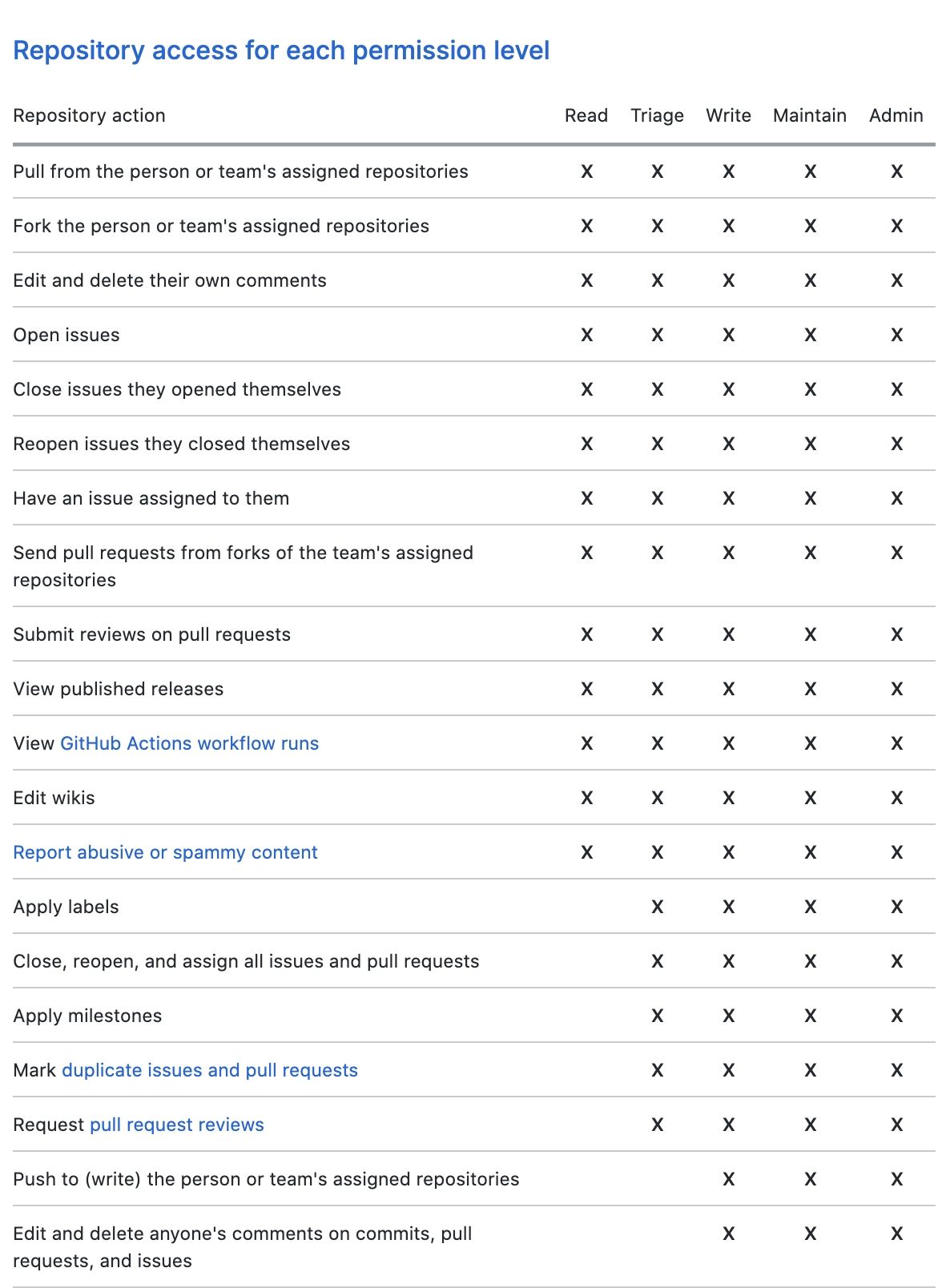
To make OpenFGA aware of this "concentric" permission model we need to update our definitions:
```
model
schema 1.1
type user
type repo
relations
define reader: [user] or triager
define triager: [user] or writer
define writer: [user] or maintainer
define maintainer: [user] or admin
define admin: [user]
```
Let us examine one of those relations in detail:
```
type repo
relations
define reader: [user] or triager
```
info
The users with a reader relationship to a certain object of type "repo" are any of:
- the "readers": the set of users who are [directly related](https://openfga.dev/docs/concepts.md#what-are-direct-and-implied-relationships) to the repo as a "reader"
- the "triagers": the set of users who are related to the object as "triager"
With this simple update our model now supports nested definitions and now:
- Node.js
- Go
- .NET
- Python
- Java
- CLI
- curl
- Pseudocode
- Playground
Initialize the SDK
```
// ApiTokenIssuer, ApiAudience, ClientId and ClientSecret are optional.
// import the SDK
const { OpenFgaClient } = require('@openfga/sdk');
// Initialize the SDK with no auth - see "How to setup SDK client" for more options
const fgaClient = new OpenFgaClient({
apiUrl: process.env.FGA_API_URL, // required, e.g. https://api.fga.example
storeId: process.env.FGA_STORE_ID,
authorizationModelId: process.env.FGA_MODEL_ID, // Optional, can be overridden per request
});
```
```
// Run a check
const { allowed } = await fgaClient.check({
user: 'user:beth',
relation: 'writer',
object: 'repo:contoso/tooling',
}, {
authorizationModelId: '01HVMMBCMGZNT3SED4Z17ECXCA',
});
// allowed = true
```
Initialize the SDK
```
// ApiTokenIssuer, ApiAudience, ClientId and ClientSecret are optional.
import (
"os"
. "github.com/openfga/go-sdk"
. "github.com/openfga/go-sdk/client"
)
func main() {
// Initialize the SDK with no auth - see "How to setup SDK client" for more options
fgaClient, err := NewSdkClient(&ClientConfiguration{
ApiUrl: os.Getenv("FGA_API_URL"), // required, e.g. https://api.fga.example
StoreId: os.Getenv("FGA_STORE_ID"), // optional, not needed for `CreateStore` and `ListStores`, required before calling for all other methods
AuthorizationModelId: os.Getenv("FGA_MODEL_ID"), // Optional, can be overridden per request
})
if err != nil {
// .. Handle error
}
}
```
```
options := ClientCheckOptions{
AuthorizationModelId: openfga.PtrString("01HVMMBCMGZNT3SED4Z17ECXCA"),
}
body := ClientCheckRequest{
User: "user:beth",
Relation: "writer",
Object: "repo:contoso/tooling",
}
data, err := fgaClient.Check(context.Background()).
Body(body).
Options(options).
Execute()
// data = { allowed: true }
```
Initialize the SDK
```
// ApiTokenIssuer, ApiAudience, ClientId and ClientSecret are optional.
// import the SDK
using OpenFga.Sdk.Client;
using OpenFga.Sdk.Client.Model;
using OpenFga.Sdk.Model;
using Environment = System.Environment;
namespace Example;
class Example {
public static async Task Main() {
// Initialize the SDK with no auth - see "How to setup SDK client" for more options
var configuration = new ClientConfiguration() {
ApiUrl = Environment.GetEnvironmentVariable("FGA_API_URL"), ?? "http://localhost:8080", // required, e.g. https://api.fga.example
StoreId = Environment.GetEnvironmentVariable("FGA_STORE_ID"), // optional, not needed for `CreateStore` and `ListStores`, required before calling for all other methods
AuthorizationModelId = Environment.GetEnvironmentVariable("FGA_MODEL_ID"), // Optional, can be overridden per request
};
var fgaClient = new OpenFgaClient(configuration);
}
}
```
```
var options = new ClientCheckOptions {
AuthorizationModelId = "01HVMMBCMGZNT3SED4Z17ECXCA"
};
var body = new ClientCheckRequest {
User = "user:beth",
Relation = "writer",
Object = "repo:contoso/tooling",
};
var response = await fgaClient.Check(body, options);
// response.Allowed = true
```
Initialize the SDK
```
# ApiTokenIssuer, ApiAudience, ClientId and ClientSecret are optional.
import asyncio
import os
import json
from openfga_sdk.client import ClientConfiguration, OpenFgaClient
async def main():
configuration = ClientConfiguration(
api_url = os.environ.get('FGA_API_URL'), # required, e.g. https://api.fga.example
store_id = os.environ.get('FGA_STORE_ID'), # optional, not needed for `CreateStore` and `ListStores`, required before calling for all other methods
authorization_model_id = os.environ.get('FGA_MODEL_ID'), # Optional, can be overridden per request
)
# Enter a context with an instance of the OpenFgaClient
async with OpenFgaClient(configuration) as fga_client:
api_response = await fga_client.read_authorization_models()
await fga_client.close()
asyncio.run(main())
```
```
options = {
"authorization_model_id": "01HVMMBCMGZNT3SED4Z17ECXCA",
}
body = ClientCheckRequest(
user="user:beth",
relation="writer",
object="repo:contoso/tooling",
)
response = await fga_client.check(body, options)
# response.allowed = true
```
Initialize the SDK
```
// ApiTokenIssuer, ApiAudience, ClientId and ClientSecret are optional.
import dev.openfga.sdk.api.client.OpenFgaClient;
import dev.openfga.sdk.api.configuration.ClientConfiguration;
public class Example {
public static void main(String[] args) throws Exception {
var config = new ClientConfiguration()
.apiUrl(System.getenv("FGA_API_URL")) // If not specified, will default to "https://localhost:8080"
.storeId(System.getenv("FGA_STORE_ID")) // Not required when calling createStore() or listStores()
.authorizationModelId(System.getenv("FGA_AUTHORIZATION_MODEL_ID")); // Optional, can be overridden per request
var fgaClient = new OpenFgaClient(config);
}
}
```
```
var options = new ClientCheckOptions()
.authorizationModelId("01HVMMBCMGZNT3SED4Z17ECXCA");
var body = new ClientCheckRequest()
.user("user:beth")
.relation("writer")
._object("repo:contoso/tooling");
var response = fgaClient.check(body, options).get();
// response.getAllowed() = true
```
Set FGA\_API\_URL according to the service you are using (e.g. https\://api.fga.example)
```
Set FGA_API_URL according to the service you are using (e.g. https://api.fga.example)
```
```
fga query check --store-id=$FGA_STORE_ID --model-id=01HVMMBCMGZNT3SED4Z17ECXCA user:beth writer repo:contoso/tooling
# Response: {"allowed":true}
```
Set FGA\_API\_URL according to the service you are using (e.g. https\://api.fga.example)
```
Set FGA_API_URL according to the service you are using (e.g. https://api.fga.example)
```
```
curl -X POST $FGA_API_URL/stores/$FGA_STORE_ID/check \
-H "Authorization: Bearer $FGA_API_TOKEN" \ # Not needed if service does not require authorization
-H "content-type: application/json" \
-d '{
"authorization_model_id": "01HVMMBCMGZNT3SED4Z17ECXCA",
"tuple_key": {
"user": "user:beth",
"relation": "writer",
"object": "repo:contoso/tooling"
}
}'
# Response: {"allowed": true}
```
```
check(
user = "user:beth", // check if the user `user:beth`
relation = "writer", // has an `writer` relation
object = "repo:contoso/tooling", // with the object `repo:contoso/tooling`
);
Reply: true
```
```
is user:beth related to repo:contoso/tooling as writer?
# Response: A green path from the user to the object indicating that the response from the API is `{"allowed":true}`
```
- Node.js
- Go
- .NET
- Python
- Java
- CLI
- curl
- Pseudocode
- Playground
Initialize the SDK
```
// ApiTokenIssuer, ApiAudience, ClientId and ClientSecret are optional.
// import the SDK
const { OpenFgaClient } = require('@openfga/sdk');
// Initialize the SDK with no auth - see "How to setup SDK client" for more options
const fgaClient = new OpenFgaClient({
apiUrl: process.env.FGA_API_URL, // required, e.g. https://api.fga.example
storeId: process.env.FGA_STORE_ID,
authorizationModelId: process.env.FGA_MODEL_ID, // Optional, can be overridden per request
});
```
```
// Run a check
const { allowed } = await fgaClient.check({
user: 'user:beth',
relation: 'reader',
object: 'repo:contoso/tooling',
}, {
authorizationModelId: '01HVMMBCMGZNT3SED4Z17ECXCA',
});
// allowed = true
```
Initialize the SDK
```
// ApiTokenIssuer, ApiAudience, ClientId and ClientSecret are optional.
import (
"os"
. "github.com/openfga/go-sdk"
. "github.com/openfga/go-sdk/client"
)
func main() {
// Initialize the SDK with no auth - see "How to setup SDK client" for more options
fgaClient, err := NewSdkClient(&ClientConfiguration{
ApiUrl: os.Getenv("FGA_API_URL"), // required, e.g. https://api.fga.example
StoreId: os.Getenv("FGA_STORE_ID"), // optional, not needed for `CreateStore` and `ListStores`, required before calling for all other methods
AuthorizationModelId: os.Getenv("FGA_MODEL_ID"), // Optional, can be overridden per request
})
if err != nil {
// .. Handle error
}
}
```
```
options := ClientCheckOptions{
AuthorizationModelId: openfga.PtrString("01HVMMBCMGZNT3SED4Z17ECXCA"),
}
body := ClientCheckRequest{
User: "user:beth",
Relation: "reader",
Object: "repo:contoso/tooling",
}
data, err := fgaClient.Check(context.Background()).
Body(body).
Options(options).
Execute()
// data = { allowed: true }
```
Initialize the SDK
```
// ApiTokenIssuer, ApiAudience, ClientId and ClientSecret are optional.
// import the SDK
using OpenFga.Sdk.Client;
using OpenFga.Sdk.Client.Model;
using OpenFga.Sdk.Model;
using Environment = System.Environment;
namespace Example;
class Example {
public static async Task Main() {
// Initialize the SDK with no auth - see "How to setup SDK client" for more options
var configuration = new ClientConfiguration() {
ApiUrl = Environment.GetEnvironmentVariable("FGA_API_URL"), ?? "http://localhost:8080", // required, e.g. https://api.fga.example
StoreId = Environment.GetEnvironmentVariable("FGA_STORE_ID"), // optional, not needed for `CreateStore` and `ListStores`, required before calling for all other methods
AuthorizationModelId = Environment.GetEnvironmentVariable("FGA_MODEL_ID"), // Optional, can be overridden per request
};
var fgaClient = new OpenFgaClient(configuration);
}
}
```
```
var options = new ClientCheckOptions {
AuthorizationModelId = "01HVMMBCMGZNT3SED4Z17ECXCA"
};
var body = new ClientCheckRequest {
User = "user:beth",
Relation = "reader",
Object = "repo:contoso/tooling",
};
var response = await fgaClient.Check(body, options);
// response.Allowed = true
```
Initialize the SDK
```
# ApiTokenIssuer, ApiAudience, ClientId and ClientSecret are optional.
import asyncio
import os
import json
from openfga_sdk.client import ClientConfiguration, OpenFgaClient
async def main():
configuration = ClientConfiguration(
api_url = os.environ.get('FGA_API_URL'), # required, e.g. https://api.fga.example
store_id = os.environ.get('FGA_STORE_ID'), # optional, not needed for `CreateStore` and `ListStores`, required before calling for all other methods
authorization_model_id = os.environ.get('FGA_MODEL_ID'), # Optional, can be overridden per request
)
# Enter a context with an instance of the OpenFgaClient
async with OpenFgaClient(configuration) as fga_client:
api_response = await fga_client.read_authorization_models()
await fga_client.close()
asyncio.run(main())
```
```
options = {
"authorization_model_id": "01HVMMBCMGZNT3SED4Z17ECXCA",
}
body = ClientCheckRequest(
user="user:beth",
relation="reader",
object="repo:contoso/tooling",
)
response = await fga_client.check(body, options)
# response.allowed = true
```
Initialize the SDK
```
// ApiTokenIssuer, ApiAudience, ClientId and ClientSecret are optional.
import dev.openfga.sdk.api.client.OpenFgaClient;
import dev.openfga.sdk.api.configuration.ClientConfiguration;
public class Example {
public static void main(String[] args) throws Exception {
var config = new ClientConfiguration()
.apiUrl(System.getenv("FGA_API_URL")) // If not specified, will default to "https://localhost:8080"
.storeId(System.getenv("FGA_STORE_ID")) // Not required when calling createStore() or listStores()
.authorizationModelId(System.getenv("FGA_AUTHORIZATION_MODEL_ID")); // Optional, can be overridden per request
var fgaClient = new OpenFgaClient(config);
}
}
```
```
var options = new ClientCheckOptions()
.authorizationModelId("01HVMMBCMGZNT3SED4Z17ECXCA");
var body = new ClientCheckRequest()
.user("user:beth")
.relation("reader")
._object("repo:contoso/tooling");
var response = fgaClient.check(body, options).get();
// response.getAllowed() = true
```
Set FGA\_API\_URL according to the service you are using (e.g. https\://api.fga.example)
```
Set FGA_API_URL according to the service you are using (e.g. https://api.fga.example)
```
```
fga query check --store-id=$FGA_STORE_ID --model-id=01HVMMBCMGZNT3SED4Z17ECXCA user:beth reader repo:contoso/tooling
# Response: {"allowed":true}
```
Set FGA\_API\_URL according to the service you are using (e.g. https\://api.fga.example)
```
Set FGA_API_URL according to the service you are using (e.g. https://api.fga.example)
```
```
curl -X POST $FGA_API_URL/stores/$FGA_STORE_ID/check \
-H "Authorization: Bearer $FGA_API_TOKEN" \ # Not needed if service does not require authorization
-H "content-type: application/json" \
-d '{
"authorization_model_id": "01HVMMBCMGZNT3SED4Z17ECXCA",
"tuple_key": {
"user": "user:beth",
"relation": "reader",
"object": "repo:contoso/tooling"
}
}'
# Response: {"allowed": true}
```
```
check(
user = "user:beth", // check if the user `user:beth`
relation = "reader", // has an `reader` relation
object = "repo:contoso/tooling", // with the object `repo:contoso/tooling`
);
Reply: true
```
```
is user:beth related to repo:contoso/tooling as reader?
# Response: A green path from the user to the object indicating that the response from the API is `{"allowed":true}`
```
### 02. Permissions for teams in an org
GitHub also supports [creating teams in an organization](https://docs.github.com/en/free-pro-team@latest/github/setting-up-and-managing-organizations-and-teams/creating-a-team), [adding members to a team](https://docs.github.com/en/free-pro-team@latest/github/setting-up-and-managing-organizations-and-teams/adding-organization-members-to-a-team) and [granting teams permissions, rather than individuals](https://docs.github.com/en/free-pro-team@latest/github/setting-up-and-managing-organizations-and-teams/managing-team-access-to-an-organization-repository).
At the end of this section we want to end up with the following permissions represented:
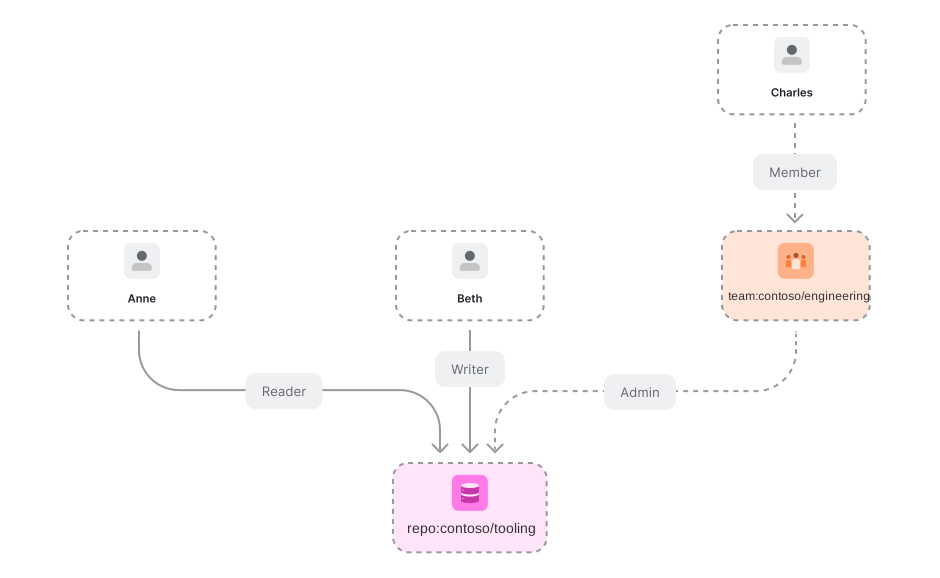
To add support for teams and memberships all we need to do is add this object to the OpenFGA [authorization model](https://openfga.dev/docs/concepts.md#what-is-an-authorization-model):
```
model
schema 1.1
type team
relations
define member: [user, team#member]
```
In addition, the repo's relations should have team member as a directly related user types.
```
model
schema 1.1
type user
type repo
relations
define reader: [user, team#member] or triager
define triager: [user, team#member] or writer
define writer: [user, team#member] or maintainer
define maintainer: [user, team#member] or admin
define admin: [user, team#member]
```
Let us now create a team, add a member to it and make it an admin of **repo:contoso/tooling** by adding the following [relationship tuples](https://openfga.dev/docs/concepts.md#what-is-a-relationship-tuple):
- Node.js
- Go
- .NET
- Python
- Java
- curl
- CLI
- Pseudocode
Initialize the SDK
```
// ApiTokenIssuer, ApiAudience, ClientId and ClientSecret are optional.
// import the SDK
const { OpenFgaClient } = require('@openfga/sdk');
// Initialize the SDK with no auth - see "How to setup SDK client" for more options
const fgaClient = new OpenFgaClient({
apiUrl: process.env.FGA_API_URL, // required, e.g. https://api.fga.example
storeId: process.env.FGA_STORE_ID,
authorizationModelId: process.env.FGA_MODEL_ID, // Optional, can be overridden per request
});
```
```
const options = {
authorizationModelId: "01HVMMBCMGZNT3SED4Z17ECXCA",
};
await fgaClient.write({
writes: [
// make charles a member of the contoso/engineering team
{"_description":"make charles a member of the contoso/engineering team","user":"user:charles","relation":"member","object":"team:contoso/engineering"},
// make members of contoso/engineering team admins of contoso/tooling
{"_description":"make members of contoso/engineering team admins of contoso/tooling","user":"team:contoso/engineering#member","relation":"admin","object":"repo:contoso/tooling"}
],
}, options);
```
Initialize the SDK
```
// ApiTokenIssuer, ApiAudience, ClientId and ClientSecret are optional.
import (
"os"
. "github.com/openfga/go-sdk"
. "github.com/openfga/go-sdk/client"
)
func main() {
// Initialize the SDK with no auth - see "How to setup SDK client" for more options
fgaClient, err := NewSdkClient(&ClientConfiguration{
ApiUrl: os.Getenv("FGA_API_URL"), // required, e.g. https://api.fga.example
StoreId: os.Getenv("FGA_STORE_ID"), // optional, not needed for `CreateStore` and `ListStores`, required before calling for all other methods
AuthorizationModelId: os.Getenv("FGA_MODEL_ID"), // Optional, can be overridden per request
})
if err != nil {
// .. Handle error
}
}
```
```
options := ClientWriteOptions{
AuthorizationModelId: openfga.PtrString("01HVMMBCMGZNT3SED4Z17ECXCA"),
}
body := ClientWriteRequest{
Writes: []ClientTupleKey{
{
// make charles a member of the contoso/engineering team
User: "user:charles",
Relation: "member",
Object: "team:contoso/engineering",
}, {
// make members of contoso/engineering team admins of contoso/tooling
User: "team:contoso/engineering#member",
Relation: "admin",
Object: "repo:contoso/tooling",
},
},
}
data, err := fgaClient.Write(context.Background()).
Body(body).
Options(options).
Execute()
if err != nil {
// .. Handle error
}
_ = data // use the response
```
Initialize the SDK
```
// ApiTokenIssuer, ApiAudience, ClientId and ClientSecret are optional.
// import the SDK
using OpenFga.Sdk.Client;
using OpenFga.Sdk.Client.Model;
using OpenFga.Sdk.Model;
using Environment = System.Environment;
namespace Example;
class Example {
public static async Task Main() {
// Initialize the SDK with no auth - see "How to setup SDK client" for more options
var configuration = new ClientConfiguration() {
ApiUrl = Environment.GetEnvironmentVariable("FGA_API_URL"), ?? "http://localhost:8080", // required, e.g. https://api.fga.example
StoreId = Environment.GetEnvironmentVariable("FGA_STORE_ID"), // optional, not needed for `CreateStore` and `ListStores`, required before calling for all other methods
AuthorizationModelId = Environment.GetEnvironmentVariable("FGA_MODEL_ID"), // Optional, can be overridden per request
};
var fgaClient = new OpenFgaClient(configuration);
}
}
```
```
var options = new ClientWriteOptions {
AuthorizationModelId = "01HVMMBCMGZNT3SED4Z17ECXCA",
};
var body = new ClientWriteRequest() {
Writes = new List() {
// make charles a member of the contoso/engineering team
new() {
User = "user:charles",
Relation = "member",
Object = "team:contoso/engineering"
},
// make members of contoso/engineering team admins of contoso/tooling
new() {
User = "team:contoso/engineering#member",
Relation = "admin",
Object = "repo:contoso/tooling"
}
},
};
var response = await fgaClient.Write(body, options);
```
Initialize the SDK
```
# ApiTokenIssuer, ApiAudience, ClientId and ClientSecret are optional.
import asyncio
import os
import json
from openfga_sdk.client import ClientConfiguration, OpenFgaClient
async def main():
configuration = ClientConfiguration(
api_url = os.environ.get('FGA_API_URL'), # required, e.g. https://api.fga.example
store_id = os.environ.get('FGA_STORE_ID'), # optional, not needed for `CreateStore` and `ListStores`, required before calling for all other methods
authorization_model_id = os.environ.get('FGA_MODEL_ID'), # Optional, can be overridden per request
)
# Enter a context with an instance of the OpenFgaClient
async with OpenFgaClient(configuration) as fga_client:
api_response = await fga_client.read_authorization_models()
await fga_client.close()
asyncio.run(main())
```
```
options = {
"authorization_model_id": "01HVMMBCMGZNT3SED4Z17ECXCA"
}
body = ClientWriteRequest(
writes=[
ClientTuple(
# make charles a member of the contoso/engineering team
user="user:charles",
relation="member",
object="team:contoso/engineering",
),
ClientTuple(
# make members of contoso/engineering team admins of contoso/tooling
user="team:contoso/engineering#member",
relation="admin",
object="repo:contoso/tooling",
),
],
)
response = await fga_client.write(body, options)
```
Initialize the SDK
```
// ApiTokenIssuer, ApiAudience, ClientId and ClientSecret are optional.
import dev.openfga.sdk.api.client.OpenFgaClient;
import dev.openfga.sdk.api.configuration.ClientConfiguration;
public class Example {
public static void main(String[] args) throws Exception {
var config = new ClientConfiguration()
.apiUrl(System.getenv("FGA_API_URL")) // If not specified, will default to "https://localhost:8080"
.storeId(System.getenv("FGA_STORE_ID")) // Not required when calling createStore() or listStores()
.authorizationModelId(System.getenv("FGA_AUTHORIZATION_MODEL_ID")); // Optional, can be overridden per request
var fgaClient = new OpenFgaClient(config);
}
}
```
```
var options = new ClientWriteOptions()
.authorizationModelId("01HVMMBCMGZNT3SED4Z17ECXCA");
var body = new ClientWriteRequest()
.writes(List.of(
// make charles a member of the contoso/engineering team
new ClientTupleKey()
.user("user:charles")
.relation("member")
._object("team:contoso/engineering"),
// make members of contoso/engineering team admins of contoso/tooling
new ClientTupleKey()
.user("team:contoso/engineering#member")
.relation("admin")
._object("repo:contoso/tooling")
));
var response = fgaClient.write(body, options).get();
```
Set FGA\_API\_URL according to the service you are using (e.g. https\://api.fga.example)
```
Set FGA_API_URL according to the service you are using (e.g. https://api.fga.example)
```
```
curl -X POST $FGA_API_URL/stores/$FGA_STORE_ID/write \
-H "Authorization: Bearer $FGA_API_TOKEN" \ # Not needed if service does not require authorization
-H "content-type: application/json" \
-d '{
"writes": {
"tuple_keys": [
{
"user": "user:charles",
"relation": "member",
"object": "team:contoso/engineering"
},
{
"user": "team:contoso/engineering#member",
"relation": "admin",
"object": "repo:contoso/tooling"
}
]
},
"authorization_model_id": "01HVMMBCMGZNT3SED4Z17ECXCA"
}'
```
Set FGA\_API\_URL according to the service you are using (e.g. https\://api.fga.example)
```
Set FGA_API_URL according to the service you are using (e.g. https://api.fga.example)
```
```
fga tuple write --store-id=${FGA_STORE_ID} --model-id=01HVMMBCMGZNT3SED4Z17ECXCA user:charles member team:contoso/engineering
fga tuple write --store-id=${FGA_STORE_ID} --model-id=01HVMMBCMGZNT3SED4Z17ECXCA team:contoso/engineering#member admin repo:contoso/tooling
```
```
write([
// make charles a member of the contoso/engineering team
{
"user":"user:charles",
"relation":"member",
"object":"team:contoso/engineering"
},
// make members of contoso/engineering team admins of contoso/tooling
{
"user":"team:contoso/engineering#member",
"relation":"admin",
"object":"repo:contoso/tooling"
}
])
```
The last relationship tuple introduces a new **OpenFGA** concept. A **[userset](https://openfga.dev/docs/concepts.md#what-is-a-user)**. When the value of a user is formatted like this **type:objectId#relation**, OpenFGA will automatically expand the userset into all its individual user identifiers:
- Node.js
- Go
- .NET
- Python
- Java
- CLI
- curl
- Pseudocode
- Playground
Initialize the SDK
```
// ApiTokenIssuer, ApiAudience, ClientId and ClientSecret are optional.
// import the SDK
const { OpenFgaClient } = require('@openfga/sdk');
// Initialize the SDK with no auth - see "How to setup SDK client" for more options
const fgaClient = new OpenFgaClient({
apiUrl: process.env.FGA_API_URL, // required, e.g. https://api.fga.example
storeId: process.env.FGA_STORE_ID,
authorizationModelId: process.env.FGA_MODEL_ID, // Optional, can be overridden per request
});
```
```
// Run a check
const { allowed } = await fgaClient.check({
user: 'user:charles',
relation: 'admin',
object: 'repo:contoso/tooling',
}, {
authorizationModelId: '01HVMMBCMGZNT3SED4Z17ECXCA',
});
// allowed = true
```
Initialize the SDK
```
// ApiTokenIssuer, ApiAudience, ClientId and ClientSecret are optional.
import (
"os"
. "github.com/openfga/go-sdk"
. "github.com/openfga/go-sdk/client"
)
func main() {
// Initialize the SDK with no auth - see "How to setup SDK client" for more options
fgaClient, err := NewSdkClient(&ClientConfiguration{
ApiUrl: os.Getenv("FGA_API_URL"), // required, e.g. https://api.fga.example
StoreId: os.Getenv("FGA_STORE_ID"), // optional, not needed for `CreateStore` and `ListStores`, required before calling for all other methods
AuthorizationModelId: os.Getenv("FGA_MODEL_ID"), // Optional, can be overridden per request
})
if err != nil {
// .. Handle error
}
}
```
```
options := ClientCheckOptions{
AuthorizationModelId: openfga.PtrString("01HVMMBCMGZNT3SED4Z17ECXCA"),
}
body := ClientCheckRequest{
User: "user:charles",
Relation: "admin",
Object: "repo:contoso/tooling",
}
data, err := fgaClient.Check(context.Background()).
Body(body).
Options(options).
Execute()
// data = { allowed: true }
```
Initialize the SDK
```
// ApiTokenIssuer, ApiAudience, ClientId and ClientSecret are optional.
// import the SDK
using OpenFga.Sdk.Client;
using OpenFga.Sdk.Client.Model;
using OpenFga.Sdk.Model;
using Environment = System.Environment;
namespace Example;
class Example {
public static async Task Main() {
// Initialize the SDK with no auth - see "How to setup SDK client" for more options
var configuration = new ClientConfiguration() {
ApiUrl = Environment.GetEnvironmentVariable("FGA_API_URL"), ?? "http://localhost:8080", // required, e.g. https://api.fga.example
StoreId = Environment.GetEnvironmentVariable("FGA_STORE_ID"), // optional, not needed for `CreateStore` and `ListStores`, required before calling for all other methods
AuthorizationModelId = Environment.GetEnvironmentVariable("FGA_MODEL_ID"), // Optional, can be overridden per request
};
var fgaClient = new OpenFgaClient(configuration);
}
}
```
```
var options = new ClientCheckOptions {
AuthorizationModelId = "01HVMMBCMGZNT3SED4Z17ECXCA"
};
var body = new ClientCheckRequest {
User = "user:charles",
Relation = "admin",
Object = "repo:contoso/tooling",
};
var response = await fgaClient.Check(body, options);
// response.Allowed = true
```
Initialize the SDK
```
# ApiTokenIssuer, ApiAudience, ClientId and ClientSecret are optional.
import asyncio
import os
import json
from openfga_sdk.client import ClientConfiguration, OpenFgaClient
async def main():
configuration = ClientConfiguration(
api_url = os.environ.get('FGA_API_URL'), # required, e.g. https://api.fga.example
store_id = os.environ.get('FGA_STORE_ID'), # optional, not needed for `CreateStore` and `ListStores`, required before calling for all other methods
authorization_model_id = os.environ.get('FGA_MODEL_ID'), # Optional, can be overridden per request
)
# Enter a context with an instance of the OpenFgaClient
async with OpenFgaClient(configuration) as fga_client:
api_response = await fga_client.read_authorization_models()
await fga_client.close()
asyncio.run(main())
```
```
options = {
"authorization_model_id": "01HVMMBCMGZNT3SED4Z17ECXCA",
}
body = ClientCheckRequest(
user="user:charles",
relation="admin",
object="repo:contoso/tooling",
)
response = await fga_client.check(body, options)
# response.allowed = true
```
Initialize the SDK
```
// ApiTokenIssuer, ApiAudience, ClientId and ClientSecret are optional.
import dev.openfga.sdk.api.client.OpenFgaClient;
import dev.openfga.sdk.api.configuration.ClientConfiguration;
public class Example {
public static void main(String[] args) throws Exception {
var config = new ClientConfiguration()
.apiUrl(System.getenv("FGA_API_URL")) // If not specified, will default to "https://localhost:8080"
.storeId(System.getenv("FGA_STORE_ID")) // Not required when calling createStore() or listStores()
.authorizationModelId(System.getenv("FGA_AUTHORIZATION_MODEL_ID")); // Optional, can be overridden per request
var fgaClient = new OpenFgaClient(config);
}
}
```
```
var options = new ClientCheckOptions()
.authorizationModelId("01HVMMBCMGZNT3SED4Z17ECXCA");
var body = new ClientCheckRequest()
.user("user:charles")
.relation("admin")
._object("repo:contoso/tooling");
var response = fgaClient.check(body, options).get();
// response.getAllowed() = true
```
Set FGA\_API\_URL according to the service you are using (e.g. https\://api.fga.example)
```
Set FGA_API_URL according to the service you are using (e.g. https://api.fga.example)
```
```
fga query check --store-id=$FGA_STORE_ID --model-id=01HVMMBCMGZNT3SED4Z17ECXCA user:charles admin repo:contoso/tooling
# Response: {"allowed":true}
```
Set FGA\_API\_URL according to the service you are using (e.g. https\://api.fga.example)
```
Set FGA_API_URL according to the service you are using (e.g. https://api.fga.example)
```
```
curl -X POST $FGA_API_URL/stores/$FGA_STORE_ID/check \
-H "Authorization: Bearer $FGA_API_TOKEN" \ # Not needed if service does not require authorization
-H "content-type: application/json" \
-d '{
"authorization_model_id": "01HVMMBCMGZNT3SED4Z17ECXCA",
"tuple_key": {
"user": "user:charles",
"relation": "admin",
"object": "repo:contoso/tooling"
}
}'
# Response: {"allowed": true}
```
```
check(
user = "user:charles", // check if the user `user:charles`
relation = "admin", // has an `admin` relation
object = "repo:contoso/tooling", // with the object `repo:contoso/tooling`
);
Reply: true
```
```
is user:charles related to repo:contoso/tooling as admin?
# Response: A green path from the user to the object indicating that the response from the API is `{"allowed":true}`
```
### 03. Permissions for child teams in an org
GitHub also supports team nesting, [known as "child teams"](https://docs.github.com/en/free-pro-team@latest/github/setting-up-and-managing-organizations-and-teams/requesting-to-add-a-child-team). **Child teams inherit the access permissions of the parent team.** Let's say we have a **protocols** team that is part of the **engineering**. The simplest way to achieve the aforementioned requirement is just adding this [relationship tuple](https://openfga.dev/docs/concepts.md#what-is-a-relationship-tuple):
- Node.js
- Go
- .NET
- Python
- Java
- curl
- CLI
- Pseudocode
Initialize the SDK
```
// ApiTokenIssuer, ApiAudience, ClientId and ClientSecret are optional.
// import the SDK
const { OpenFgaClient } = require('@openfga/sdk');
// Initialize the SDK with no auth - see "How to setup SDK client" for more options
const fgaClient = new OpenFgaClient({
apiUrl: process.env.FGA_API_URL, // required, e.g. https://api.fga.example
storeId: process.env.FGA_STORE_ID,
authorizationModelId: process.env.FGA_MODEL_ID, // Optional, can be overridden per request
});
```
```
const options = {
authorizationModelId: "01HVMMBCMGZNT3SED4Z17ECXCA",
};
await fgaClient.write({
writes: [
{"user":"team:contoso/protocols#member","relation":"member","object":"team:contoso/engineering"}
],
}, options);
```
Initialize the SDK
```
// ApiTokenIssuer, ApiAudience, ClientId and ClientSecret are optional.
import (
"os"
. "github.com/openfga/go-sdk"
. "github.com/openfga/go-sdk/client"
)
func main() {
// Initialize the SDK with no auth - see "How to setup SDK client" for more options
fgaClient, err := NewSdkClient(&ClientConfiguration{
ApiUrl: os.Getenv("FGA_API_URL"), // required, e.g. https://api.fga.example
StoreId: os.Getenv("FGA_STORE_ID"), // optional, not needed for `CreateStore` and `ListStores`, required before calling for all other methods
AuthorizationModelId: os.Getenv("FGA_MODEL_ID"), // Optional, can be overridden per request
})
if err != nil {
// .. Handle error
}
}
```
```
options := ClientWriteOptions{
AuthorizationModelId: openfga.PtrString("01HVMMBCMGZNT3SED4Z17ECXCA"),
}
body := ClientWriteRequest{
Writes: []ClientTupleKey{
{
User: "team:contoso/protocols#member",
Relation: "member",
Object: "team:contoso/engineering",
},
},
}
data, err := fgaClient.Write(context.Background()).
Body(body).
Options(options).
Execute()
if err != nil {
// .. Handle error
}
_ = data // use the response
```
Initialize the SDK
```
// ApiTokenIssuer, ApiAudience, ClientId and ClientSecret are optional.
// import the SDK
using OpenFga.Sdk.Client;
using OpenFga.Sdk.Client.Model;
using OpenFga.Sdk.Model;
using Environment = System.Environment;
namespace Example;
class Example {
public static async Task Main() {
// Initialize the SDK with no auth - see "How to setup SDK client" for more options
var configuration = new ClientConfiguration() {
ApiUrl = Environment.GetEnvironmentVariable("FGA_API_URL"), ?? "http://localhost:8080", // required, e.g. https://api.fga.example
StoreId = Environment.GetEnvironmentVariable("FGA_STORE_ID"), // optional, not needed for `CreateStore` and `ListStores`, required before calling for all other methods
AuthorizationModelId = Environment.GetEnvironmentVariable("FGA_MODEL_ID"), // Optional, can be overridden per request
};
var fgaClient = new OpenFgaClient(configuration);
}
}
```
```
var options = new ClientWriteOptions {
AuthorizationModelId = "01HVMMBCMGZNT3SED4Z17ECXCA",
};
var body = new ClientWriteRequest() {
Writes = new List() {
new() {
User = "team:contoso/protocols#member",
Relation = "member",
Object = "team:contoso/engineering"
}
},
};
var response = await fgaClient.Write(body, options);
```
Initialize the SDK
```
# ApiTokenIssuer, ApiAudience, ClientId and ClientSecret are optional.
import asyncio
import os
import json
from openfga_sdk.client import ClientConfiguration, OpenFgaClient
async def main():
configuration = ClientConfiguration(
api_url = os.environ.get('FGA_API_URL'), # required, e.g. https://api.fga.example
store_id = os.environ.get('FGA_STORE_ID'), # optional, not needed for `CreateStore` and `ListStores`, required before calling for all other methods
authorization_model_id = os.environ.get('FGA_MODEL_ID'), # Optional, can be overridden per request
)
# Enter a context with an instance of the OpenFgaClient
async with OpenFgaClient(configuration) as fga_client:
api_response = await fga_client.read_authorization_models()
await fga_client.close()
asyncio.run(main())
```
```
options = {
"authorization_model_id": "01HVMMBCMGZNT3SED4Z17ECXCA"
}
body = ClientWriteRequest(
writes=[
ClientTuple(
user="team:contoso/protocols#member",
relation="member",
object="team:contoso/engineering",
),
],
)
response = await fga_client.write(body, options)
```
Initialize the SDK
```
// ApiTokenIssuer, ApiAudience, ClientId and ClientSecret are optional.
import dev.openfga.sdk.api.client.OpenFgaClient;
import dev.openfga.sdk.api.configuration.ClientConfiguration;
public class Example {
public static void main(String[] args) throws Exception {
var config = new ClientConfiguration()
.apiUrl(System.getenv("FGA_API_URL")) // If not specified, will default to "https://localhost:8080"
.storeId(System.getenv("FGA_STORE_ID")) // Not required when calling createStore() or listStores()
.authorizationModelId(System.getenv("FGA_AUTHORIZATION_MODEL_ID")); // Optional, can be overridden per request
var fgaClient = new OpenFgaClient(config);
}
}
```
```
var options = new ClientWriteOptions()
.authorizationModelId("01HVMMBCMGZNT3SED4Z17ECXCA");
var body = new ClientWriteRequest()
.writes(List.of(
new ClientTupleKey()
.user("team:contoso/protocols#member")
.relation("member")
._object("team:contoso/engineering")
));
var response = fgaClient.write(body, options).get();
```
Set FGA\_API\_URL according to the service you are using (e.g. https\://api.fga.example)
```
Set FGA_API_URL according to the service you are using (e.g. https://api.fga.example)
```
```
curl -X POST $FGA_API_URL/stores/$FGA_STORE_ID/write \
-H "Authorization: Bearer $FGA_API_TOKEN" \ # Not needed if service does not require authorization
-H "content-type: application/json" \
-d '{
"writes": {
"tuple_keys": [
{
"user": "team:contoso/protocols#member",
"relation": "member",
"object": "team:contoso/engineering"
}
]
},
"authorization_model_id": "01HVMMBCMGZNT3SED4Z17ECXCA"
}'
```
Set FGA\_API\_URL according to the service you are using (e.g. https\://api.fga.example)
```
Set FGA_API_URL according to the service you are using (e.g. https://api.fga.example)
```
```
fga tuple write --store-id=${FGA_STORE_ID} --model-id=01HVMMBCMGZNT3SED4Z17ECXCA team:contoso/protocols#member member team:contoso/engineering
```
```
write([
{
"user":"team:contoso/protocols#member",
"relation":"member",
"object":"team:contoso/engineering"
}
])
```
which says that members of protocols are members of engineering.
> **Note:** this is enough and valid for our current requirements, and for other read cases allows determining members of the direct team vs sub teams as the latter come from **team:contoso/protocols#member**. If the #member relation should not be followed for use cases a different approach could be taken.
We can now add a member to the protocols team and check that they are admins of the tooling repository.
- Node.js
- Go
- .NET
- Python
- Java
- curl
- CLI
- Pseudocode
Initialize the SDK
```
// ApiTokenIssuer, ApiAudience, ClientId and ClientSecret are optional.
// import the SDK
const { OpenFgaClient } = require('@openfga/sdk');
// Initialize the SDK with no auth - see "How to setup SDK client" for more options
const fgaClient = new OpenFgaClient({
apiUrl: process.env.FGA_API_URL, // required, e.g. https://api.fga.example
storeId: process.env.FGA_STORE_ID,
authorizationModelId: process.env.FGA_MODEL_ID, // Optional, can be overridden per request
});
```
```
const options = {
authorizationModelId: "01HVMMBCMGZNT3SED4Z17ECXCA",
};
await fgaClient.write({
writes: [
// make diane a member of the contoso/protocols team
{"_description":"make diane a member of the contoso/protocols team","user":"user:diane","relation":"member","object":"team:contoso/protocols"}
],
}, options);
```
Initialize the SDK
```
// ApiTokenIssuer, ApiAudience, ClientId and ClientSecret are optional.
import (
"os"
. "github.com/openfga/go-sdk"
. "github.com/openfga/go-sdk/client"
)
func main() {
// Initialize the SDK with no auth - see "How to setup SDK client" for more options
fgaClient, err := NewSdkClient(&ClientConfiguration{
ApiUrl: os.Getenv("FGA_API_URL"), // required, e.g. https://api.fga.example
StoreId: os.Getenv("FGA_STORE_ID"), // optional, not needed for `CreateStore` and `ListStores`, required before calling for all other methods
AuthorizationModelId: os.Getenv("FGA_MODEL_ID"), // Optional, can be overridden per request
})
if err != nil {
// .. Handle error
}
}
```
```
options := ClientWriteOptions{
AuthorizationModelId: openfga.PtrString("01HVMMBCMGZNT3SED4Z17ECXCA"),
}
body := ClientWriteRequest{
Writes: []ClientTupleKey{
{
// make diane a member of the contoso/protocols team
User: "user:diane",
Relation: "member",
Object: "team:contoso/protocols",
},
},
}
data, err := fgaClient.Write(context.Background()).
Body(body).
Options(options).
Execute()
if err != nil {
// .. Handle error
}
_ = data // use the response
```
Initialize the SDK
```
// ApiTokenIssuer, ApiAudience, ClientId and ClientSecret are optional.
// import the SDK
using OpenFga.Sdk.Client;
using OpenFga.Sdk.Client.Model;
using OpenFga.Sdk.Model;
using Environment = System.Environment;
namespace Example;
class Example {
public static async Task Main() {
// Initialize the SDK with no auth - see "How to setup SDK client" for more options
var configuration = new ClientConfiguration() {
ApiUrl = Environment.GetEnvironmentVariable("FGA_API_URL"), ?? "http://localhost:8080", // required, e.g. https://api.fga.example
StoreId = Environment.GetEnvironmentVariable("FGA_STORE_ID"), // optional, not needed for `CreateStore` and `ListStores`, required before calling for all other methods
AuthorizationModelId = Environment.GetEnvironmentVariable("FGA_MODEL_ID"), // Optional, can be overridden per request
};
var fgaClient = new OpenFgaClient(configuration);
}
}
```
```
var options = new ClientWriteOptions {
AuthorizationModelId = "01HVMMBCMGZNT3SED4Z17ECXCA",
};
var body = new ClientWriteRequest() {
Writes = new List() {
// make diane a member of the contoso/protocols team
new() {
User = "user:diane",
Relation = "member",
Object = "team:contoso/protocols"
}
},
};
var response = await fgaClient.Write(body, options);
```
Initialize the SDK
```
# ApiTokenIssuer, ApiAudience, ClientId and ClientSecret are optional.
import asyncio
import os
import json
from openfga_sdk.client import ClientConfiguration, OpenFgaClient
async def main():
configuration = ClientConfiguration(
api_url = os.environ.get('FGA_API_URL'), # required, e.g. https://api.fga.example
store_id = os.environ.get('FGA_STORE_ID'), # optional, not needed for `CreateStore` and `ListStores`, required before calling for all other methods
authorization_model_id = os.environ.get('FGA_MODEL_ID'), # Optional, can be overridden per request
)
# Enter a context with an instance of the OpenFgaClient
async with OpenFgaClient(configuration) as fga_client:
api_response = await fga_client.read_authorization_models()
await fga_client.close()
asyncio.run(main())
```
```
options = {
"authorization_model_id": "01HVMMBCMGZNT3SED4Z17ECXCA"
}
body = ClientWriteRequest(
writes=[
ClientTuple(
# make diane a member of the contoso/protocols team
user="user:diane",
relation="member",
object="team:contoso/protocols",
),
],
)
response = await fga_client.write(body, options)
```
Initialize the SDK
```
// ApiTokenIssuer, ApiAudience, ClientId and ClientSecret are optional.
import dev.openfga.sdk.api.client.OpenFgaClient;
import dev.openfga.sdk.api.configuration.ClientConfiguration;
public class Example {
public static void main(String[] args) throws Exception {
var config = new ClientConfiguration()
.apiUrl(System.getenv("FGA_API_URL")) // If not specified, will default to "https://localhost:8080"
.storeId(System.getenv("FGA_STORE_ID")) // Not required when calling createStore() or listStores()
.authorizationModelId(System.getenv("FGA_AUTHORIZATION_MODEL_ID")); // Optional, can be overridden per request
var fgaClient = new OpenFgaClient(config);
}
}
```
```
var options = new ClientWriteOptions()
.authorizationModelId("01HVMMBCMGZNT3SED4Z17ECXCA");
var body = new ClientWriteRequest()
.writes(List.of(
// make diane a member of the contoso/protocols team
new ClientTupleKey()
.user("user:diane")
.relation("member")
._object("team:contoso/protocols")
));
var response = fgaClient.write(body, options).get();
```
Set FGA\_API\_URL according to the service you are using (e.g. https\://api.fga.example)
```
Set FGA_API_URL according to the service you are using (e.g. https://api.fga.example)
```
```
curl -X POST $FGA_API_URL/stores/$FGA_STORE_ID/write \
-H "Authorization: Bearer $FGA_API_TOKEN" \ # Not needed if service does not require authorization
-H "content-type: application/json" \
-d '{
"writes": {
"tuple_keys": [
{
"user": "user:diane",
"relation": "member",
"object": "team:contoso/protocols"
}
]
},
"authorization_model_id": "01HVMMBCMGZNT3SED4Z17ECXCA"
}'
```
Set FGA\_API\_URL according to the service you are using (e.g. https\://api.fga.example)
```
Set FGA_API_URL according to the service you are using (e.g. https://api.fga.example)
```
```
fga tuple write --store-id=${FGA_STORE_ID} --model-id=01HVMMBCMGZNT3SED4Z17ECXCA user:diane member team:contoso/protocols
```
```
write([
// make diane a member of the contoso/protocols team
{
"user":"user:diane",
"relation":"member",
"object":"team:contoso/protocols"
}
])
```
- Node.js
- Go
- .NET
- Python
- Java
- CLI
- curl
- Pseudocode
- Playground
Initialize the SDK
```
// ApiTokenIssuer, ApiAudience, ClientId and ClientSecret are optional.
// import the SDK
const { OpenFgaClient } = require('@openfga/sdk');
// Initialize the SDK with no auth - see "How to setup SDK client" for more options
const fgaClient = new OpenFgaClient({
apiUrl: process.env.FGA_API_URL, // required, e.g. https://api.fga.example
storeId: process.env.FGA_STORE_ID,
authorizationModelId: process.env.FGA_MODEL_ID, // Optional, can be overridden per request
});
```
```
// Run a check
const { allowed } = await fgaClient.check({
user: 'user:diane',
relation: 'admin',
object: 'repo:contoso/tooling',
}, {
authorizationModelId: '01HVMMBCMGZNT3SED4Z17ECXCA',
});
// allowed = true
```
Initialize the SDK
```
// ApiTokenIssuer, ApiAudience, ClientId and ClientSecret are optional.
import (
"os"
. "github.com/openfga/go-sdk"
. "github.com/openfga/go-sdk/client"
)
func main() {
// Initialize the SDK with no auth - see "How to setup SDK client" for more options
fgaClient, err := NewSdkClient(&ClientConfiguration{
ApiUrl: os.Getenv("FGA_API_URL"), // required, e.g. https://api.fga.example
StoreId: os.Getenv("FGA_STORE_ID"), // optional, not needed for `CreateStore` and `ListStores`, required before calling for all other methods
AuthorizationModelId: os.Getenv("FGA_MODEL_ID"), // Optional, can be overridden per request
})
if err != nil {
// .. Handle error
}
}
```
```
options := ClientCheckOptions{
AuthorizationModelId: openfga.PtrString("01HVMMBCMGZNT3SED4Z17ECXCA"),
}
body := ClientCheckRequest{
User: "user:diane",
Relation: "admin",
Object: "repo:contoso/tooling",
}
data, err := fgaClient.Check(context.Background()).
Body(body).
Options(options).
Execute()
// data = { allowed: true }
```
Initialize the SDK
```
// ApiTokenIssuer, ApiAudience, ClientId and ClientSecret are optional.
// import the SDK
using OpenFga.Sdk.Client;
using OpenFga.Sdk.Client.Model;
using OpenFga.Sdk.Model;
using Environment = System.Environment;
namespace Example;
class Example {
public static async Task Main() {
// Initialize the SDK with no auth - see "How to setup SDK client" for more options
var configuration = new ClientConfiguration() {
ApiUrl = Environment.GetEnvironmentVariable("FGA_API_URL"), ?? "http://localhost:8080", // required, e.g. https://api.fga.example
StoreId = Environment.GetEnvironmentVariable("FGA_STORE_ID"), // optional, not needed for `CreateStore` and `ListStores`, required before calling for all other methods
AuthorizationModelId = Environment.GetEnvironmentVariable("FGA_MODEL_ID"), // Optional, can be overridden per request
};
var fgaClient = new OpenFgaClient(configuration);
}
}
```
```
var options = new ClientCheckOptions {
AuthorizationModelId = "01HVMMBCMGZNT3SED4Z17ECXCA"
};
var body = new ClientCheckRequest {
User = "user:diane",
Relation = "admin",
Object = "repo:contoso/tooling",
};
var response = await fgaClient.Check(body, options);
// response.Allowed = true
```
Initialize the SDK
```
# ApiTokenIssuer, ApiAudience, ClientId and ClientSecret are optional.
import asyncio
import os
import json
from openfga_sdk.client import ClientConfiguration, OpenFgaClient
async def main():
configuration = ClientConfiguration(
api_url = os.environ.get('FGA_API_URL'), # required, e.g. https://api.fga.example
store_id = os.environ.get('FGA_STORE_ID'), # optional, not needed for `CreateStore` and `ListStores`, required before calling for all other methods
authorization_model_id = os.environ.get('FGA_MODEL_ID'), # Optional, can be overridden per request
)
# Enter a context with an instance of the OpenFgaClient
async with OpenFgaClient(configuration) as fga_client:
api_response = await fga_client.read_authorization_models()
await fga_client.close()
asyncio.run(main())
```
```
options = {
"authorization_model_id": "01HVMMBCMGZNT3SED4Z17ECXCA",
}
body = ClientCheckRequest(
user="user:diane",
relation="admin",
object="repo:contoso/tooling",
)
response = await fga_client.check(body, options)
# response.allowed = true
```
Initialize the SDK
```
// ApiTokenIssuer, ApiAudience, ClientId and ClientSecret are optional.
import dev.openfga.sdk.api.client.OpenFgaClient;
import dev.openfga.sdk.api.configuration.ClientConfiguration;
public class Example {
public static void main(String[] args) throws Exception {
var config = new ClientConfiguration()
.apiUrl(System.getenv("FGA_API_URL")) // If not specified, will default to "https://localhost:8080"
.storeId(System.getenv("FGA_STORE_ID")) // Not required when calling createStore() or listStores()
.authorizationModelId(System.getenv("FGA_AUTHORIZATION_MODEL_ID")); // Optional, can be overridden per request
var fgaClient = new OpenFgaClient(config);
}
}
```
```
var options = new ClientCheckOptions()
.authorizationModelId("01HVMMBCMGZNT3SED4Z17ECXCA");
var body = new ClientCheckRequest()
.user("user:diane")
.relation("admin")
._object("repo:contoso/tooling");
var response = fgaClient.check(body, options).get();
// response.getAllowed() = true
```
Set FGA\_API\_URL according to the service you are using (e.g. https\://api.fga.example)
```
Set FGA_API_URL according to the service you are using (e.g. https://api.fga.example)
```
```
fga query check --store-id=$FGA_STORE_ID --model-id=01HVMMBCMGZNT3SED4Z17ECXCA user:diane admin repo:contoso/tooling
# Response: {"allowed":true}
```
Set FGA\_API\_URL according to the service you are using (e.g. https\://api.fga.example)
```
Set FGA_API_URL according to the service you are using (e.g. https://api.fga.example)
```
```
curl -X POST $FGA_API_URL/stores/$FGA_STORE_ID/check \
-H "Authorization: Bearer $FGA_API_TOKEN" \ # Not needed if service does not require authorization
-H "content-type: application/json" \
-d '{
"authorization_model_id": "01HVMMBCMGZNT3SED4Z17ECXCA",
"tuple_key": {
"user": "user:diane",
"relation": "admin",
"object": "repo:contoso/tooling"
}
}'
# Response: {"allowed": true}
```
```
check(
user = "user:diane", // check if the user `user:diane`
relation = "admin", // has an `admin` relation
object = "repo:contoso/tooling", // with the object `repo:contoso/tooling`
);
Reply: true
```
```
is user:diane related to repo:contoso/tooling as admin?
# Response: A green path from the user to the object indicating that the response from the API is `{"allowed":true}`
```
At the end of this section ended with the following permissions represented:
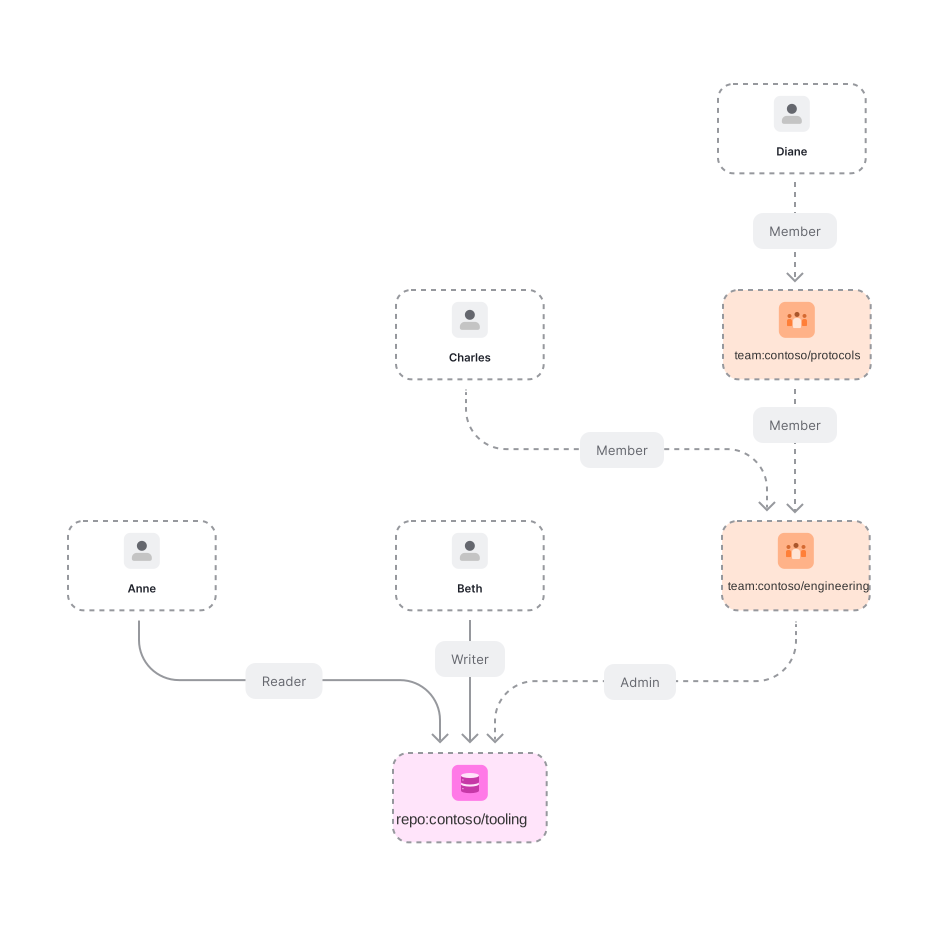
### 04. Base permissions for org members
In GitHub, ["you can set base permissions that apply to all members of an organization when accessing any of the organization's repositories"](https://docs.github.com/en/free-pro-team@latest/github/setting-up-and-managing-organizations-and-teams/setting-base-permissions-for-an-organization). For our purposes this means that if:
- User `erik` is a member of an organization `contoso`
- _and_ `contoso` has a repository `tooling`
- _and_ `contoso` has configured base permission to be "write"
then `erik` has write permissions to tooling.
Let us model that!
At the end of this section we want to end up with the following permissions represented:
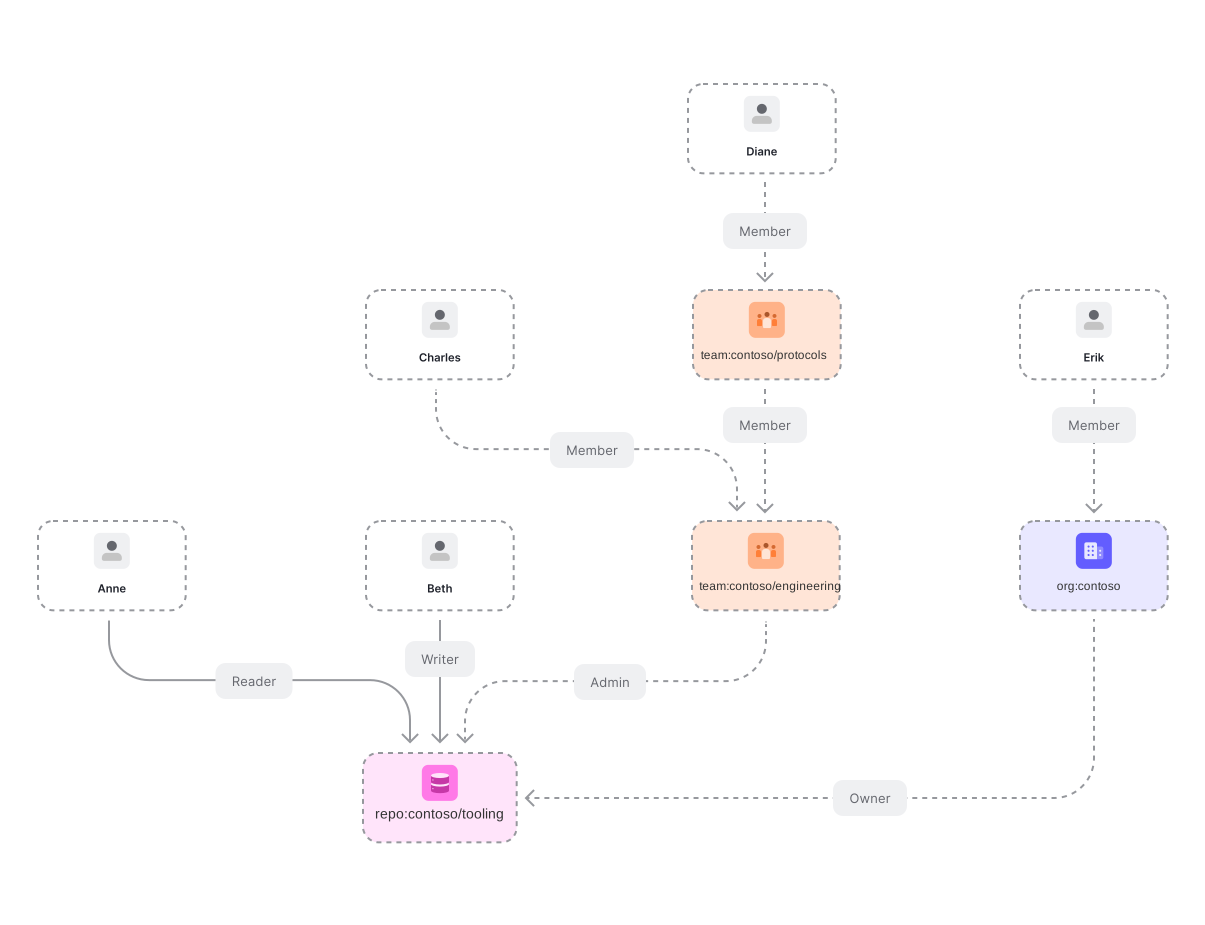
We need to introduce the notion of organization as a type, user organization membership and repository ownership as a relation. - It is worth calling that before this addition we were able to represent almost the entire GitHub repo permissions without adding the notion of organization to OpenFGA. Identifiers for users, repositories and teams were all that was necessary. Let us add support for organizations and membership. Hopefully this feels familiar by now:
```
model
schema 1.1
type organization
relations
define member: [user]
```
And support for repositories having owners:
```
model
schema 1.1
type repo
relations
define reader: [user, team#member] or triager
define triager: [user, team#member] or writer
define writer: [user, team#member] or maintainer
define maintainer: [user, team#member] or admin
define admin: [user, team#member]
define owner: [organization]
```
info
Note the added "owner" relation, indicating that organizations can own repositories.
We can now make Erik a member of contoso and make contoso own **contoso/tooling**:
- Node.js
- Go
- .NET
- Python
- Java
- curl
- CLI
- Pseudocode
Initialize the SDK
```
// ApiTokenIssuer, ApiAudience, ClientId and ClientSecret are optional.
// import the SDK
const { OpenFgaClient } = require('@openfga/sdk');
// Initialize the SDK with no auth - see "How to setup SDK client" for more options
const fgaClient = new OpenFgaClient({
apiUrl: process.env.FGA_API_URL, // required, e.g. https://api.fga.example
storeId: process.env.FGA_STORE_ID,
authorizationModelId: process.env.FGA_MODEL_ID, // Optional, can be overridden per request
});
```
```
const options = {
authorizationModelId: "01HVMMBCMGZNT3SED4Z17ECXCA",
};
await fgaClient.write({
writes: [
{"user":"user:erik","relation":"member","object":"organization:contoso"},
{"user":"organization:contoso","relation":"owner","object":"repo:contoso/tooling"}
],
}, options);
```
Initialize the SDK
```
// ApiTokenIssuer, ApiAudience, ClientId and ClientSecret are optional.
import (
"os"
. "github.com/openfga/go-sdk"
. "github.com/openfga/go-sdk/client"
)
func main() {
// Initialize the SDK with no auth - see "How to setup SDK client" for more options
fgaClient, err := NewSdkClient(&ClientConfiguration{
ApiUrl: os.Getenv("FGA_API_URL"), // required, e.g. https://api.fga.example
StoreId: os.Getenv("FGA_STORE_ID"), // optional, not needed for `CreateStore` and `ListStores`, required before calling for all other methods
AuthorizationModelId: os.Getenv("FGA_MODEL_ID"), // Optional, can be overridden per request
})
if err != nil {
// .. Handle error
}
}
```
```
options := ClientWriteOptions{
AuthorizationModelId: openfga.PtrString("01HVMMBCMGZNT3SED4Z17ECXCA"),
}
body := ClientWriteRequest{
Writes: []ClientTupleKey{
{
User: "user:erik",
Relation: "member",
Object: "organization:contoso",
}, {
User: "organization:contoso",
Relation: "owner",
Object: "repo:contoso/tooling",
},
},
}
data, err := fgaClient.Write(context.Background()).
Body(body).
Options(options).
Execute()
if err != nil {
// .. Handle error
}
_ = data // use the response
```
Initialize the SDK
```
// ApiTokenIssuer, ApiAudience, ClientId and ClientSecret are optional.
// import the SDK
using OpenFga.Sdk.Client;
using OpenFga.Sdk.Client.Model;
using OpenFga.Sdk.Model;
using Environment = System.Environment;
namespace Example;
class Example {
public static async Task Main() {
// Initialize the SDK with no auth - see "How to setup SDK client" for more options
var configuration = new ClientConfiguration() {
ApiUrl = Environment.GetEnvironmentVariable("FGA_API_URL"), ?? "http://localhost:8080", // required, e.g. https://api.fga.example
StoreId = Environment.GetEnvironmentVariable("FGA_STORE_ID"), // optional, not needed for `CreateStore` and `ListStores`, required before calling for all other methods
AuthorizationModelId = Environment.GetEnvironmentVariable("FGA_MODEL_ID"), // Optional, can be overridden per request
};
var fgaClient = new OpenFgaClient(configuration);
}
}
```
```
var options = new ClientWriteOptions {
AuthorizationModelId = "01HVMMBCMGZNT3SED4Z17ECXCA",
};
var body = new ClientWriteRequest() {
Writes = new List() {
new() {
User = "user:erik",
Relation = "member",
Object = "organization:contoso"
},
new() {
User = "organization:contoso",
Relation = "owner",
Object = "repo:contoso/tooling"
}
},
};
var response = await fgaClient.Write(body, options);
```
Initialize the SDK
```
# ApiTokenIssuer, ApiAudience, ClientId and ClientSecret are optional.
import asyncio
import os
import json
from openfga_sdk.client import ClientConfiguration, OpenFgaClient
async def main():
configuration = ClientConfiguration(
api_url = os.environ.get('FGA_API_URL'), # required, e.g. https://api.fga.example
store_id = os.environ.get('FGA_STORE_ID'), # optional, not needed for `CreateStore` and `ListStores`, required before calling for all other methods
authorization_model_id = os.environ.get('FGA_MODEL_ID'), # Optional, can be overridden per request
)
# Enter a context with an instance of the OpenFgaClient
async with OpenFgaClient(configuration) as fga_client:
api_response = await fga_client.read_authorization_models()
await fga_client.close()
asyncio.run(main())
```
```
options = {
"authorization_model_id": "01HVMMBCMGZNT3SED4Z17ECXCA"
}
body = ClientWriteRequest(
writes=[
ClientTuple(
user="user:erik",
relation="member",
object="organization:contoso",
),
ClientTuple(
user="organization:contoso",
relation="owner",
object="repo:contoso/tooling",
),
],
)
response = await fga_client.write(body, options)
```
Initialize the SDK
```
// ApiTokenIssuer, ApiAudience, ClientId and ClientSecret are optional.
import dev.openfga.sdk.api.client.OpenFgaClient;
import dev.openfga.sdk.api.configuration.ClientConfiguration;
public class Example {
public static void main(String[] args) throws Exception {
var config = new ClientConfiguration()
.apiUrl(System.getenv("FGA_API_URL")) // If not specified, will default to "https://localhost:8080"
.storeId(System.getenv("FGA_STORE_ID")) // Not required when calling createStore() or listStores()
.authorizationModelId(System.getenv("FGA_AUTHORIZATION_MODEL_ID")); // Optional, can be overridden per request
var fgaClient = new OpenFgaClient(config);
}
}
```
```
var options = new ClientWriteOptions()
.authorizationModelId("01HVMMBCMGZNT3SED4Z17ECXCA");
var body = new ClientWriteRequest()
.writes(List.of(
new ClientTupleKey()
.user("user:erik")
.relation("member")
._object("organization:contoso"),
new ClientTupleKey()
.user("organization:contoso")
.relation("owner")
._object("repo:contoso/tooling")
));
var response = fgaClient.write(body, options).get();
```
Set FGA\_API\_URL according to the service you are using (e.g. https\://api.fga.example)
```
Set FGA_API_URL according to the service you are using (e.g. https://api.fga.example)
```
```
curl -X POST $FGA_API_URL/stores/$FGA_STORE_ID/write \
-H "Authorization: Bearer $FGA_API_TOKEN" \ # Not needed if service does not require authorization
-H "content-type: application/json" \
-d '{
"writes": {
"tuple_keys": [
{
"user": "user:erik",
"relation": "member",
"object": "organization:contoso"
},
{
"user": "organization:contoso",
"relation": "owner",
"object": "repo:contoso/tooling"
}
]
},
"authorization_model_id": "01HVMMBCMGZNT3SED4Z17ECXCA"
}'
```
Set FGA\_API\_URL according to the service you are using (e.g. https\://api.fga.example)
```
Set FGA_API_URL according to the service you are using (e.g. https://api.fga.example)
```
```
fga tuple write --store-id=${FGA_STORE_ID} --model-id=01HVMMBCMGZNT3SED4Z17ECXCA user:erik member organization:contoso
fga tuple write --store-id=${FGA_STORE_ID} --model-id=01HVMMBCMGZNT3SED4Z17ECXCA organization:contoso owner repo:contoso/tooling
```
```
write([
{
"user":"user:erik",
"relation":"member",
"object":"organization:contoso"
},
{
"user":"organization:contoso",
"relation":"owner",
"object":"repo:contoso/tooling"
}
])
```
What we still lack is the ability to create "default permissions" for the organization and have those be considered when determining if a user has a particular relation to a repository. Let's start with the simplest case **admin**. We want to say that a user is an admin of a repo if either:
- \[done] they have a repo admin relation (directly or through team membership)
- \[pending] their organization is configured with **repo\_admin** as the base permission
We need a way to consider the organization members, not just direct relations to the repo when getting a check for:
- Node.js
- Go
- .NET
- Python
- Java
- CLI
- curl
- Pseudocode
- Playground
Initialize the SDK
```
// ApiTokenIssuer, ApiAudience, ClientId and ClientSecret are optional.
// import the SDK
const { OpenFgaClient } = require('@openfga/sdk');
// Initialize the SDK with no auth - see "How to setup SDK client" for more options
const fgaClient = new OpenFgaClient({
apiUrl: process.env.FGA_API_URL, // required, e.g. https://api.fga.example
storeId: process.env.FGA_STORE_ID,
authorizationModelId: process.env.FGA_MODEL_ID, // Optional, can be overridden per request
});
```
```
// Run a check
const { allowed } = await fgaClient.check({
user: 'user:erik',
relation: 'admin',
object: 'repo:contoso/tooling',
}, {
authorizationModelId: '01HVMMBCMGZNT3SED4Z17ECXCA',
});
// allowed = undefined
```
Initialize the SDK
```
// ApiTokenIssuer, ApiAudience, ClientId and ClientSecret are optional.
import (
"os"
. "github.com/openfga/go-sdk"
. "github.com/openfga/go-sdk/client"
)
func main() {
// Initialize the SDK with no auth - see "How to setup SDK client" for more options
fgaClient, err := NewSdkClient(&ClientConfiguration{
ApiUrl: os.Getenv("FGA_API_URL"), // required, e.g. https://api.fga.example
StoreId: os.Getenv("FGA_STORE_ID"), // optional, not needed for `CreateStore` and `ListStores`, required before calling for all other methods
AuthorizationModelId: os.Getenv("FGA_MODEL_ID"), // Optional, can be overridden per request
})
if err != nil {
// .. Handle error
}
}
```
```
options := ClientCheckOptions{
AuthorizationModelId: openfga.PtrString("01HVMMBCMGZNT3SED4Z17ECXCA"),
}
body := ClientCheckRequest{
User: "user:erik",
Relation: "admin",
Object: "repo:contoso/tooling",
}
data, err := fgaClient.Check(context.Background()).
Body(body).
Options(options).
Execute()
// data = { allowed: undefined }
```
Initialize the SDK
```
// ApiTokenIssuer, ApiAudience, ClientId and ClientSecret are optional.
// import the SDK
using OpenFga.Sdk.Client;
using OpenFga.Sdk.Client.Model;
using OpenFga.Sdk.Model;
using Environment = System.Environment;
namespace Example;
class Example {
public static async Task Main() {
// Initialize the SDK with no auth - see "How to setup SDK client" for more options
var configuration = new ClientConfiguration() {
ApiUrl = Environment.GetEnvironmentVariable("FGA_API_URL"), ?? "http://localhost:8080", // required, e.g. https://api.fga.example
StoreId = Environment.GetEnvironmentVariable("FGA_STORE_ID"), // optional, not needed for `CreateStore` and `ListStores`, required before calling for all other methods
AuthorizationModelId = Environment.GetEnvironmentVariable("FGA_MODEL_ID"), // Optional, can be overridden per request
};
var fgaClient = new OpenFgaClient(configuration);
}
}
```
```
var options = new ClientCheckOptions {
AuthorizationModelId = "01HVMMBCMGZNT3SED4Z17ECXCA"
};
var body = new ClientCheckRequest {
User = "user:erik",
Relation = "admin",
Object = "repo:contoso/tooling",
};
var response = await fgaClient.Check(body, options);
// response.Allowed = undefined
```
Initialize the SDK
```
# ApiTokenIssuer, ApiAudience, ClientId and ClientSecret are optional.
import asyncio
import os
import json
from openfga_sdk.client import ClientConfiguration, OpenFgaClient
async def main():
configuration = ClientConfiguration(
api_url = os.environ.get('FGA_API_URL'), # required, e.g. https://api.fga.example
store_id = os.environ.get('FGA_STORE_ID'), # optional, not needed for `CreateStore` and `ListStores`, required before calling for all other methods
authorization_model_id = os.environ.get('FGA_MODEL_ID'), # Optional, can be overridden per request
)
# Enter a context with an instance of the OpenFgaClient
async with OpenFgaClient(configuration) as fga_client:
api_response = await fga_client.read_authorization_models()
await fga_client.close()
asyncio.run(main())
```
```
options = {
"authorization_model_id": "01HVMMBCMGZNT3SED4Z17ECXCA",
}
body = ClientCheckRequest(
user="user:erik",
relation="admin",
object="repo:contoso/tooling",
)
response = await fga_client.check(body, options)
# response.allowed = undefined
```
Initialize the SDK
```
// ApiTokenIssuer, ApiAudience, ClientId and ClientSecret are optional.
import dev.openfga.sdk.api.client.OpenFgaClient;
import dev.openfga.sdk.api.configuration.ClientConfiguration;
public class Example {
public static void main(String[] args) throws Exception {
var config = new ClientConfiguration()
.apiUrl(System.getenv("FGA_API_URL")) // If not specified, will default to "https://localhost:8080"
.storeId(System.getenv("FGA_STORE_ID")) // Not required when calling createStore() or listStores()
.authorizationModelId(System.getenv("FGA_AUTHORIZATION_MODEL_ID")); // Optional, can be overridden per request
var fgaClient = new OpenFgaClient(config);
}
}
```
```
var options = new ClientCheckOptions()
.authorizationModelId("01HVMMBCMGZNT3SED4Z17ECXCA");
var body = new ClientCheckRequest()
.user("user:erik")
.relation("admin")
._object("repo:contoso/tooling");
var response = fgaClient.check(body, options).get();
// response.getAllowed() = undefined
```
Set FGA\_API\_URL according to the service you are using (e.g. https\://api.fga.example)
```
Set FGA_API_URL according to the service you are using (e.g. https://api.fga.example)
```
```
fga query check --store-id=$FGA_STORE_ID --model-id=01HVMMBCMGZNT3SED4Z17ECXCA user:erik admin repo:contoso/tooling
# Response: {"allowed":undefined}
```
Set FGA\_API\_URL according to the service you are using (e.g. https\://api.fga.example)
```
Set FGA_API_URL according to the service you are using (e.g. https://api.fga.example)
```
```
curl -X POST $FGA_API_URL/stores/$FGA_STORE_ID/check \
-H "Authorization: Bearer $FGA_API_TOKEN" \ # Not needed if service does not require authorization
-H "content-type: application/json" \
-d '{
"authorization_model_id": "01HVMMBCMGZNT3SED4Z17ECXCA",
"tuple_key": {
"user": "user:erik",
"relation": "admin",
"object": "repo:contoso/tooling"
}
}'
# Response: {"allowed": undefined}
```
```
check(
user = "user:erik", // check if the user `user:erik`
relation = "admin", // has an `admin` relation
object = "repo:contoso/tooling", // with the object `repo:contoso/tooling`
);
Reply: undefined
```
```
is user:erik related to repo:contoso/tooling as admin?
# Response: A red object indicating that the response from the API is `{"allowed":false}`
```
More details on this technique can be found in the section [Modeling Parent-Child Objects](https://openfga.dev/docs/modeling/parent-child.md).
We express it like this:
```
type repo
relations
define admin: [user, team#member, organization#member] or repo_admin from owner
```
info
The users with an admin relationship to a certain object of type "repo" are any of:
- the "admins": the set of users who are [directly related](https://openfga.dev/docs/concepts.md#what-are-direct-and-implied-relationships) to the repo as an "admin"
- the "repository admins of the org that owns the repo": from the objects who are related to the doc as owner, return the sets of users who are related to those objects as "repo\_admin"
What the added section is doing is:
1. read all relationship tuples related to repo:contoso/tooling as owner which returns:
`[{ "object": "repo:contoso/tooling", "relation": "owner", "user": "organization:contoso" }]`
2. for each relationship tuple read, return all usersets that match the following, returning tuples of shape:
`{ "object": "organization:contoso", "relation": "repo_admin", "user": ??? }`
What should the **users** in those relationship tuples with **???** be?
- Well:
- If the base permission for org contoso is repo\_admin then it should be **organization:contoso#member**.
- If the base permission for org contoso is NOT repo\_admin, then it should be empty (no relationship tuple).
- Whenever the value of this dropdown changes: 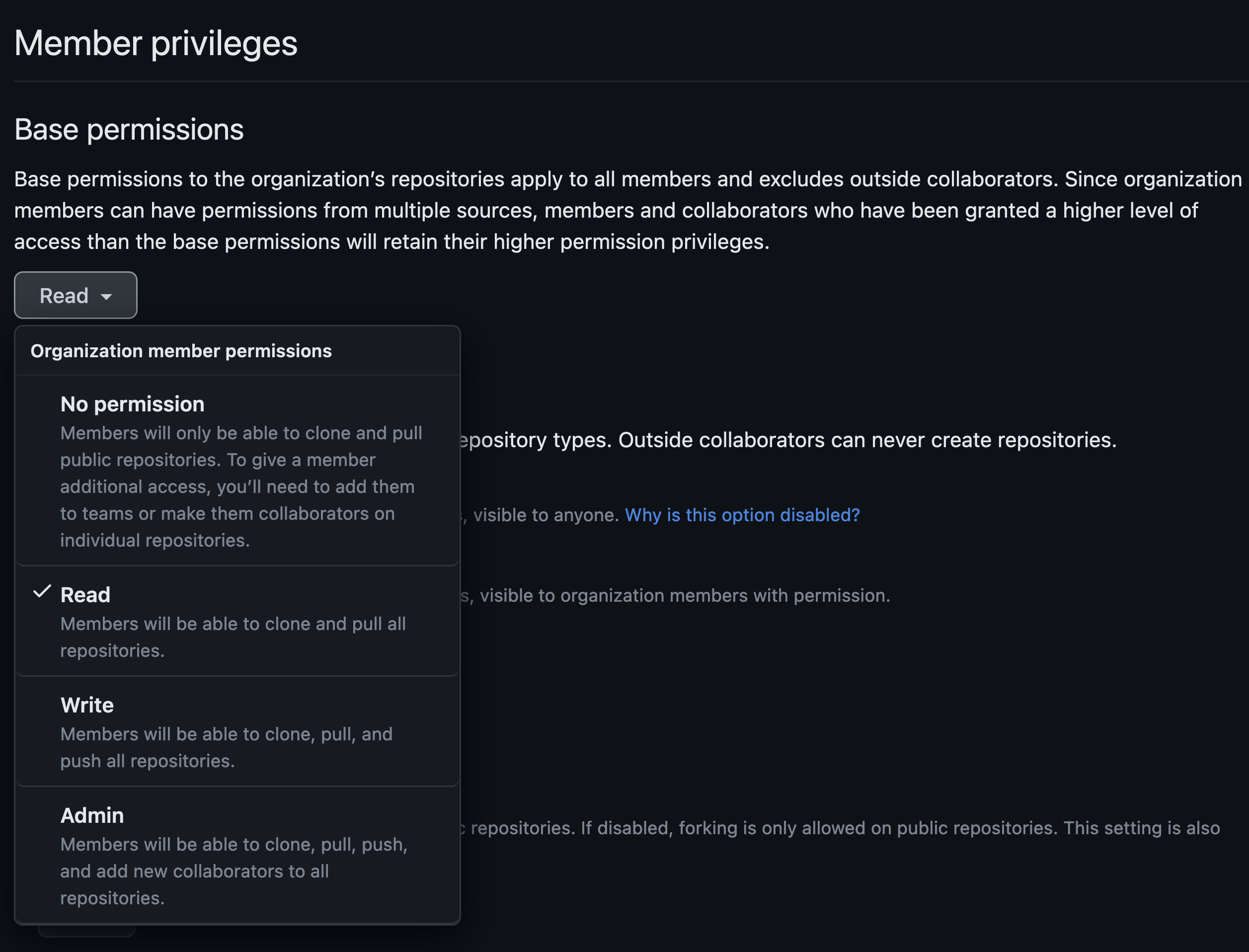
- Delete the previous relationship tuple and create a new one:
- Node.js
- Go
- .NET
- Python
- Java
- curl
- CLI
- Pseudocode
Initialize the SDK
```
// ApiTokenIssuer, ApiAudience, ClientId and ClientSecret are optional.
// import the SDK
const { OpenFgaClient } = require('@openfga/sdk');
// Initialize the SDK with no auth - see "How to setup SDK client" for more options
const fgaClient = new OpenFgaClient({
apiUrl: process.env.FGA_API_URL, // required, e.g. https://api.fga.example
storeId: process.env.FGA_STORE_ID,
authorizationModelId: process.env.FGA_MODEL_ID, // Optional, can be overridden per request
});
```
```
const options = {
authorizationModelId: "01HVMMBCMGZNT3SED4Z17ECXCA",
};
await fgaClient.write({
writes: [
{"user":"organization:contoso#member","relation":"repo_admin","object":"organization:contoso"}
],
}, options);
```
Initialize the SDK
```
// ApiTokenIssuer, ApiAudience, ClientId and ClientSecret are optional.
import (
"os"
. "github.com/openfga/go-sdk"
. "github.com/openfga/go-sdk/client"
)
func main() {
// Initialize the SDK with no auth - see "How to setup SDK client" for more options
fgaClient, err := NewSdkClient(&ClientConfiguration{
ApiUrl: os.Getenv("FGA_API_URL"), // required, e.g. https://api.fga.example
StoreId: os.Getenv("FGA_STORE_ID"), // optional, not needed for `CreateStore` and `ListStores`, required before calling for all other methods
AuthorizationModelId: os.Getenv("FGA_MODEL_ID"), // Optional, can be overridden per request
})
if err != nil {
// .. Handle error
}
}
```
```
options := ClientWriteOptions{
AuthorizationModelId: openfga.PtrString("01HVMMBCMGZNT3SED4Z17ECXCA"),
}
body := ClientWriteRequest{
Writes: []ClientTupleKey{
{
User: "organization:contoso#member",
Relation: "repo_admin",
Object: "organization:contoso",
},
},
}
data, err := fgaClient.Write(context.Background()).
Body(body).
Options(options).
Execute()
if err != nil {
// .. Handle error
}
_ = data // use the response
```
Initialize the SDK
```
// ApiTokenIssuer, ApiAudience, ClientId and ClientSecret are optional.
// import the SDK
using OpenFga.Sdk.Client;
using OpenFga.Sdk.Client.Model;
using OpenFga.Sdk.Model;
using Environment = System.Environment;
namespace Example;
class Example {
public static async Task Main() {
// Initialize the SDK with no auth - see "How to setup SDK client" for more options
var configuration = new ClientConfiguration() {
ApiUrl = Environment.GetEnvironmentVariable("FGA_API_URL"), ?? "http://localhost:8080", // required, e.g. https://api.fga.example
StoreId = Environment.GetEnvironmentVariable("FGA_STORE_ID"), // optional, not needed for `CreateStore` and `ListStores`, required before calling for all other methods
AuthorizationModelId = Environment.GetEnvironmentVariable("FGA_MODEL_ID"), // Optional, can be overridden per request
};
var fgaClient = new OpenFgaClient(configuration);
}
}
```
```
var options = new ClientWriteOptions {
AuthorizationModelId = "01HVMMBCMGZNT3SED4Z17ECXCA",
};
var body = new ClientWriteRequest() {
Writes = new List() {
new() {
User = "organization:contoso#member",
Relation = "repo_admin",
Object = "organization:contoso"
}
},
};
var response = await fgaClient.Write(body, options);
```
Initialize the SDK
```
# ApiTokenIssuer, ApiAudience, ClientId and ClientSecret are optional.
import asyncio
import os
import json
from openfga_sdk.client import ClientConfiguration, OpenFgaClient
async def main():
configuration = ClientConfiguration(
api_url = os.environ.get('FGA_API_URL'), # required, e.g. https://api.fga.example
store_id = os.environ.get('FGA_STORE_ID'), # optional, not needed for `CreateStore` and `ListStores`, required before calling for all other methods
authorization_model_id = os.environ.get('FGA_MODEL_ID'), # Optional, can be overridden per request
)
# Enter a context with an instance of the OpenFgaClient
async with OpenFgaClient(configuration) as fga_client:
api_response = await fga_client.read_authorization_models()
await fga_client.close()
asyncio.run(main())
```
```
options = {
"authorization_model_id": "01HVMMBCMGZNT3SED4Z17ECXCA"
}
body = ClientWriteRequest(
writes=[
ClientTuple(
user="organization:contoso#member",
relation="repo_admin",
object="organization:contoso",
),
],
)
response = await fga_client.write(body, options)
```
Initialize the SDK
```
// ApiTokenIssuer, ApiAudience, ClientId and ClientSecret are optional.
import dev.openfga.sdk.api.client.OpenFgaClient;
import dev.openfga.sdk.api.configuration.ClientConfiguration;
public class Example {
public static void main(String[] args) throws Exception {
var config = new ClientConfiguration()
.apiUrl(System.getenv("FGA_API_URL")) // If not specified, will default to "https://localhost:8080"
.storeId(System.getenv("FGA_STORE_ID")) // Not required when calling createStore() or listStores()
.authorizationModelId(System.getenv("FGA_AUTHORIZATION_MODEL_ID")); // Optional, can be overridden per request
var fgaClient = new OpenFgaClient(config);
}
}
```
```
var options = new ClientWriteOptions()
.authorizationModelId("01HVMMBCMGZNT3SED4Z17ECXCA");
var body = new ClientWriteRequest()
.writes(List.of(
new ClientTupleKey()
.user("organization:contoso#member")
.relation("repo_admin")
._object("organization:contoso")
));
var response = fgaClient.write(body, options).get();
```
Set FGA\_API\_URL according to the service you are using (e.g. https\://api.fga.example)
```
Set FGA_API_URL according to the service you are using (e.g. https://api.fga.example)
```
```
curl -X POST $FGA_API_URL/stores/$FGA_STORE_ID/write \
-H "Authorization: Bearer $FGA_API_TOKEN" \ # Not needed if service does not require authorization
-H "content-type: application/json" \
-d '{
"writes": {
"tuple_keys": [
{
"user": "organization:contoso#member",
"relation": "repo_admin",
"object": "organization:contoso"
}
]
},
"authorization_model_id": "01HVMMBCMGZNT3SED4Z17ECXCA"
}'
```
Set FGA\_API\_URL according to the service you are using (e.g. https\://api.fga.example)
```
Set FGA_API_URL according to the service you are using (e.g. https://api.fga.example)
```
```
fga tuple write --store-id=${FGA_STORE_ID} --model-id=01HVMMBCMGZNT3SED4Z17ECXCA organization:contoso#member repo_admin organization:contoso
```
```
write([
{
"user":"organization:contoso#member",
"relation":"repo_admin",
"object":"organization:contoso"
}
])
```
The updated authorization model looks like this:
```
model
schema 1.1
type user
type repo
relations
define admin: [user, team#member, organization#member] or repo_admin from owner
define maintainer: [user, team#member, organization#member] or admin
define writer: [user, team#member, organization#member] or maintainer or writer from owner
define triager: [user, team#member, organization#member] or writer
define reader: [user, team#member, organization#member] or triager or reader from owner
define owner: [organization]
type organization
relations
define owner: [organization]
define repo_admin: [user, team#member, organization#member]
```
## Summary
GitHub has a number of other permissions. You have [organization billing managers, users that can manage specific apps, etc](https://docs.github.com/en/free-pro-team@latest/github/setting-up-and-managing-organizations-and-teams/permission-levels-for-an-organization). We might explore those in the future, but hopefully this blog post has shown you how you could represent those cases using OpenFGA.