---
title: "Slack"
description: "Modeling authorization for Slack"
canonical: "https://openfga.dev/docs/modeling/advanced/slack"
content_type: "documentation"
last_updated: "2026-08-31T13:15:17.000Z"
---
# Modeling Authorization for Slack with OpenFGA
This tutorial explains how to model permissions for a communication platform like Slack using OpenFGA.
**What you will learn**
- How to indicate relationships between a group of **[users](https://openfga.dev/docs/concepts.md#what-is-a-user)** and an **[object](https://openfga.dev/docs/concepts.md#what-is-an-object)**.
Used here to indicate that all members of a slack workspace can write in a certain channel.
See [Modeling User Groups](https://openfga.dev/docs/modeling/user-groups.md) for more.
- How to Model **concentric relationship** to have a certain [relation](https://openfga.dev/docs/concepts.md#what-is-a-relation) on an object imply another relation on the same object.
Used here to indicate that legacy admins have all the permissions of the more granular channels admin.
See [Modeling Concentric Relationships](https://openfga.dev/docs/modeling/building-blocks/concentric-relationships.md) for more.
- How to use [**the union operator**](https://openfga.dev/docs/configuration-language.md#the-union-operator) condition to indicate that a user might have a certain relation with an object if they match any of the criteria indicated.
## Before you start
In order to understand this guide correctly you must be familiar with some OpenFGA concepts and know how to develop the things that we will list below.
### OpenFGA conceptsIt would be helpful to have an understanding of some concepts of OpenFGA before you start.
#### Direct access
You need to know how to create an authorization model and create a relationship tuple to grant a user access to an object. [Learn more →](https://openfga.dev/docs/modeling/direct-access.md)
#### Modeling concentric relationships
You need to know how to update the authorization model to allow having nested relations such as all writers are readers. [Learn more →](https://openfga.dev/docs/modeling/building-blocks/concentric-relationships.md)
#### Concepts & configuration language
- Some [OpenFGA Concepts](https://openfga.dev/docs/concepts.md)
- [Configuration Language](https://openfga.dev/docs/configuration-language.md)
## What you will be modeling
Slack is a messaging app for businesses that connects people to the information they need. By bringing people together to work as one unified team, Slack transforms the way organizations communicate. (Source: [What is Slack?](https://slack.com/intl/en-ca/help/articles/115004071768-What-is-Slack-))
In this tutorial, you will build a subset of the Slack permission model (detailed below) in OpenFGA, using some scenarios to validate the model.
> As reference, you can refer to Slack's publicly available docs:
>
> - [Role Management at Slack](https://slack.engineering/role-management-at-slack/)
> - [Types of Roles in Slack](https://slack.com/intl/en-ca/help/articles/360018112273-Types-of-roles-in-Slack)
> - [Permissions by Role in Slack](https://slack.com/intl/en-ca/help/articles/201314026-Permissions-by-role-in-Slack)
> - [Manage a Workspace on Enterprise Grid](https://slack.com/intl/en-ca/help/articles/115005225987-Manage-a-workspace-on-Enterprise-Grid)
> - [Manage channel posting permissions](https://slack.com/intl/en-ca/help/articles/360004635551-Manage-channel-posting-permissions-)
> Note: For brevity, this tutorial will not model all of Slack's permissions. Instead, it will focus on modeling the scenarios outlined below.
### Requirements
This tutorial will focus on the following sections (this is a partial list of Slack's roles):
Workspace Roles:
- **Guest**: This type of user is limited in their ability to use Slack, and is only permitted to see one or multiple delegated channels.
- **Member**: This is the base type of user that does not have any particular administrative abilities, but has basic access to the organization's Slack workspaces. When an administrative change needs to be made, these users need the support of admins and owners to make the changes.
- **Legacy Admin**: This type of user is the basic administrator of any organization, and can make a wide variety of administrative changes across Slack, such as renaming channels, archiving channels, setting up preferences and policies, inviting new users, and installing applications. Users with this role perform the majority of administrative tasks across a team.
System Roles:
- **Channels Admin**: This type of user has the permission to archive channels, rename channels, create private channels, and convert public channels into private channels.
Channel Settings:
- **Visibility**:
- **Public**: Visible to all members and open to join
- **Private**: Visible to admins and invited members
- [**Posting Permissions**](https://slack.com/intl/en-ca/help/articles/360004635551-Manage-channel-posting-permissions-):
- **Open**: Anyone can post
- **Limited**: Only allowed members can post
### Defined scenarios
Use the following scenarios to be able to validate whether the model of the requirements is correct.
There will be the following users:
- Amy
- Bob
- Catherine
- David
- Emily
These users will interact in the following scenarios:
- You will assume there is a Slack workspace called Sandcastle
- Amy is a legacy admin of the Sandcastle workspace
- Bob is a member of the Sandcastle workspace with a channels admin role (Read more about system roles at Slack [here](https://slack.engineering/role-management-at-slack/))
- Catherine and Emily are normal members of the Sandcastle workspace, they can view all public channels, as well as channels they have been invited to
- David is a guest user with only view and write access to #proj-marketing-campaign, one of the public channels in the Sandcastle workspace
- Bob and Emily are in a private channel #marketing-internal in the Sandcastle workspace which only they can view and post to
- All members of the Sandcastle workspace can view the general channel, but only Amy and Emily can post to it
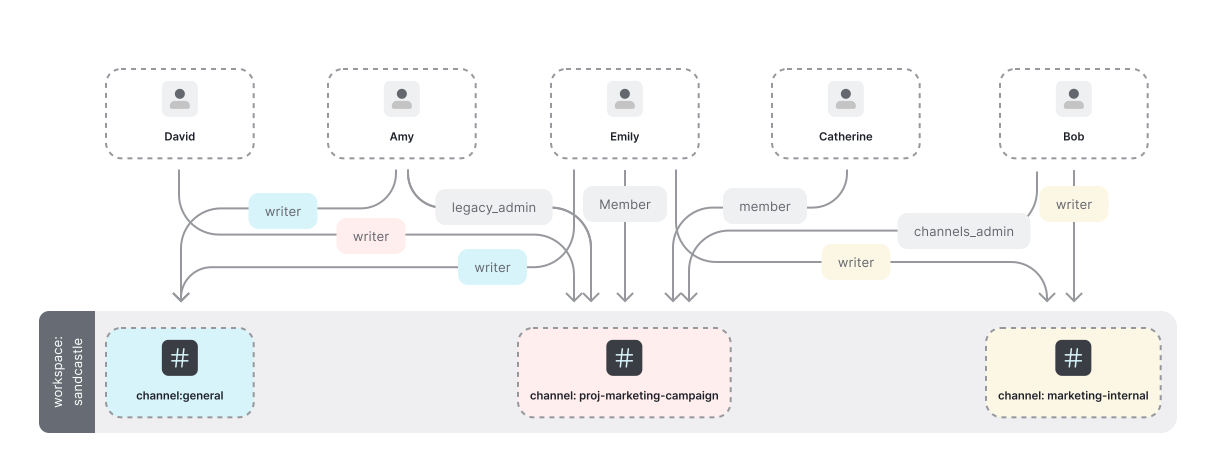
caution
In production, it is highly recommended to use unique, immutable identifiers. Names are used in this article to make it easier to read and follow.
## Modeling workspaces & channels
The goal by the end of this post is to ask OpenFGA: Does person X have permission to perform action Y on channel Z? In response, you want to either get a confirmation that person X can indeed do that, or a rejection that they cannot. E.g. does David have access to view #general?
The OpenFGA is based on [Zanzibar](https://zanzibar.academy), a Relation Based Access Control system. This means it relies on [objects](https://openfga.dev/docs/concepts.md#what-is-an-object) and [user](https://openfga.dev/docs/concepts.md#what-is-a-user) [relations](https://openfga.dev/docs/concepts.md#what-is-a-relation) to perform authorization [checks](https://openfga.dev/docs/concepts.md#what-is-a-check-request).
Setting aside the permissions, you will start with the roles and learn how to express the requirements in terms of relations you can feed into OpenFGA.
The requirements stated:
- **Amy** is a **legacy admin** of the **Sandcastle workspace**
- **Bob** is a **channels admin** of the **Sandcastle workspace**
- **Catherine** and **Emily** are a normal **members** of the **Sandcastle workspace**
- **David** is a **guest** user
Here is how you would express than in OpenFGA's [authorization model](https://openfga.dev/docs/concepts.md#what-is-an-authorization-model): You have a [type](https://openfga.dev/docs/concepts.md#what-is-a-type) called "workspace", and users can be related to it as a legacy\_admin, channels\_admin, member and guest
```
model
schema 1.1
type user
type workspace
relations
define legacy_admin: [user]
define channels_admin: [user]
define member: [user]
define guest: [user]
```
info
**Objects** of type `workspace` have users related to them as:
- Legacy Admin (`legacy_admin`)
- Channels Admin (`channels_admin`)
- Member (`member`)
- Guest (`guest`)
[Direct relationship type restrictions](https://openfga.dev/docs/configuration-language.md#direct-relationship-type-restrictions) indicate that a user can have a [direct relationship](https://openfga.dev/docs/concepts.md#what-are-direct-and-implied-relationships) with an object of the type the relation specifies.
### 01. Individual permissions
To keep things simple and focus on OpenFGA rather than Slack complexity, we will model only four roles (legacy\_admin, channels\_admin, member, guest).
At the end of this section we want to have the following permissions represented
| User | Relation | Object |
| --------- | --------------- | -------------------- |
| amy | legacy\_admin | workspace:sandcastle |
| bob | channels\_admin | workspace:sandcastle |
| catherine | member | workspace:sandcastle |
| david | guest | workspace:sandcastle |
| emily | member | workspace:sandcastle |
To represent permissions in OpenFGA we use [relations](https://openfga.dev/docs/concepts.md#what-is-a-relation). For workspace permissions we need to create the following [authorization model](https://openfga.dev/docs/concepts.md#what-is-an-authorization-model):
```
model
schema 1.1
type user
type workspace
relations
define legacy_admin: [user]
define channels_admin: [user]
define member: [user]
define guest: [user]
```
The OpenFGA service determines if a [user](https://openfga.dev/docs/concepts.md#what-is-a-user) has access to an [object](https://openfga.dev/docs/concepts.md#what-is-an-object) by [checking](https://openfga.dev/docs/concepts.md#what-is-a-check-request) if the user has a relation to that object. Let us examine one of those relations in detail:
```
type workspace
relations
define member: [user]
```
info
The snippet above indicates that objects of type workspace have users related to them as "member" if those users belong to the userset of all users related to the workspace as "member".
This means that a user can be [directly related](https://openfga.dev/docs/concepts.md#what-are-direct-and-implied-relationships) as a member to an object of type "workspace"
If we want to say `amy` is a `legacy_admin` of `workspace:sandcastle` we create this relationship tuple
- Node.js
- Go
- .NET
- Python
- Java
- curl
- CLI
- Pseudocode
Initialize the SDK
```
// ApiTokenIssuer, ApiAudience, ClientId and ClientSecret are optional.
// import the SDK
const { OpenFgaClient } = require('@openfga/sdk');
// Initialize the SDK with no auth - see "How to setup SDK client" for more options
const fgaClient = new OpenFgaClient({
apiUrl: process.env.FGA_API_URL, // required, e.g. https://api.fga.example
storeId: process.env.FGA_STORE_ID,
authorizationModelId: process.env.FGA_MODEL_ID, // Optional, can be overridden per request
});
```
```
const options = {
authorizationModelId: "01HVMMBCMGZNT3SED4Z17ECXCA",
};
await fgaClient.write({
writes: [
// Amy is a Legacy Admin in the Sandcastle workspace
{"_description":"Amy is a Legacy Admin in the Sandcastle workspace","user":"user:amy","relation":"legacy_admin","object":"workspace:sandcastle"}
],
}, options);
```
Initialize the SDK
```
// ApiTokenIssuer, ApiAudience, ClientId and ClientSecret are optional.
import (
"os"
. "github.com/openfga/go-sdk"
. "github.com/openfga/go-sdk/client"
)
func main() {
// Initialize the SDK with no auth - see "How to setup SDK client" for more options
fgaClient, err := NewSdkClient(&ClientConfiguration{
ApiUrl: os.Getenv("FGA_API_URL"), // required, e.g. https://api.fga.example
StoreId: os.Getenv("FGA_STORE_ID"), // optional, not needed for `CreateStore` and `ListStores`, required before calling for all other methods
AuthorizationModelId: os.Getenv("FGA_MODEL_ID"), // Optional, can be overridden per request
})
if err != nil {
// .. Handle error
}
}
```
```
options := ClientWriteOptions{
AuthorizationModelId: openfga.PtrString("01HVMMBCMGZNT3SED4Z17ECXCA"),
}
body := ClientWriteRequest{
Writes: []ClientTupleKey{
{
// Amy is a Legacy Admin in the Sandcastle workspace
User: "user:amy",
Relation: "legacy_admin",
Object: "workspace:sandcastle",
},
},
}
data, err := fgaClient.Write(context.Background()).
Body(body).
Options(options).
Execute()
if err != nil {
// .. Handle error
}
_ = data // use the response
```
Initialize the SDK
```
// ApiTokenIssuer, ApiAudience, ClientId and ClientSecret are optional.
// import the SDK
using OpenFga.Sdk.Client;
using OpenFga.Sdk.Client.Model;
using OpenFga.Sdk.Model;
using Environment = System.Environment;
namespace Example;
class Example {
public static async Task Main() {
// Initialize the SDK with no auth - see "How to setup SDK client" for more options
var configuration = new ClientConfiguration() {
ApiUrl = Environment.GetEnvironmentVariable("FGA_API_URL"), ?? "http://localhost:8080", // required, e.g. https://api.fga.example
StoreId = Environment.GetEnvironmentVariable("FGA_STORE_ID"), // optional, not needed for `CreateStore` and `ListStores`, required before calling for all other methods
AuthorizationModelId = Environment.GetEnvironmentVariable("FGA_MODEL_ID"), // Optional, can be overridden per request
};
var fgaClient = new OpenFgaClient(configuration);
}
}
```
```
var options = new ClientWriteOptions {
AuthorizationModelId = "01HVMMBCMGZNT3SED4Z17ECXCA",
};
var body = new ClientWriteRequest() {
Writes = new List() {
// Amy is a Legacy Admin in the Sandcastle workspace
new() {
User = "user:amy",
Relation = "legacy_admin",
Object = "workspace:sandcastle"
}
},
};
var response = await fgaClient.Write(body, options);
```
Initialize the SDK
```
# ApiTokenIssuer, ApiAudience, ClientId and ClientSecret are optional.
import asyncio
import os
import json
from openfga_sdk.client import ClientConfiguration, OpenFgaClient
async def main():
configuration = ClientConfiguration(
api_url = os.environ.get('FGA_API_URL'), # required, e.g. https://api.fga.example
store_id = os.environ.get('FGA_STORE_ID'), # optional, not needed for `CreateStore` and `ListStores`, required before calling for all other methods
authorization_model_id = os.environ.get('FGA_MODEL_ID'), # Optional, can be overridden per request
)
# Enter a context with an instance of the OpenFgaClient
async with OpenFgaClient(configuration) as fga_client:
api_response = await fga_client.read_authorization_models()
await fga_client.close()
asyncio.run(main())
```
```
options = {
"authorization_model_id": "01HVMMBCMGZNT3SED4Z17ECXCA"
}
body = ClientWriteRequest(
writes=[
ClientTuple(
# Amy is a Legacy Admin in the Sandcastle workspace
user="user:amy",
relation="legacy_admin",
object="workspace:sandcastle",
),
],
)
response = await fga_client.write(body, options)
```
Initialize the SDK
```
// ApiTokenIssuer, ApiAudience, ClientId and ClientSecret are optional.
import dev.openfga.sdk.api.client.OpenFgaClient;
import dev.openfga.sdk.api.configuration.ClientConfiguration;
public class Example {
public static void main(String[] args) throws Exception {
var config = new ClientConfiguration()
.apiUrl(System.getenv("FGA_API_URL")) // If not specified, will default to "https://localhost:8080"
.storeId(System.getenv("FGA_STORE_ID")) // Not required when calling createStore() or listStores()
.authorizationModelId(System.getenv("FGA_AUTHORIZATION_MODEL_ID")); // Optional, can be overridden per request
var fgaClient = new OpenFgaClient(config);
}
}
```
```
var options = new ClientWriteOptions()
.authorizationModelId("01HVMMBCMGZNT3SED4Z17ECXCA");
var body = new ClientWriteRequest()
.writes(List.of(
// Amy is a Legacy Admin in the Sandcastle workspace
new ClientTupleKey()
.user("user:amy")
.relation("legacy_admin")
._object("workspace:sandcastle")
));
var response = fgaClient.write(body, options).get();
```
Set FGA\_API\_URL according to the service you are using (e.g. https\://api.fga.example)
```
Set FGA_API_URL according to the service you are using (e.g. https://api.fga.example)
```
```
curl -X POST $FGA_API_URL/stores/$FGA_STORE_ID/write \
-H "Authorization: Bearer $FGA_API_TOKEN" \ # Not needed if service does not require authorization
-H "content-type: application/json" \
-d '{
"writes": {
"tuple_keys": [
{
"user": "user:amy",
"relation": "legacy_admin",
"object": "workspace:sandcastle"
}
]
},
"authorization_model_id": "01HVMMBCMGZNT3SED4Z17ECXCA"
}'
```
Set FGA\_API\_URL according to the service you are using (e.g. https\://api.fga.example)
```
Set FGA_API_URL according to the service you are using (e.g. https://api.fga.example)
```
```
fga tuple write --store-id=${FGA_STORE_ID} --model-id=01HVMMBCMGZNT3SED4Z17ECXCA user:amy legacy_admin workspace:sandcastle
```
```
write([
// Amy is a Legacy Admin in the Sandcastle workspace
{
"user":"user:amy",
"relation":"legacy_admin",
"object":"workspace:sandcastle"
}
])
```
We can now ask OpenFGA "is `amy` a legacy\_admin of **workspace:sandcastle**?"
- Node.js
- Go
- .NET
- Python
- Java
- CLI
- curl
- Pseudocode
- Playground
Initialize the SDK
```
// ApiTokenIssuer, ApiAudience, ClientId and ClientSecret are optional.
// import the SDK
const { OpenFgaClient } = require('@openfga/sdk');
// Initialize the SDK with no auth - see "How to setup SDK client" for more options
const fgaClient = new OpenFgaClient({
apiUrl: process.env.FGA_API_URL, // required, e.g. https://api.fga.example
storeId: process.env.FGA_STORE_ID,
authorizationModelId: process.env.FGA_MODEL_ID, // Optional, can be overridden per request
});
```
```
// Run a check
const { allowed } = await fgaClient.check({
user: 'user:amy',
relation: 'legacy_admin',
object: 'workspace:sandcastle',
}, {
authorizationModelId: '01HVMMBCMGZNT3SED4Z17ECXCA',
});
// allowed = true
```
Initialize the SDK
```
// ApiTokenIssuer, ApiAudience, ClientId and ClientSecret are optional.
import (
"os"
. "github.com/openfga/go-sdk"
. "github.com/openfga/go-sdk/client"
)
func main() {
// Initialize the SDK with no auth - see "How to setup SDK client" for more options
fgaClient, err := NewSdkClient(&ClientConfiguration{
ApiUrl: os.Getenv("FGA_API_URL"), // required, e.g. https://api.fga.example
StoreId: os.Getenv("FGA_STORE_ID"), // optional, not needed for `CreateStore` and `ListStores`, required before calling for all other methods
AuthorizationModelId: os.Getenv("FGA_MODEL_ID"), // Optional, can be overridden per request
})
if err != nil {
// .. Handle error
}
}
```
```
options := ClientCheckOptions{
AuthorizationModelId: openfga.PtrString("01HVMMBCMGZNT3SED4Z17ECXCA"),
}
body := ClientCheckRequest{
User: "user:amy",
Relation: "legacy_admin",
Object: "workspace:sandcastle",
}
data, err := fgaClient.Check(context.Background()).
Body(body).
Options(options).
Execute()
// data = { allowed: true }
```
Initialize the SDK
```
// ApiTokenIssuer, ApiAudience, ClientId and ClientSecret are optional.
// import the SDK
using OpenFga.Sdk.Client;
using OpenFga.Sdk.Client.Model;
using OpenFga.Sdk.Model;
using Environment = System.Environment;
namespace Example;
class Example {
public static async Task Main() {
// Initialize the SDK with no auth - see "How to setup SDK client" for more options
var configuration = new ClientConfiguration() {
ApiUrl = Environment.GetEnvironmentVariable("FGA_API_URL"), ?? "http://localhost:8080", // required, e.g. https://api.fga.example
StoreId = Environment.GetEnvironmentVariable("FGA_STORE_ID"), // optional, not needed for `CreateStore` and `ListStores`, required before calling for all other methods
AuthorizationModelId = Environment.GetEnvironmentVariable("FGA_MODEL_ID"), // Optional, can be overridden per request
};
var fgaClient = new OpenFgaClient(configuration);
}
}
```
```
var options = new ClientCheckOptions {
AuthorizationModelId = "01HVMMBCMGZNT3SED4Z17ECXCA"
};
var body = new ClientCheckRequest {
User = "user:amy",
Relation = "legacy_admin",
Object = "workspace:sandcastle",
};
var response = await fgaClient.Check(body, options);
// response.Allowed = true
```
Initialize the SDK
```
# ApiTokenIssuer, ApiAudience, ClientId and ClientSecret are optional.
import asyncio
import os
import json
from openfga_sdk.client import ClientConfiguration, OpenFgaClient
async def main():
configuration = ClientConfiguration(
api_url = os.environ.get('FGA_API_URL'), # required, e.g. https://api.fga.example
store_id = os.environ.get('FGA_STORE_ID'), # optional, not needed for `CreateStore` and `ListStores`, required before calling for all other methods
authorization_model_id = os.environ.get('FGA_MODEL_ID'), # Optional, can be overridden per request
)
# Enter a context with an instance of the OpenFgaClient
async with OpenFgaClient(configuration) as fga_client:
api_response = await fga_client.read_authorization_models()
await fga_client.close()
asyncio.run(main())
```
```
options = {
"authorization_model_id": "01HVMMBCMGZNT3SED4Z17ECXCA",
}
body = ClientCheckRequest(
user="user:amy",
relation="legacy_admin",
object="workspace:sandcastle",
)
response = await fga_client.check(body, options)
# response.allowed = true
```
Initialize the SDK
```
// ApiTokenIssuer, ApiAudience, ClientId and ClientSecret are optional.
import dev.openfga.sdk.api.client.OpenFgaClient;
import dev.openfga.sdk.api.configuration.ClientConfiguration;
public class Example {
public static void main(String[] args) throws Exception {
var config = new ClientConfiguration()
.apiUrl(System.getenv("FGA_API_URL")) // If not specified, will default to "https://localhost:8080"
.storeId(System.getenv("FGA_STORE_ID")) // Not required when calling createStore() or listStores()
.authorizationModelId(System.getenv("FGA_AUTHORIZATION_MODEL_ID")); // Optional, can be overridden per request
var fgaClient = new OpenFgaClient(config);
}
}
```
```
var options = new ClientCheckOptions()
.authorizationModelId("01HVMMBCMGZNT3SED4Z17ECXCA");
var body = new ClientCheckRequest()
.user("user:amy")
.relation("legacy_admin")
._object("workspace:sandcastle");
var response = fgaClient.check(body, options).get();
// response.getAllowed() = true
```
Set FGA\_API\_URL according to the service you are using (e.g. https\://api.fga.example)
```
Set FGA_API_URL according to the service you are using (e.g. https://api.fga.example)
```
```
fga query check --store-id=$FGA_STORE_ID --model-id=01HVMMBCMGZNT3SED4Z17ECXCA user:amy legacy_admin workspace:sandcastle
# Response: {"allowed":true}
```
Set FGA\_API\_URL according to the service you are using (e.g. https\://api.fga.example)
```
Set FGA_API_URL according to the service you are using (e.g. https://api.fga.example)
```
```
curl -X POST $FGA_API_URL/stores/$FGA_STORE_ID/check \
-H "Authorization: Bearer $FGA_API_TOKEN" \ # Not needed if service does not require authorization
-H "content-type: application/json" \
-d '{
"authorization_model_id": "01HVMMBCMGZNT3SED4Z17ECXCA",
"tuple_key": {
"user": "user:amy",
"relation": "legacy_admin",
"object": "workspace:sandcastle"
}
}'
# Response: {"allowed": true}
```
```
check(
user = "user:amy", // check if the user `user:amy`
relation = "legacy_admin", // has an `legacy_admin` relation
object = "workspace:sandcastle", // with the object `workspace:sandcastle`
);
Reply: true
```
```
is user:amy related to workspace:sandcastle as legacy_admin?
# Response: A green path from the user to the object indicating that the response from the API is `{"allowed":true}`
```
We can also say that `catherine` is a `member` of `workspace:sandcastle`:
- Node.js
- Go
- .NET
- Python
- Java
- curl
- CLI
- Pseudocode
Initialize the SDK
```
// ApiTokenIssuer, ApiAudience, ClientId and ClientSecret are optional.
// import the SDK
const { OpenFgaClient } = require('@openfga/sdk');
// Initialize the SDK with no auth - see "How to setup SDK client" for more options
const fgaClient = new OpenFgaClient({
apiUrl: process.env.FGA_API_URL, // required, e.g. https://api.fga.example
storeId: process.env.FGA_STORE_ID,
authorizationModelId: process.env.FGA_MODEL_ID, // Optional, can be overridden per request
});
```
```
const options = {
authorizationModelId: "01HVMMBCMGZNT3SED4Z17ECXCA",
};
await fgaClient.write({
writes: [
// Catherine is a Member in the Sandcastle workspace
{"_description":"Catherine is a Member in the Sandcastle workspace","user":"user:catherine","relation":"member","object":"workspace:sandcastle"}
],
}, options);
```
Initialize the SDK
```
// ApiTokenIssuer, ApiAudience, ClientId and ClientSecret are optional.
import (
"os"
. "github.com/openfga/go-sdk"
. "github.com/openfga/go-sdk/client"
)
func main() {
// Initialize the SDK with no auth - see "How to setup SDK client" for more options
fgaClient, err := NewSdkClient(&ClientConfiguration{
ApiUrl: os.Getenv("FGA_API_URL"), // required, e.g. https://api.fga.example
StoreId: os.Getenv("FGA_STORE_ID"), // optional, not needed for `CreateStore` and `ListStores`, required before calling for all other methods
AuthorizationModelId: os.Getenv("FGA_MODEL_ID"), // Optional, can be overridden per request
})
if err != nil {
// .. Handle error
}
}
```
```
options := ClientWriteOptions{
AuthorizationModelId: openfga.PtrString("01HVMMBCMGZNT3SED4Z17ECXCA"),
}
body := ClientWriteRequest{
Writes: []ClientTupleKey{
{
// Catherine is a Member in the Sandcastle workspace
User: "user:catherine",
Relation: "member",
Object: "workspace:sandcastle",
},
},
}
data, err := fgaClient.Write(context.Background()).
Body(body).
Options(options).
Execute()
if err != nil {
// .. Handle error
}
_ = data // use the response
```
Initialize the SDK
```
// ApiTokenIssuer, ApiAudience, ClientId and ClientSecret are optional.
// import the SDK
using OpenFga.Sdk.Client;
using OpenFga.Sdk.Client.Model;
using OpenFga.Sdk.Model;
using Environment = System.Environment;
namespace Example;
class Example {
public static async Task Main() {
// Initialize the SDK with no auth - see "How to setup SDK client" for more options
var configuration = new ClientConfiguration() {
ApiUrl = Environment.GetEnvironmentVariable("FGA_API_URL"), ?? "http://localhost:8080", // required, e.g. https://api.fga.example
StoreId = Environment.GetEnvironmentVariable("FGA_STORE_ID"), // optional, not needed for `CreateStore` and `ListStores`, required before calling for all other methods
AuthorizationModelId = Environment.GetEnvironmentVariable("FGA_MODEL_ID"), // Optional, can be overridden per request
};
var fgaClient = new OpenFgaClient(configuration);
}
}
```
```
var options = new ClientWriteOptions {
AuthorizationModelId = "01HVMMBCMGZNT3SED4Z17ECXCA",
};
var body = new ClientWriteRequest() {
Writes = new List() {
// Catherine is a Member in the Sandcastle workspace
new() {
User = "user:catherine",
Relation = "member",
Object = "workspace:sandcastle"
}
},
};
var response = await fgaClient.Write(body, options);
```
Initialize the SDK
```
# ApiTokenIssuer, ApiAudience, ClientId and ClientSecret are optional.
import asyncio
import os
import json
from openfga_sdk.client import ClientConfiguration, OpenFgaClient
async def main():
configuration = ClientConfiguration(
api_url = os.environ.get('FGA_API_URL'), # required, e.g. https://api.fga.example
store_id = os.environ.get('FGA_STORE_ID'), # optional, not needed for `CreateStore` and `ListStores`, required before calling for all other methods
authorization_model_id = os.environ.get('FGA_MODEL_ID'), # Optional, can be overridden per request
)
# Enter a context with an instance of the OpenFgaClient
async with OpenFgaClient(configuration) as fga_client:
api_response = await fga_client.read_authorization_models()
await fga_client.close()
asyncio.run(main())
```
```
options = {
"authorization_model_id": "01HVMMBCMGZNT3SED4Z17ECXCA"
}
body = ClientWriteRequest(
writes=[
ClientTuple(
# Catherine is a Member in the Sandcastle workspace
user="user:catherine",
relation="member",
object="workspace:sandcastle",
),
],
)
response = await fga_client.write(body, options)
```
Initialize the SDK
```
// ApiTokenIssuer, ApiAudience, ClientId and ClientSecret are optional.
import dev.openfga.sdk.api.client.OpenFgaClient;
import dev.openfga.sdk.api.configuration.ClientConfiguration;
public class Example {
public static void main(String[] args) throws Exception {
var config = new ClientConfiguration()
.apiUrl(System.getenv("FGA_API_URL")) // If not specified, will default to "https://localhost:8080"
.storeId(System.getenv("FGA_STORE_ID")) // Not required when calling createStore() or listStores()
.authorizationModelId(System.getenv("FGA_AUTHORIZATION_MODEL_ID")); // Optional, can be overridden per request
var fgaClient = new OpenFgaClient(config);
}
}
```
```
var options = new ClientWriteOptions()
.authorizationModelId("01HVMMBCMGZNT3SED4Z17ECXCA");
var body = new ClientWriteRequest()
.writes(List.of(
// Catherine is a Member in the Sandcastle workspace
new ClientTupleKey()
.user("user:catherine")
.relation("member")
._object("workspace:sandcastle")
));
var response = fgaClient.write(body, options).get();
```
Set FGA\_API\_URL according to the service you are using (e.g. https\://api.fga.example)
```
Set FGA_API_URL according to the service you are using (e.g. https://api.fga.example)
```
```
curl -X POST $FGA_API_URL/stores/$FGA_STORE_ID/write \
-H "Authorization: Bearer $FGA_API_TOKEN" \ # Not needed if service does not require authorization
-H "content-type: application/json" \
-d '{
"writes": {
"tuple_keys": [
{
"user": "user:catherine",
"relation": "member",
"object": "workspace:sandcastle"
}
]
},
"authorization_model_id": "01HVMMBCMGZNT3SED4Z17ECXCA"
}'
```
Set FGA\_API\_URL according to the service you are using (e.g. https\://api.fga.example)
```
Set FGA_API_URL according to the service you are using (e.g. https://api.fga.example)
```
```
fga tuple write --store-id=${FGA_STORE_ID} --model-id=01HVMMBCMGZNT3SED4Z17ECXCA user:catherine member workspace:sandcastle
```
```
write([
// Catherine is a Member in the Sandcastle workspace
{
"user":"user:catherine",
"relation":"member",
"object":"workspace:sandcastle"
}
])
```
And verify by [asking](https://openfga.dev/docs/concepts.md#what-is-a-check-request) OpenFGA
- Node.js
- Go
- .NET
- Python
- Java
- CLI
- curl
- Pseudocode
- Playground
Initialize the SDK
```
// ApiTokenIssuer, ApiAudience, ClientId and ClientSecret are optional.
// import the SDK
const { OpenFgaClient } = require('@openfga/sdk');
// Initialize the SDK with no auth - see "How to setup SDK client" for more options
const fgaClient = new OpenFgaClient({
apiUrl: process.env.FGA_API_URL, // required, e.g. https://api.fga.example
storeId: process.env.FGA_STORE_ID,
authorizationModelId: process.env.FGA_MODEL_ID, // Optional, can be overridden per request
});
```
```
// Run a check
const { allowed } = await fgaClient.check({
user: 'user:catherine',
relation: 'member',
object: 'workspace:sandcastle',
}, {
authorizationModelId: '01HVMMBCMGZNT3SED4Z17ECXCA',
});
// allowed = true
```
Initialize the SDK
```
// ApiTokenIssuer, ApiAudience, ClientId and ClientSecret are optional.
import (
"os"
. "github.com/openfga/go-sdk"
. "github.com/openfga/go-sdk/client"
)
func main() {
// Initialize the SDK with no auth - see "How to setup SDK client" for more options
fgaClient, err := NewSdkClient(&ClientConfiguration{
ApiUrl: os.Getenv("FGA_API_URL"), // required, e.g. https://api.fga.example
StoreId: os.Getenv("FGA_STORE_ID"), // optional, not needed for `CreateStore` and `ListStores`, required before calling for all other methods
AuthorizationModelId: os.Getenv("FGA_MODEL_ID"), // Optional, can be overridden per request
})
if err != nil {
// .. Handle error
}
}
```
```
options := ClientCheckOptions{
AuthorizationModelId: openfga.PtrString("01HVMMBCMGZNT3SED4Z17ECXCA"),
}
body := ClientCheckRequest{
User: "user:catherine",
Relation: "member",
Object: "workspace:sandcastle",
}
data, err := fgaClient.Check(context.Background()).
Body(body).
Options(options).
Execute()
// data = { allowed: true }
```
Initialize the SDK
```
// ApiTokenIssuer, ApiAudience, ClientId and ClientSecret are optional.
// import the SDK
using OpenFga.Sdk.Client;
using OpenFga.Sdk.Client.Model;
using OpenFga.Sdk.Model;
using Environment = System.Environment;
namespace Example;
class Example {
public static async Task Main() {
// Initialize the SDK with no auth - see "How to setup SDK client" for more options
var configuration = new ClientConfiguration() {
ApiUrl = Environment.GetEnvironmentVariable("FGA_API_URL"), ?? "http://localhost:8080", // required, e.g. https://api.fga.example
StoreId = Environment.GetEnvironmentVariable("FGA_STORE_ID"), // optional, not needed for `CreateStore` and `ListStores`, required before calling for all other methods
AuthorizationModelId = Environment.GetEnvironmentVariable("FGA_MODEL_ID"), // Optional, can be overridden per request
};
var fgaClient = new OpenFgaClient(configuration);
}
}
```
```
var options = new ClientCheckOptions {
AuthorizationModelId = "01HVMMBCMGZNT3SED4Z17ECXCA"
};
var body = new ClientCheckRequest {
User = "user:catherine",
Relation = "member",
Object = "workspace:sandcastle",
};
var response = await fgaClient.Check(body, options);
// response.Allowed = true
```
Initialize the SDK
```
# ApiTokenIssuer, ApiAudience, ClientId and ClientSecret are optional.
import asyncio
import os
import json
from openfga_sdk.client import ClientConfiguration, OpenFgaClient
async def main():
configuration = ClientConfiguration(
api_url = os.environ.get('FGA_API_URL'), # required, e.g. https://api.fga.example
store_id = os.environ.get('FGA_STORE_ID'), # optional, not needed for `CreateStore` and `ListStores`, required before calling for all other methods
authorization_model_id = os.environ.get('FGA_MODEL_ID'), # Optional, can be overridden per request
)
# Enter a context with an instance of the OpenFgaClient
async with OpenFgaClient(configuration) as fga_client:
api_response = await fga_client.read_authorization_models()
await fga_client.close()
asyncio.run(main())
```
```
options = {
"authorization_model_id": "01HVMMBCMGZNT3SED4Z17ECXCA",
}
body = ClientCheckRequest(
user="user:catherine",
relation="member",
object="workspace:sandcastle",
)
response = await fga_client.check(body, options)
# response.allowed = true
```
Initialize the SDK
```
// ApiTokenIssuer, ApiAudience, ClientId and ClientSecret are optional.
import dev.openfga.sdk.api.client.OpenFgaClient;
import dev.openfga.sdk.api.configuration.ClientConfiguration;
public class Example {
public static void main(String[] args) throws Exception {
var config = new ClientConfiguration()
.apiUrl(System.getenv("FGA_API_URL")) // If not specified, will default to "https://localhost:8080"
.storeId(System.getenv("FGA_STORE_ID")) // Not required when calling createStore() or listStores()
.authorizationModelId(System.getenv("FGA_AUTHORIZATION_MODEL_ID")); // Optional, can be overridden per request
var fgaClient = new OpenFgaClient(config);
}
}
```
```
var options = new ClientCheckOptions()
.authorizationModelId("01HVMMBCMGZNT3SED4Z17ECXCA");
var body = new ClientCheckRequest()
.user("user:catherine")
.relation("member")
._object("workspace:sandcastle");
var response = fgaClient.check(body, options).get();
// response.getAllowed() = true
```
Set FGA\_API\_URL according to the service you are using (e.g. https\://api.fga.example)
```
Set FGA_API_URL according to the service you are using (e.g. https://api.fga.example)
```
```
fga query check --store-id=$FGA_STORE_ID --model-id=01HVMMBCMGZNT3SED4Z17ECXCA user:catherine member workspace:sandcastle
# Response: {"allowed":true}
```
Set FGA\_API\_URL according to the service you are using (e.g. https\://api.fga.example)
```
Set FGA_API_URL according to the service you are using (e.g. https://api.fga.example)
```
```
curl -X POST $FGA_API_URL/stores/$FGA_STORE_ID/check \
-H "Authorization: Bearer $FGA_API_TOKEN" \ # Not needed if service does not require authorization
-H "content-type: application/json" \
-d '{
"authorization_model_id": "01HVMMBCMGZNT3SED4Z17ECXCA",
"tuple_key": {
"user": "user:catherine",
"relation": "member",
"object": "workspace:sandcastle"
}
}'
# Response: {"allowed": true}
```
```
check(
user = "user:catherine", // check if the user `user:catherine`
relation = "member", // has an `member` relation
object = "workspace:sandcastle", // with the object `workspace:sandcastle`
);
Reply: true
```
```
is user:catherine related to workspace:sandcastle as member?
# Response: A green path from the user to the object indicating that the response from the API is `{"allowed":true}`
```
Catherine, on the other hand, is not a legacy\_admin of workspace:sandcastle.
- Node.js
- Go
- .NET
- Python
- Java
- CLI
- curl
- Pseudocode
- Playground
Initialize the SDK
```
// ApiTokenIssuer, ApiAudience, ClientId and ClientSecret are optional.
// import the SDK
const { OpenFgaClient } = require('@openfga/sdk');
// Initialize the SDK with no auth - see "How to setup SDK client" for more options
const fgaClient = new OpenFgaClient({
apiUrl: process.env.FGA_API_URL, // required, e.g. https://api.fga.example
storeId: process.env.FGA_STORE_ID,
authorizationModelId: process.env.FGA_MODEL_ID, // Optional, can be overridden per request
});
```
```
// Run a check
const { allowed } = await fgaClient.check({
user: 'user:catherine',
relation: 'legacy_admin',
object: 'workspace:sandcastle',
}, {
authorizationModelId: '01HVMMBCMGZNT3SED4Z17ECXCA',
});
// allowed = false
```
Initialize the SDK
```
// ApiTokenIssuer, ApiAudience, ClientId and ClientSecret are optional.
import (
"os"
. "github.com/openfga/go-sdk"
. "github.com/openfga/go-sdk/client"
)
func main() {
// Initialize the SDK with no auth - see "How to setup SDK client" for more options
fgaClient, err := NewSdkClient(&ClientConfiguration{
ApiUrl: os.Getenv("FGA_API_URL"), // required, e.g. https://api.fga.example
StoreId: os.Getenv("FGA_STORE_ID"), // optional, not needed for `CreateStore` and `ListStores`, required before calling for all other methods
AuthorizationModelId: os.Getenv("FGA_MODEL_ID"), // Optional, can be overridden per request
})
if err != nil {
// .. Handle error
}
}
```
```
options := ClientCheckOptions{
AuthorizationModelId: openfga.PtrString("01HVMMBCMGZNT3SED4Z17ECXCA"),
}
body := ClientCheckRequest{
User: "user:catherine",
Relation: "legacy_admin",
Object: "workspace:sandcastle",
}
data, err := fgaClient.Check(context.Background()).
Body(body).
Options(options).
Execute()
// data = { allowed: false }
```
Initialize the SDK
```
// ApiTokenIssuer, ApiAudience, ClientId and ClientSecret are optional.
// import the SDK
using OpenFga.Sdk.Client;
using OpenFga.Sdk.Client.Model;
using OpenFga.Sdk.Model;
using Environment = System.Environment;
namespace Example;
class Example {
public static async Task Main() {
// Initialize the SDK with no auth - see "How to setup SDK client" for more options
var configuration = new ClientConfiguration() {
ApiUrl = Environment.GetEnvironmentVariable("FGA_API_URL"), ?? "http://localhost:8080", // required, e.g. https://api.fga.example
StoreId = Environment.GetEnvironmentVariable("FGA_STORE_ID"), // optional, not needed for `CreateStore` and `ListStores`, required before calling for all other methods
AuthorizationModelId = Environment.GetEnvironmentVariable("FGA_MODEL_ID"), // Optional, can be overridden per request
};
var fgaClient = new OpenFgaClient(configuration);
}
}
```
```
var options = new ClientCheckOptions {
AuthorizationModelId = "01HVMMBCMGZNT3SED4Z17ECXCA"
};
var body = new ClientCheckRequest {
User = "user:catherine",
Relation = "legacy_admin",
Object = "workspace:sandcastle",
};
var response = await fgaClient.Check(body, options);
// response.Allowed = false
```
Initialize the SDK
```
# ApiTokenIssuer, ApiAudience, ClientId and ClientSecret are optional.
import asyncio
import os
import json
from openfga_sdk.client import ClientConfiguration, OpenFgaClient
async def main():
configuration = ClientConfiguration(
api_url = os.environ.get('FGA_API_URL'), # required, e.g. https://api.fga.example
store_id = os.environ.get('FGA_STORE_ID'), # optional, not needed for `CreateStore` and `ListStores`, required before calling for all other methods
authorization_model_id = os.environ.get('FGA_MODEL_ID'), # Optional, can be overridden per request
)
# Enter a context with an instance of the OpenFgaClient
async with OpenFgaClient(configuration) as fga_client:
api_response = await fga_client.read_authorization_models()
await fga_client.close()
asyncio.run(main())
```
```
options = {
"authorization_model_id": "01HVMMBCMGZNT3SED4Z17ECXCA",
}
body = ClientCheckRequest(
user="user:catherine",
relation="legacy_admin",
object="workspace:sandcastle",
)
response = await fga_client.check(body, options)
# response.allowed = false
```
Initialize the SDK
```
// ApiTokenIssuer, ApiAudience, ClientId and ClientSecret are optional.
import dev.openfga.sdk.api.client.OpenFgaClient;
import dev.openfga.sdk.api.configuration.ClientConfiguration;
public class Example {
public static void main(String[] args) throws Exception {
var config = new ClientConfiguration()
.apiUrl(System.getenv("FGA_API_URL")) // If not specified, will default to "https://localhost:8080"
.storeId(System.getenv("FGA_STORE_ID")) // Not required when calling createStore() or listStores()
.authorizationModelId(System.getenv("FGA_AUTHORIZATION_MODEL_ID")); // Optional, can be overridden per request
var fgaClient = new OpenFgaClient(config);
}
}
```
```
var options = new ClientCheckOptions()
.authorizationModelId("01HVMMBCMGZNT3SED4Z17ECXCA");
var body = new ClientCheckRequest()
.user("user:catherine")
.relation("legacy_admin")
._object("workspace:sandcastle");
var response = fgaClient.check(body, options).get();
// response.getAllowed() = false
```
Set FGA\_API\_URL according to the service you are using (e.g. https\://api.fga.example)
```
Set FGA_API_URL according to the service you are using (e.g. https://api.fga.example)
```
```
fga query check --store-id=$FGA_STORE_ID --model-id=01HVMMBCMGZNT3SED4Z17ECXCA user:catherine legacy_admin workspace:sandcastle
# Response: {"allowed":false}
```
Set FGA\_API\_URL according to the service you are using (e.g. https\://api.fga.example)
```
Set FGA_API_URL according to the service you are using (e.g. https://api.fga.example)
```
```
curl -X POST $FGA_API_URL/stores/$FGA_STORE_ID/check \
-H "Authorization: Bearer $FGA_API_TOKEN" \ # Not needed if service does not require authorization
-H "content-type: application/json" \
-d '{
"authorization_model_id": "01HVMMBCMGZNT3SED4Z17ECXCA",
"tuple_key": {
"user": "user:catherine",
"relation": "legacy_admin",
"object": "workspace:sandcastle"
}
}'
# Response: {"allowed": false}
```
```
check(
user = "user:catherine", // check if the user `user:catherine`
relation = "legacy_admin", // has an `legacy_admin` relation
object = "workspace:sandcastle", // with the object `workspace:sandcastle`
);
Reply: false
```
```
is user:catherine related to workspace:sandcastle as legacy_admin?
# Response: A red object indicating that the response from the API is `{"allowed":false}`
```
Repeat this process for the other relationships
```
[
{
// Bob is a Channels Admin in the Sandcastle workspace
user: 'user:bob',
relation: 'channels_admin',
object: 'workspace:sandcastle',
},
{
// David is a guest in the Sandcastle workspace
user: 'user:david',
relation: 'guest',
object: 'workspace:sandcastle',
},
{
// Emily is a Member in the Sandcastle workspace
user: 'user:emily',
relation: 'member',
object: 'workspace:sandcastle',
},
]
```
- Node.js
- Go
- .NET
- Python
- Java
- curl
- CLI
- Pseudocode
Initialize the SDK
```
// ApiTokenIssuer, ApiAudience, ClientId and ClientSecret are optional.
// import the SDK
const { OpenFgaClient } = require('@openfga/sdk');
// Initialize the SDK with no auth - see "How to setup SDK client" for more options
const fgaClient = new OpenFgaClient({
apiUrl: process.env.FGA_API_URL, // required, e.g. https://api.fga.example
storeId: process.env.FGA_STORE_ID,
authorizationModelId: process.env.FGA_MODEL_ID, // Optional, can be overridden per request
});
```
```
const options = {
authorizationModelId: "01HVMMBCMGZNT3SED4Z17ECXCA",
};
await fgaClient.write({
writes: [
// Bob is a Channels Admin in the Sandcastle workspace
{"_description":"Bob is a Channels Admin in the Sandcastle workspace","user":"user:bob","relation":"channels_admin","object":"workspace:sandcastle"},
// David is a guest in the Sandcastle workspace
{"_description":"David is a guest in the Sandcastle workspace","user":"user:david","relation":"guest","object":"workspace:sandcastle"},
// Emily is a Member in the Sandcastle workspace
{"_description":"Emily is a Member in the Sandcastle workspace","user":"user:emily","relation":"member","object":"workspace:sandcastle"}
],
}, options);
```
Initialize the SDK
```
// ApiTokenIssuer, ApiAudience, ClientId and ClientSecret are optional.
import (
"os"
. "github.com/openfga/go-sdk"
. "github.com/openfga/go-sdk/client"
)
func main() {
// Initialize the SDK with no auth - see "How to setup SDK client" for more options
fgaClient, err := NewSdkClient(&ClientConfiguration{
ApiUrl: os.Getenv("FGA_API_URL"), // required, e.g. https://api.fga.example
StoreId: os.Getenv("FGA_STORE_ID"), // optional, not needed for `CreateStore` and `ListStores`, required before calling for all other methods
AuthorizationModelId: os.Getenv("FGA_MODEL_ID"), // Optional, can be overridden per request
})
if err != nil {
// .. Handle error
}
}
```
```
options := ClientWriteOptions{
AuthorizationModelId: openfga.PtrString("01HVMMBCMGZNT3SED4Z17ECXCA"),
}
body := ClientWriteRequest{
Writes: []ClientTupleKey{
{
// Bob is a Channels Admin in the Sandcastle workspace
User: "user:bob",
Relation: "channels_admin",
Object: "workspace:sandcastle",
}, {
// David is a guest in the Sandcastle workspace
User: "user:david",
Relation: "guest",
Object: "workspace:sandcastle",
}, {
// Emily is a Member in the Sandcastle workspace
User: "user:emily",
Relation: "member",
Object: "workspace:sandcastle",
},
},
}
data, err := fgaClient.Write(context.Background()).
Body(body).
Options(options).
Execute()
if err != nil {
// .. Handle error
}
_ = data // use the response
```
Initialize the SDK
```
// ApiTokenIssuer, ApiAudience, ClientId and ClientSecret are optional.
// import the SDK
using OpenFga.Sdk.Client;
using OpenFga.Sdk.Client.Model;
using OpenFga.Sdk.Model;
using Environment = System.Environment;
namespace Example;
class Example {
public static async Task Main() {
// Initialize the SDK with no auth - see "How to setup SDK client" for more options
var configuration = new ClientConfiguration() {
ApiUrl = Environment.GetEnvironmentVariable("FGA_API_URL"), ?? "http://localhost:8080", // required, e.g. https://api.fga.example
StoreId = Environment.GetEnvironmentVariable("FGA_STORE_ID"), // optional, not needed for `CreateStore` and `ListStores`, required before calling for all other methods
AuthorizationModelId = Environment.GetEnvironmentVariable("FGA_MODEL_ID"), // Optional, can be overridden per request
};
var fgaClient = new OpenFgaClient(configuration);
}
}
```
```
var options = new ClientWriteOptions {
AuthorizationModelId = "01HVMMBCMGZNT3SED4Z17ECXCA",
};
var body = new ClientWriteRequest() {
Writes = new List() {
// Bob is a Channels Admin in the Sandcastle workspace
new() {
User = "user:bob",
Relation = "channels_admin",
Object = "workspace:sandcastle"
},
// David is a guest in the Sandcastle workspace
new() {
User = "user:david",
Relation = "guest",
Object = "workspace:sandcastle"
},
// Emily is a Member in the Sandcastle workspace
new() {
User = "user:emily",
Relation = "member",
Object = "workspace:sandcastle"
}
},
};
var response = await fgaClient.Write(body, options);
```
Initialize the SDK
```
# ApiTokenIssuer, ApiAudience, ClientId and ClientSecret are optional.
import asyncio
import os
import json
from openfga_sdk.client import ClientConfiguration, OpenFgaClient
async def main():
configuration = ClientConfiguration(
api_url = os.environ.get('FGA_API_URL'), # required, e.g. https://api.fga.example
store_id = os.environ.get('FGA_STORE_ID'), # optional, not needed for `CreateStore` and `ListStores`, required before calling for all other methods
authorization_model_id = os.environ.get('FGA_MODEL_ID'), # Optional, can be overridden per request
)
# Enter a context with an instance of the OpenFgaClient
async with OpenFgaClient(configuration) as fga_client:
api_response = await fga_client.read_authorization_models()
await fga_client.close()
asyncio.run(main())
```
```
options = {
"authorization_model_id": "01HVMMBCMGZNT3SED4Z17ECXCA"
}
body = ClientWriteRequest(
writes=[
ClientTuple(
# Bob is a Channels Admin in the Sandcastle workspace
user="user:bob",
relation="channels_admin",
object="workspace:sandcastle",
),
ClientTuple(
# David is a guest in the Sandcastle workspace
user="user:david",
relation="guest",
object="workspace:sandcastle",
),
ClientTuple(
# Emily is a Member in the Sandcastle workspace
user="user:emily",
relation="member",
object="workspace:sandcastle",
),
],
)
response = await fga_client.write(body, options)
```
Initialize the SDK
```
// ApiTokenIssuer, ApiAudience, ClientId and ClientSecret are optional.
import dev.openfga.sdk.api.client.OpenFgaClient;
import dev.openfga.sdk.api.configuration.ClientConfiguration;
public class Example {
public static void main(String[] args) throws Exception {
var config = new ClientConfiguration()
.apiUrl(System.getenv("FGA_API_URL")) // If not specified, will default to "https://localhost:8080"
.storeId(System.getenv("FGA_STORE_ID")) // Not required when calling createStore() or listStores()
.authorizationModelId(System.getenv("FGA_AUTHORIZATION_MODEL_ID")); // Optional, can be overridden per request
var fgaClient = new OpenFgaClient(config);
}
}
```
```
var options = new ClientWriteOptions()
.authorizationModelId("01HVMMBCMGZNT3SED4Z17ECXCA");
var body = new ClientWriteRequest()
.writes(List.of(
// Bob is a Channels Admin in the Sandcastle workspace
new ClientTupleKey()
.user("user:bob")
.relation("channels_admin")
._object("workspace:sandcastle"),
// David is a guest in the Sandcastle workspace
new ClientTupleKey()
.user("user:david")
.relation("guest")
._object("workspace:sandcastle"),
// Emily is a Member in the Sandcastle workspace
new ClientTupleKey()
.user("user:emily")
.relation("member")
._object("workspace:sandcastle")
));
var response = fgaClient.write(body, options).get();
```
Set FGA\_API\_URL according to the service you are using (e.g. https\://api.fga.example)
```
Set FGA_API_URL according to the service you are using (e.g. https://api.fga.example)
```
```
curl -X POST $FGA_API_URL/stores/$FGA_STORE_ID/write \
-H "Authorization: Bearer $FGA_API_TOKEN" \ # Not needed if service does not require authorization
-H "content-type: application/json" \
-d '{
"writes": {
"tuple_keys": [
{
"user": "user:bob",
"relation": "channels_admin",
"object": "workspace:sandcastle"
},
{
"user": "user:david",
"relation": "guest",
"object": "workspace:sandcastle"
},
{
"user": "user:emily",
"relation": "member",
"object": "workspace:sandcastle"
}
]
},
"authorization_model_id": "01HVMMBCMGZNT3SED4Z17ECXCA"
}'
```
Set FGA\_API\_URL according to the service you are using (e.g. https\://api.fga.example)
```
Set FGA_API_URL according to the service you are using (e.g. https://api.fga.example)
```
```
fga tuple write --store-id=${FGA_STORE_ID} --model-id=01HVMMBCMGZNT3SED4Z17ECXCA user:bob channels_admin workspace:sandcastle
fga tuple write --store-id=${FGA_STORE_ID} --model-id=01HVMMBCMGZNT3SED4Z17ECXCA user:david guest workspace:sandcastle
fga tuple write --store-id=${FGA_STORE_ID} --model-id=01HVMMBCMGZNT3SED4Z17ECXCA user:emily member workspace:sandcastle
```
```
write([
// Bob is a Channels Admin in the Sandcastle workspace
{
"user":"user:bob",
"relation":"channels_admin",
"object":"workspace:sandcastle"
},
// David is a guest in the Sandcastle workspace
{
"user":"user:david",
"relation":"guest",
"object":"workspace:sandcastle"
},
// Emily is a Member in the Sandcastle workspace
{
"user":"user:emily",
"relation":"member",
"object":"workspace:sandcastle"
}
])
```
#### Verification
To verify, we can issue [check request](https://openfga.dev/docs/concepts.md#what-is-a-check-request) to verify it is working as expected.
- Node.js
- Go
- .NET
- Python
- Java
- CLI
- curl
- Pseudocode
- Playground
Initialize the SDK
```
// ApiTokenIssuer, ApiAudience, ClientId and ClientSecret are optional.
// import the SDK
const { OpenFgaClient } = require('@openfga/sdk');
// Initialize the SDK with no auth - see "How to setup SDK client" for more options
const fgaClient = new OpenFgaClient({
apiUrl: process.env.FGA_API_URL, // required, e.g. https://api.fga.example
storeId: process.env.FGA_STORE_ID,
authorizationModelId: process.env.FGA_MODEL_ID, // Optional, can be overridden per request
});
```
```
// Run a check
const { allowed } = await fgaClient.check({
user: 'user:amy',
relation: 'legacy_admin',
object: 'workspace:sandcastle',
}, {
authorizationModelId: '01HVMMBCMGZNT3SED4Z17ECXCA',
});
// allowed = true
```
Initialize the SDK
```
// ApiTokenIssuer, ApiAudience, ClientId and ClientSecret are optional.
import (
"os"
. "github.com/openfga/go-sdk"
. "github.com/openfga/go-sdk/client"
)
func main() {
// Initialize the SDK with no auth - see "How to setup SDK client" for more options
fgaClient, err := NewSdkClient(&ClientConfiguration{
ApiUrl: os.Getenv("FGA_API_URL"), // required, e.g. https://api.fga.example
StoreId: os.Getenv("FGA_STORE_ID"), // optional, not needed for `CreateStore` and `ListStores`, required before calling for all other methods
AuthorizationModelId: os.Getenv("FGA_MODEL_ID"), // Optional, can be overridden per request
})
if err != nil {
// .. Handle error
}
}
```
```
options := ClientCheckOptions{
AuthorizationModelId: openfga.PtrString("01HVMMBCMGZNT3SED4Z17ECXCA"),
}
body := ClientCheckRequest{
User: "user:amy",
Relation: "legacy_admin",
Object: "workspace:sandcastle",
}
data, err := fgaClient.Check(context.Background()).
Body(body).
Options(options).
Execute()
// data = { allowed: true }
```
Initialize the SDK
```
// ApiTokenIssuer, ApiAudience, ClientId and ClientSecret are optional.
// import the SDK
using OpenFga.Sdk.Client;
using OpenFga.Sdk.Client.Model;
using OpenFga.Sdk.Model;
using Environment = System.Environment;
namespace Example;
class Example {
public static async Task Main() {
// Initialize the SDK with no auth - see "How to setup SDK client" for more options
var configuration = new ClientConfiguration() {
ApiUrl = Environment.GetEnvironmentVariable("FGA_API_URL"), ?? "http://localhost:8080", // required, e.g. https://api.fga.example
StoreId = Environment.GetEnvironmentVariable("FGA_STORE_ID"), // optional, not needed for `CreateStore` and `ListStores`, required before calling for all other methods
AuthorizationModelId = Environment.GetEnvironmentVariable("FGA_MODEL_ID"), // Optional, can be overridden per request
};
var fgaClient = new OpenFgaClient(configuration);
}
}
```
```
var options = new ClientCheckOptions {
AuthorizationModelId = "01HVMMBCMGZNT3SED4Z17ECXCA"
};
var body = new ClientCheckRequest {
User = "user:amy",
Relation = "legacy_admin",
Object = "workspace:sandcastle",
};
var response = await fgaClient.Check(body, options);
// response.Allowed = true
```
Initialize the SDK
```
# ApiTokenIssuer, ApiAudience, ClientId and ClientSecret are optional.
import asyncio
import os
import json
from openfga_sdk.client import ClientConfiguration, OpenFgaClient
async def main():
configuration = ClientConfiguration(
api_url = os.environ.get('FGA_API_URL'), # required, e.g. https://api.fga.example
store_id = os.environ.get('FGA_STORE_ID'), # optional, not needed for `CreateStore` and `ListStores`, required before calling for all other methods
authorization_model_id = os.environ.get('FGA_MODEL_ID'), # Optional, can be overridden per request
)
# Enter a context with an instance of the OpenFgaClient
async with OpenFgaClient(configuration) as fga_client:
api_response = await fga_client.read_authorization_models()
await fga_client.close()
asyncio.run(main())
```
```
options = {
"authorization_model_id": "01HVMMBCMGZNT3SED4Z17ECXCA",
}
body = ClientCheckRequest(
user="user:amy",
relation="legacy_admin",
object="workspace:sandcastle",
)
response = await fga_client.check(body, options)
# response.allowed = true
```
Initialize the SDK
```
// ApiTokenIssuer, ApiAudience, ClientId and ClientSecret are optional.
import dev.openfga.sdk.api.client.OpenFgaClient;
import dev.openfga.sdk.api.configuration.ClientConfiguration;
public class Example {
public static void main(String[] args) throws Exception {
var config = new ClientConfiguration()
.apiUrl(System.getenv("FGA_API_URL")) // If not specified, will default to "https://localhost:8080"
.storeId(System.getenv("FGA_STORE_ID")) // Not required when calling createStore() or listStores()
.authorizationModelId(System.getenv("FGA_AUTHORIZATION_MODEL_ID")); // Optional, can be overridden per request
var fgaClient = new OpenFgaClient(config);
}
}
```
```
var options = new ClientCheckOptions()
.authorizationModelId("01HVMMBCMGZNT3SED4Z17ECXCA");
var body = new ClientCheckRequest()
.user("user:amy")
.relation("legacy_admin")
._object("workspace:sandcastle");
var response = fgaClient.check(body, options).get();
// response.getAllowed() = true
```
Set FGA\_API\_URL according to the service you are using (e.g. https\://api.fga.example)
```
Set FGA_API_URL according to the service you are using (e.g. https://api.fga.example)
```
```
fga query check --store-id=$FGA_STORE_ID --model-id=01HVMMBCMGZNT3SED4Z17ECXCA user:amy legacy_admin workspace:sandcastle
# Response: {"allowed":true}
```
Set FGA\_API\_URL according to the service you are using (e.g. https\://api.fga.example)
```
Set FGA_API_URL according to the service you are using (e.g. https://api.fga.example)
```
```
curl -X POST $FGA_API_URL/stores/$FGA_STORE_ID/check \
-H "Authorization: Bearer $FGA_API_TOKEN" \ # Not needed if service does not require authorization
-H "content-type: application/json" \
-d '{
"authorization_model_id": "01HVMMBCMGZNT3SED4Z17ECXCA",
"tuple_key": {
"user": "user:amy",
"relation": "legacy_admin",
"object": "workspace:sandcastle"
}
}'
# Response: {"allowed": true}
```
```
check(
user = "user:amy", // check if the user `user:amy`
relation = "legacy_admin", // has an `legacy_admin` relation
object = "workspace:sandcastle", // with the object `workspace:sandcastle`
);
Reply: true
```
```
is user:amy related to workspace:sandcastle as legacy_admin?
# Response: A green path from the user to the object indicating that the response from the API is `{"allowed":true}`
```
Let's try to verify the followings:
| User | Object | Relation | Query | Relation? |
| ------- | ---------------------- | -------------- | ----------------------------------------------------------- | --------- |
| `amy` | `workspace:sandcastle` | `legacy_admin` | `is amy related to workspace:sandcastle as legacy_admin?` | Yes |
| `david` | `workspace:sandcastle` | `legacy_admin` | `is david related to workspace:sandcastle as legacy_admin?` | No |
| `amy` | `workspace:sandcastle` | `guest` | `is amy related to workspace:sandcastle as guest?` | No |
| `david` | `workspace:sandcastle` | `guest` | `is david related to workspace:sandcastle as guest?` | Yes |
| `amy` | `workspace:sandcastle` | `member` | `is amy related to workspace:sandcastle as member?` | No |
| `david` | `workspace:sandcastle` | `member` | `is david related to workspace:sandcastle as member?` | No |
### 02. Updating The `workspace` Authorization Model With Implied Relations
Some of the queries that you ran earlier, while returning the correct response, do not match reality. One of which is:
- Node.js
- Go
- .NET
- Python
- Java
- CLI
- curl
- Pseudocode
- Playground
Initialize the SDK
```
// ApiTokenIssuer, ApiAudience, ClientId and ClientSecret are optional.
// import the SDK
const { OpenFgaClient } = require('@openfga/sdk');
// Initialize the SDK with no auth - see "How to setup SDK client" for more options
const fgaClient = new OpenFgaClient({
apiUrl: process.env.FGA_API_URL, // required, e.g. https://api.fga.example
storeId: process.env.FGA_STORE_ID,
authorizationModelId: process.env.FGA_MODEL_ID, // Optional, can be overridden per request
});
```
```
// Run a check
const { allowed } = await fgaClient.check({
user: 'user:amy',
relation: 'member',
object: 'workspace:sandcastle',
}, {
authorizationModelId: '01HVMMBCMGZNT3SED4Z17ECXCA',
});
// allowed = false
```
Initialize the SDK
```
// ApiTokenIssuer, ApiAudience, ClientId and ClientSecret are optional.
import (
"os"
. "github.com/openfga/go-sdk"
. "github.com/openfga/go-sdk/client"
)
func main() {
// Initialize the SDK with no auth - see "How to setup SDK client" for more options
fgaClient, err := NewSdkClient(&ClientConfiguration{
ApiUrl: os.Getenv("FGA_API_URL"), // required, e.g. https://api.fga.example
StoreId: os.Getenv("FGA_STORE_ID"), // optional, not needed for `CreateStore` and `ListStores`, required before calling for all other methods
AuthorizationModelId: os.Getenv("FGA_MODEL_ID"), // Optional, can be overridden per request
})
if err != nil {
// .. Handle error
}
}
```
```
options := ClientCheckOptions{
AuthorizationModelId: openfga.PtrString("01HVMMBCMGZNT3SED4Z17ECXCA"),
}
body := ClientCheckRequest{
User: "user:amy",
Relation: "member",
Object: "workspace:sandcastle",
}
data, err := fgaClient.Check(context.Background()).
Body(body).
Options(options).
Execute()
// data = { allowed: false }
```
Initialize the SDK
```
// ApiTokenIssuer, ApiAudience, ClientId and ClientSecret are optional.
// import the SDK
using OpenFga.Sdk.Client;
using OpenFga.Sdk.Client.Model;
using OpenFga.Sdk.Model;
using Environment = System.Environment;
namespace Example;
class Example {
public static async Task Main() {
// Initialize the SDK with no auth - see "How to setup SDK client" for more options
var configuration = new ClientConfiguration() {
ApiUrl = Environment.GetEnvironmentVariable("FGA_API_URL"), ?? "http://localhost:8080", // required, e.g. https://api.fga.example
StoreId = Environment.GetEnvironmentVariable("FGA_STORE_ID"), // optional, not needed for `CreateStore` and `ListStores`, required before calling for all other methods
AuthorizationModelId = Environment.GetEnvironmentVariable("FGA_MODEL_ID"), // Optional, can be overridden per request
};
var fgaClient = new OpenFgaClient(configuration);
}
}
```
```
var options = new ClientCheckOptions {
AuthorizationModelId = "01HVMMBCMGZNT3SED4Z17ECXCA"
};
var body = new ClientCheckRequest {
User = "user:amy",
Relation = "member",
Object = "workspace:sandcastle",
};
var response = await fgaClient.Check(body, options);
// response.Allowed = false
```
Initialize the SDK
```
# ApiTokenIssuer, ApiAudience, ClientId and ClientSecret are optional.
import asyncio
import os
import json
from openfga_sdk.client import ClientConfiguration, OpenFgaClient
async def main():
configuration = ClientConfiguration(
api_url = os.environ.get('FGA_API_URL'), # required, e.g. https://api.fga.example
store_id = os.environ.get('FGA_STORE_ID'), # optional, not needed for `CreateStore` and `ListStores`, required before calling for all other methods
authorization_model_id = os.environ.get('FGA_MODEL_ID'), # Optional, can be overridden per request
)
# Enter a context with an instance of the OpenFgaClient
async with OpenFgaClient(configuration) as fga_client:
api_response = await fga_client.read_authorization_models()
await fga_client.close()
asyncio.run(main())
```
```
options = {
"authorization_model_id": "01HVMMBCMGZNT3SED4Z17ECXCA",
}
body = ClientCheckRequest(
user="user:amy",
relation="member",
object="workspace:sandcastle",
)
response = await fga_client.check(body, options)
# response.allowed = false
```
Initialize the SDK
```
// ApiTokenIssuer, ApiAudience, ClientId and ClientSecret are optional.
import dev.openfga.sdk.api.client.OpenFgaClient;
import dev.openfga.sdk.api.configuration.ClientConfiguration;
public class Example {
public static void main(String[] args) throws Exception {
var config = new ClientConfiguration()
.apiUrl(System.getenv("FGA_API_URL")) // If not specified, will default to "https://localhost:8080"
.storeId(System.getenv("FGA_STORE_ID")) // Not required when calling createStore() or listStores()
.authorizationModelId(System.getenv("FGA_AUTHORIZATION_MODEL_ID")); // Optional, can be overridden per request
var fgaClient = new OpenFgaClient(config);
}
}
```
```
var options = new ClientCheckOptions()
.authorizationModelId("01HVMMBCMGZNT3SED4Z17ECXCA");
var body = new ClientCheckRequest()
.user("user:amy")
.relation("member")
._object("workspace:sandcastle");
var response = fgaClient.check(body, options).get();
// response.getAllowed() = false
```
Set FGA\_API\_URL according to the service you are using (e.g. https\://api.fga.example)
```
Set FGA_API_URL according to the service you are using (e.g. https://api.fga.example)
```
```
fga query check --store-id=$FGA_STORE_ID --model-id=01HVMMBCMGZNT3SED4Z17ECXCA user:amy member workspace:sandcastle
# Response: {"allowed":false}
```
Set FGA\_API\_URL according to the service you are using (e.g. https\://api.fga.example)
```
Set FGA_API_URL according to the service you are using (e.g. https://api.fga.example)
```
```
curl -X POST $FGA_API_URL/stores/$FGA_STORE_ID/check \
-H "Authorization: Bearer $FGA_API_TOKEN" \ # Not needed if service does not require authorization
-H "content-type: application/json" \
-d '{
"authorization_model_id": "01HVMMBCMGZNT3SED4Z17ECXCA",
"tuple_key": {
"user": "user:amy",
"relation": "member",
"object": "workspace:sandcastle"
}
}'
# Response: {"allowed": false}
```
```
check(
user = "user:amy", // check if the user `user:amy`
relation = "member", // has an `member` relation
object = "workspace:sandcastle", // with the object `workspace:sandcastle`
);
Reply: false
```
```
is user:amy related to workspace:sandcastle as member?
# Response: A red object indicating that the response from the API is `{"allowed":false}`
```
As you saw before, running this query will return `amy is not a member of workspace:sandcastle`, which is correct based on the data you have given OpenFGA so far. But in reality, Amy, who is a `legacy_admin` already has an [implied](https://openfga.dev/docs/concepts.md#what-are-direct-and-implied-relationships) `channels_admin` and `member` relations. In fact anyone (other than a guest) is a `member` of the workspace.
To change this behavior, we will update our system with a [**concentric relationship**](https://openfga.dev/docs/modeling/building-blocks/concentric-relationships.md) model.
With the following updated [authorization model](https://openfga.dev/docs/concepts.md#what-is-a-type-definition), you are informing OpenFGA that any user who is related to a workspace as `legacy_admin`, is also related as a `channels_admin` and a `member` .
```
model
schema 1.1
type user
type workspace
relations
define legacy_admin: [user]
define channels_admin: [user] or legacy_admin
define member: [user] or channels_admin or legacy_admin
define guest: [user]
```
We can then verify `amy` is a `member` of `workspace:sandcastle`.
- Node.js
- Go
- .NET
- Python
- Java
- CLI
- curl
- Pseudocode
- Playground
Initialize the SDK
```
// ApiTokenIssuer, ApiAudience, ClientId and ClientSecret are optional.
// import the SDK
const { OpenFgaClient } = require('@openfga/sdk');
// Initialize the SDK with no auth - see "How to setup SDK client" for more options
const fgaClient = new OpenFgaClient({
apiUrl: process.env.FGA_API_URL, // required, e.g. https://api.fga.example
storeId: process.env.FGA_STORE_ID,
authorizationModelId: process.env.FGA_MODEL_ID, // Optional, can be overridden per request
});
```
```
// Run a check
const { allowed } = await fgaClient.check({
user: 'user:amy',
relation: 'member',
object: 'workspace:sandcastle',
}, {
authorizationModelId: '01HVMMBCMGZNT3SED4Z17ECXCA',
});
// allowed = true
```
Initialize the SDK
```
// ApiTokenIssuer, ApiAudience, ClientId and ClientSecret are optional.
import (
"os"
. "github.com/openfga/go-sdk"
. "github.com/openfga/go-sdk/client"
)
func main() {
// Initialize the SDK with no auth - see "How to setup SDK client" for more options
fgaClient, err := NewSdkClient(&ClientConfiguration{
ApiUrl: os.Getenv("FGA_API_URL"), // required, e.g. https://api.fga.example
StoreId: os.Getenv("FGA_STORE_ID"), // optional, not needed for `CreateStore` and `ListStores`, required before calling for all other methods
AuthorizationModelId: os.Getenv("FGA_MODEL_ID"), // Optional, can be overridden per request
})
if err != nil {
// .. Handle error
}
}
```
```
options := ClientCheckOptions{
AuthorizationModelId: openfga.PtrString("01HVMMBCMGZNT3SED4Z17ECXCA"),
}
body := ClientCheckRequest{
User: "user:amy",
Relation: "member",
Object: "workspace:sandcastle",
}
data, err := fgaClient.Check(context.Background()).
Body(body).
Options(options).
Execute()
// data = { allowed: true }
```
Initialize the SDK
```
// ApiTokenIssuer, ApiAudience, ClientId and ClientSecret are optional.
// import the SDK
using OpenFga.Sdk.Client;
using OpenFga.Sdk.Client.Model;
using OpenFga.Sdk.Model;
using Environment = System.Environment;
namespace Example;
class Example {
public static async Task Main() {
// Initialize the SDK with no auth - see "How to setup SDK client" for more options
var configuration = new ClientConfiguration() {
ApiUrl = Environment.GetEnvironmentVariable("FGA_API_URL"), ?? "http://localhost:8080", // required, e.g. https://api.fga.example
StoreId = Environment.GetEnvironmentVariable("FGA_STORE_ID"), // optional, not needed for `CreateStore` and `ListStores`, required before calling for all other methods
AuthorizationModelId = Environment.GetEnvironmentVariable("FGA_MODEL_ID"), // Optional, can be overridden per request
};
var fgaClient = new OpenFgaClient(configuration);
}
}
```
```
var options = new ClientCheckOptions {
AuthorizationModelId = "01HVMMBCMGZNT3SED4Z17ECXCA"
};
var body = new ClientCheckRequest {
User = "user:amy",
Relation = "member",
Object = "workspace:sandcastle",
};
var response = await fgaClient.Check(body, options);
// response.Allowed = true
```
Initialize the SDK
```
# ApiTokenIssuer, ApiAudience, ClientId and ClientSecret are optional.
import asyncio
import os
import json
from openfga_sdk.client import ClientConfiguration, OpenFgaClient
async def main():
configuration = ClientConfiguration(
api_url = os.environ.get('FGA_API_URL'), # required, e.g. https://api.fga.example
store_id = os.environ.get('FGA_STORE_ID'), # optional, not needed for `CreateStore` and `ListStores`, required before calling for all other methods
authorization_model_id = os.environ.get('FGA_MODEL_ID'), # Optional, can be overridden per request
)
# Enter a context with an instance of the OpenFgaClient
async with OpenFgaClient(configuration) as fga_client:
api_response = await fga_client.read_authorization_models()
await fga_client.close()
asyncio.run(main())
```
```
options = {
"authorization_model_id": "01HVMMBCMGZNT3SED4Z17ECXCA",
}
body = ClientCheckRequest(
user="user:amy",
relation="member",
object="workspace:sandcastle",
)
response = await fga_client.check(body, options)
# response.allowed = true
```
Initialize the SDK
```
// ApiTokenIssuer, ApiAudience, ClientId and ClientSecret are optional.
import dev.openfga.sdk.api.client.OpenFgaClient;
import dev.openfga.sdk.api.configuration.ClientConfiguration;
public class Example {
public static void main(String[] args) throws Exception {
var config = new ClientConfiguration()
.apiUrl(System.getenv("FGA_API_URL")) // If not specified, will default to "https://localhost:8080"
.storeId(System.getenv("FGA_STORE_ID")) // Not required when calling createStore() or listStores()
.authorizationModelId(System.getenv("FGA_AUTHORIZATION_MODEL_ID")); // Optional, can be overridden per request
var fgaClient = new OpenFgaClient(config);
}
}
```
```
var options = new ClientCheckOptions()
.authorizationModelId("01HVMMBCMGZNT3SED4Z17ECXCA");
var body = new ClientCheckRequest()
.user("user:amy")
.relation("member")
._object("workspace:sandcastle");
var response = fgaClient.check(body, options).get();
// response.getAllowed() = true
```
Set FGA\_API\_URL according to the service you are using (e.g. https\://api.fga.example)
```
Set FGA_API_URL according to the service you are using (e.g. https://api.fga.example)
```
```
fga query check --store-id=$FGA_STORE_ID --model-id=01HVMMBCMGZNT3SED4Z17ECXCA user:amy member workspace:sandcastle
# Response: {"allowed":true}
```
Set FGA\_API\_URL according to the service you are using (e.g. https\://api.fga.example)
```
Set FGA_API_URL according to the service you are using (e.g. https://api.fga.example)
```
```
curl -X POST $FGA_API_URL/stores/$FGA_STORE_ID/check \
-H "Authorization: Bearer $FGA_API_TOKEN" \ # Not needed if service does not require authorization
-H "content-type: application/json" \
-d '{
"authorization_model_id": "01HVMMBCMGZNT3SED4Z17ECXCA",
"tuple_key": {
"user": "user:amy",
"relation": "member",
"object": "workspace:sandcastle"
}
}'
# Response: {"allowed": true}
```
```
check(
user = "user:amy", // check if the user `user:amy`
relation = "member", // has an `member` relation
object = "workspace:sandcastle", // with the object `workspace:sandcastle`
);
Reply: true
```
```
is user:amy related to workspace:sandcastle as member?
# Response: A green path from the user to the object indicating that the response from the API is `{"allowed":true}`
```
We can check for other users and relationships.
| User | Object | Relation | Query | Relation? |
| ------- | ---------------------- | -------------- | ----------------------------------------------------------- | --------- |
| `amy` | `workspace:sandcastle` | `legacy_admin` | `is amy related to workspace:sandcastle as legacy_admin?` | Yes |
| `david` | `workspace:sandcastle` | `legacy_admin` | `is david related to workspace:sandcastle as legacy_admin?` | No |
| `amy` | `workspace:sandcastle` | `guest` | `is amy related to workspace:sandcastle as guest?` | No |
| `david` | `workspace:sandcastle` | `guest` | `is david related to workspace:sandcastle as guest?` | Yes |
| `amy` | `workspace:sandcastle` | `member` | `is amy related to workspace:sandcastle as member?` | Yes |
| `david` | `workspace:sandcastle` | `member` | `is david related to workspace:sandcastle as member?` | No |
### 03. Updating the authorization model to include channels
So far, you have modeled the users' [relations](https://openfga.dev/docs/concepts.md#what-is-a-relation) to the workspace itself. In this task you will expand the model to include the relations concerning the channels.
By the end of it, you will run some queries to check whether a user can view or write to a certain channel. Queries such as:
- `is david related to channel:general as viewer?` (expected answer: No relation, as David is a guest user with only a relation to #proj-marketing-campaign)
- `is david related to channel:proj_marketing_campaign as viewer?` (expected answer: There is a relation, as there is a relation between David and #proj-marketing-campaign as a writer)
- `is bob related to channel:general as viewer?` (expected answer: There is a relation, as Bob is a member of the Sandcastle workspace, and all members of the workspace have a viewer relation to #general)
The requirements are:
- **Amy**, **Bob**, **Catherine** and **Emily**, are normal members of the Sandcastle workspace, they can **view** all **public channels**, in this case: #general and #proj-marketing-campaign
- **David**, a guest user, has only **view** and **write** access to the **#proj-marketing-campaign channel**
- **Bob** and **Emily** are the only ones with either **view** or **write** access to the **#marketing-internal channel**
- **Amy** and **Emily** are the only ones with **write** access to the **#general channel**
The possible relations to channels are:
- Workspace includes the channel, consider the relation that of a **parent workspace**
- A user can be a **viewer** and/or **writer** on a channel
The authorization model already has a section describing the workspace, what remains is describing the channel. That can be done by adding the following section to the configuration above:
```
type channel
relations
define parent_workspace: [workspace]
define writer: [user, workspace#legacy_admin, workspace#channels_admin, workspace#member, workspace#guest]
define viewer: [user, workspace#legacy_admin, workspace#channels_admin, workspace#member, workspace#guest]
```
info
The configuration snippet above describes a channel that can have the following relations:
- workspaces related to it as `parent_workspace`
- users related to it as `writer`
- users related to it as `viewer`
#### Implied relation
There is an [implied relation](https://openfga.dev/docs/concepts.md#what-are-direct-and-implied-relationships) that anyone who can write to a channel can also read from it, so the authorization model can be modified to be:
```
type channel
relations
define parent_workspace: [workspace]
define writer: [user, workspace#legacy_admin, workspace#channels_admin, workspace#member, workspace#guest]
define viewer: [user, workspace#legacy_admin, workspace#channels_admin, workspace#member, workspace#guest] or writer
```
info
Note that the channel type definition has been updated to indicate that viewer is the union of:
- the set of users with a [direct](https://openfga.dev/docs/concepts.md#what-are-direct-and-implied-relationships) viewer relation to this object
- the set of users with writer relations to this object
As a result, the authorization model is:
```
model
schema 1.1
type user
type workspace
relations
define legacy_admin: [user]
define channels_admin: [user] or legacy_admin
define member: [user] or channels_admin or legacy_admin
define guest: [user]
type channel
relations
define parent_workspace: [workspace]
define writer: [user, workspace#legacy_admin, workspace#channels_admin, workspace#member, workspace#guest]
define viewer: [user, workspace#legacy_admin, workspace#channels_admin, workspace#member, workspace#guest] or writer
```
#### Updating relationship tuples
What remains is to add the [relationship tuples](https://openfga.dev/docs/concepts.md#what-is-a-relationship-tuple) to indicate the relation between the users, workspace and the channels.
The Sandcastle workspace is a parent workspace of the #general, #marketing-internal and #proj-marketing-campaign channels.
- Node.js
- Go
- .NET
- Python
- Java
- curl
- CLI
- Pseudocode
Initialize the SDK
```
// ApiTokenIssuer, ApiAudience, ClientId and ClientSecret are optional.
// import the SDK
const { OpenFgaClient } = require('@openfga/sdk');
// Initialize the SDK with no auth - see "How to setup SDK client" for more options
const fgaClient = new OpenFgaClient({
apiUrl: process.env.FGA_API_URL, // required, e.g. https://api.fga.example
storeId: process.env.FGA_STORE_ID,
authorizationModelId: process.env.FGA_MODEL_ID, // Optional, can be overridden per request
});
```
```
const options = {
authorizationModelId: "01HVMMBCMGZNT3SED4Z17ECXCA",
};
await fgaClient.write({
writes: [
{"user":"workspace:sandcastle","relation":"parent_workspace","object":"channel:general"},
{"user":"workspace:sandcastle","relation":"parent_workspace","object":"channel:marketing_internal"},
{"user":"workspace:sandcastle","relation":"parent_workspace","object":"channel:proj_marketing_campaign"}
],
}, options);
```
Initialize the SDK
```
// ApiTokenIssuer, ApiAudience, ClientId and ClientSecret are optional.
import (
"os"
. "github.com/openfga/go-sdk"
. "github.com/openfga/go-sdk/client"
)
func main() {
// Initialize the SDK with no auth - see "How to setup SDK client" for more options
fgaClient, err := NewSdkClient(&ClientConfiguration{
ApiUrl: os.Getenv("FGA_API_URL"), // required, e.g. https://api.fga.example
StoreId: os.Getenv("FGA_STORE_ID"), // optional, not needed for `CreateStore` and `ListStores`, required before calling for all other methods
AuthorizationModelId: os.Getenv("FGA_MODEL_ID"), // Optional, can be overridden per request
})
if err != nil {
// .. Handle error
}
}
```
```
options := ClientWriteOptions{
AuthorizationModelId: openfga.PtrString("01HVMMBCMGZNT3SED4Z17ECXCA"),
}
body := ClientWriteRequest{
Writes: []ClientTupleKey{
{
User: "workspace:sandcastle",
Relation: "parent_workspace",
Object: "channel:general",
}, {
User: "workspace:sandcastle",
Relation: "parent_workspace",
Object: "channel:marketing_internal",
}, {
User: "workspace:sandcastle",
Relation: "parent_workspace",
Object: "channel:proj_marketing_campaign",
},
},
}
data, err := fgaClient.Write(context.Background()).
Body(body).
Options(options).
Execute()
if err != nil {
// .. Handle error
}
_ = data // use the response
```
Initialize the SDK
```
// ApiTokenIssuer, ApiAudience, ClientId and ClientSecret are optional.
// import the SDK
using OpenFga.Sdk.Client;
using OpenFga.Sdk.Client.Model;
using OpenFga.Sdk.Model;
using Environment = System.Environment;
namespace Example;
class Example {
public static async Task Main() {
// Initialize the SDK with no auth - see "How to setup SDK client" for more options
var configuration = new ClientConfiguration() {
ApiUrl = Environment.GetEnvironmentVariable("FGA_API_URL"), ?? "http://localhost:8080", // required, e.g. https://api.fga.example
StoreId = Environment.GetEnvironmentVariable("FGA_STORE_ID"), // optional, not needed for `CreateStore` and `ListStores`, required before calling for all other methods
AuthorizationModelId = Environment.GetEnvironmentVariable("FGA_MODEL_ID"), // Optional, can be overridden per request
};
var fgaClient = new OpenFgaClient(configuration);
}
}
```
```
var options = new ClientWriteOptions {
AuthorizationModelId = "01HVMMBCMGZNT3SED4Z17ECXCA",
};
var body = new ClientWriteRequest() {
Writes = new List() {
new() {
User = "workspace:sandcastle",
Relation = "parent_workspace",
Object = "channel:general"
},
new() {
User = "workspace:sandcastle",
Relation = "parent_workspace",
Object = "channel:marketing_internal"
},
new() {
User = "workspace:sandcastle",
Relation = "parent_workspace",
Object = "channel:proj_marketing_campaign"
}
},
};
var response = await fgaClient.Write(body, options);
```
Initialize the SDK
```
# ApiTokenIssuer, ApiAudience, ClientId and ClientSecret are optional.
import asyncio
import os
import json
from openfga_sdk.client import ClientConfiguration, OpenFgaClient
async def main():
configuration = ClientConfiguration(
api_url = os.environ.get('FGA_API_URL'), # required, e.g. https://api.fga.example
store_id = os.environ.get('FGA_STORE_ID'), # optional, not needed for `CreateStore` and `ListStores`, required before calling for all other methods
authorization_model_id = os.environ.get('FGA_MODEL_ID'), # Optional, can be overridden per request
)
# Enter a context with an instance of the OpenFgaClient
async with OpenFgaClient(configuration) as fga_client:
api_response = await fga_client.read_authorization_models()
await fga_client.close()
asyncio.run(main())
```
```
options = {
"authorization_model_id": "01HVMMBCMGZNT3SED4Z17ECXCA"
}
body = ClientWriteRequest(
writes=[
ClientTuple(
user="workspace:sandcastle",
relation="parent_workspace",
object="channel:general",
),
ClientTuple(
user="workspace:sandcastle",
relation="parent_workspace",
object="channel:marketing_internal",
),
ClientTuple(
user="workspace:sandcastle",
relation="parent_workspace",
object="channel:proj_marketing_campaign",
),
],
)
response = await fga_client.write(body, options)
```
Initialize the SDK
```
// ApiTokenIssuer, ApiAudience, ClientId and ClientSecret are optional.
import dev.openfga.sdk.api.client.OpenFgaClient;
import dev.openfga.sdk.api.configuration.ClientConfiguration;
public class Example {
public static void main(String[] args) throws Exception {
var config = new ClientConfiguration()
.apiUrl(System.getenv("FGA_API_URL")) // If not specified, will default to "https://localhost:8080"
.storeId(System.getenv("FGA_STORE_ID")) // Not required when calling createStore() or listStores()
.authorizationModelId(System.getenv("FGA_AUTHORIZATION_MODEL_ID")); // Optional, can be overridden per request
var fgaClient = new OpenFgaClient(config);
}
}
```
```
var options = new ClientWriteOptions()
.authorizationModelId("01HVMMBCMGZNT3SED4Z17ECXCA");
var body = new ClientWriteRequest()
.writes(List.of(
new ClientTupleKey()
.user("workspace:sandcastle")
.relation("parent_workspace")
._object("channel:general"),
new ClientTupleKey()
.user("workspace:sandcastle")
.relation("parent_workspace")
._object("channel:marketing_internal"),
new ClientTupleKey()
.user("workspace:sandcastle")
.relation("parent_workspace")
._object("channel:proj_marketing_campaign")
));
var response = fgaClient.write(body, options).get();
```
Set FGA\_API\_URL according to the service you are using (e.g. https\://api.fga.example)
```
Set FGA_API_URL according to the service you are using (e.g. https://api.fga.example)
```
```
curl -X POST $FGA_API_URL/stores/$FGA_STORE_ID/write \
-H "Authorization: Bearer $FGA_API_TOKEN" \ # Not needed if service does not require authorization
-H "content-type: application/json" \
-d '{
"writes": {
"tuple_keys": [
{
"user": "workspace:sandcastle",
"relation": "parent_workspace",
"object": "channel:general"
},
{
"user": "workspace:sandcastle",
"relation": "parent_workspace",
"object": "channel:marketing_internal"
},
{
"user": "workspace:sandcastle",
"relation": "parent_workspace",
"object": "channel:proj_marketing_campaign"
}
]
},
"authorization_model_id": "01HVMMBCMGZNT3SED4Z17ECXCA"
}'
```
Set FGA\_API\_URL according to the service you are using (e.g. https\://api.fga.example)
```
Set FGA_API_URL according to the service you are using (e.g. https://api.fga.example)
```
```
fga tuple write --store-id=${FGA_STORE_ID} --model-id=01HVMMBCMGZNT3SED4Z17ECXCA workspace:sandcastle parent_workspace channel:general
fga tuple write --store-id=${FGA_STORE_ID} --model-id=01HVMMBCMGZNT3SED4Z17ECXCA workspace:sandcastle parent_workspace channel:marketing_internal
fga tuple write --store-id=${FGA_STORE_ID} --model-id=01HVMMBCMGZNT3SED4Z17ECXCA workspace:sandcastle parent_workspace channel:proj_marketing_campaign
```
```
write([
{
"user":"workspace:sandcastle",
"relation":"parent_workspace",
"object":"channel:general"
},
{
"user":"workspace:sandcastle",
"relation":"parent_workspace",
"object":"channel:marketing_internal"
},
{
"user":"workspace:sandcastle",
"relation":"parent_workspace",
"object":"channel:proj_marketing_campaign"
}
])
```
##### `#general` channel
The `#general` channel is a public channel visible to all the members of the workspace. In OpenFGA, you represent this relation in the form of the following relationship tuple:
- Node.js
- Go
- .NET
- Python
- Java
- curl
- CLI
- Pseudocode
Initialize the SDK
```
// ApiTokenIssuer, ApiAudience, ClientId and ClientSecret are optional.
// import the SDK
const { OpenFgaClient } = require('@openfga/sdk');
// Initialize the SDK with no auth - see "How to setup SDK client" for more options
const fgaClient = new OpenFgaClient({
apiUrl: process.env.FGA_API_URL, // required, e.g. https://api.fga.example
storeId: process.env.FGA_STORE_ID,
authorizationModelId: process.env.FGA_MODEL_ID, // Optional, can be overridden per request
});
```
```
const options = {
authorizationModelId: "01HVMMBCMGZNT3SED4Z17ECXCA",
};
await fgaClient.write({
writes: [
// The set of users related to `workspace:sandcastle` as member are also related to `channel:general` as `viewer`
{"_description":"The set of users related to `workspace:sandcastle` as member are also related to `channel:general` as `viewer`","user":"workspace:sandcastle#member","relation":"viewer","object":"channel:general"}
],
}, options);
```
Initialize the SDK
```
// ApiTokenIssuer, ApiAudience, ClientId and ClientSecret are optional.
import (
"os"
. "github.com/openfga/go-sdk"
. "github.com/openfga/go-sdk/client"
)
func main() {
// Initialize the SDK with no auth - see "How to setup SDK client" for more options
fgaClient, err := NewSdkClient(&ClientConfiguration{
ApiUrl: os.Getenv("FGA_API_URL"), // required, e.g. https://api.fga.example
StoreId: os.Getenv("FGA_STORE_ID"), // optional, not needed for `CreateStore` and `ListStores`, required before calling for all other methods
AuthorizationModelId: os.Getenv("FGA_MODEL_ID"), // Optional, can be overridden per request
})
if err != nil {
// .. Handle error
}
}
```
```
options := ClientWriteOptions{
AuthorizationModelId: openfga.PtrString("01HVMMBCMGZNT3SED4Z17ECXCA"),
}
body := ClientWriteRequest{
Writes: []ClientTupleKey{
{
// The set of users related to `workspace:sandcastle` as member are also related to `channel:general` as `viewer`
User: "workspace:sandcastle#member",
Relation: "viewer",
Object: "channel:general",
},
},
}
data, err := fgaClient.Write(context.Background()).
Body(body).
Options(options).
Execute()
if err != nil {
// .. Handle error
}
_ = data // use the response
```
Initialize the SDK
```
// ApiTokenIssuer, ApiAudience, ClientId and ClientSecret are optional.
// import the SDK
using OpenFga.Sdk.Client;
using OpenFga.Sdk.Client.Model;
using OpenFga.Sdk.Model;
using Environment = System.Environment;
namespace Example;
class Example {
public static async Task Main() {
// Initialize the SDK with no auth - see "How to setup SDK client" for more options
var configuration = new ClientConfiguration() {
ApiUrl = Environment.GetEnvironmentVariable("FGA_API_URL"), ?? "http://localhost:8080", // required, e.g. https://api.fga.example
StoreId = Environment.GetEnvironmentVariable("FGA_STORE_ID"), // optional, not needed for `CreateStore` and `ListStores`, required before calling for all other methods
AuthorizationModelId = Environment.GetEnvironmentVariable("FGA_MODEL_ID"), // Optional, can be overridden per request
};
var fgaClient = new OpenFgaClient(configuration);
}
}
```
```
var options = new ClientWriteOptions {
AuthorizationModelId = "01HVMMBCMGZNT3SED4Z17ECXCA",
};
var body = new ClientWriteRequest() {
Writes = new List() {
// The set of users related to `workspace:sandcastle` as member are also related to `channel:general` as `viewer`
new() {
User = "workspace:sandcastle#member",
Relation = "viewer",
Object = "channel:general"
}
},
};
var response = await fgaClient.Write(body, options);
```
Initialize the SDK
```
# ApiTokenIssuer, ApiAudience, ClientId and ClientSecret are optional.
import asyncio
import os
import json
from openfga_sdk.client import ClientConfiguration, OpenFgaClient
async def main():
configuration = ClientConfiguration(
api_url = os.environ.get('FGA_API_URL'), # required, e.g. https://api.fga.example
store_id = os.environ.get('FGA_STORE_ID'), # optional, not needed for `CreateStore` and `ListStores`, required before calling for all other methods
authorization_model_id = os.environ.get('FGA_MODEL_ID'), # Optional, can be overridden per request
)
# Enter a context with an instance of the OpenFgaClient
async with OpenFgaClient(configuration) as fga_client:
api_response = await fga_client.read_authorization_models()
await fga_client.close()
asyncio.run(main())
```
```
options = {
"authorization_model_id": "01HVMMBCMGZNT3SED4Z17ECXCA"
}
body = ClientWriteRequest(
writes=[
ClientTuple(
# The set of users related to `workspace:sandcastle` as member are also related to `channel:general` as `viewer`
user="workspace:sandcastle#member",
relation="viewer",
object="channel:general",
),
],
)
response = await fga_client.write(body, options)
```
Initialize the SDK
```
// ApiTokenIssuer, ApiAudience, ClientId and ClientSecret are optional.
import dev.openfga.sdk.api.client.OpenFgaClient;
import dev.openfga.sdk.api.configuration.ClientConfiguration;
public class Example {
public static void main(String[] args) throws Exception {
var config = new ClientConfiguration()
.apiUrl(System.getenv("FGA_API_URL")) // If not specified, will default to "https://localhost:8080"
.storeId(System.getenv("FGA_STORE_ID")) // Not required when calling createStore() or listStores()
.authorizationModelId(System.getenv("FGA_AUTHORIZATION_MODEL_ID")); // Optional, can be overridden per request
var fgaClient = new OpenFgaClient(config);
}
}
```
```
var options = new ClientWriteOptions()
.authorizationModelId("01HVMMBCMGZNT3SED4Z17ECXCA");
var body = new ClientWriteRequest()
.writes(List.of(
// The set of users related to `workspace:sandcastle` as member are also related to `channel:general` as `viewer`
new ClientTupleKey()
.user("workspace:sandcastle#member")
.relation("viewer")
._object("channel:general")
));
var response = fgaClient.write(body, options).get();
```
Set FGA\_API\_URL according to the service you are using (e.g. https\://api.fga.example)
```
Set FGA_API_URL according to the service you are using (e.g. https://api.fga.example)
```
```
curl -X POST $FGA_API_URL/stores/$FGA_STORE_ID/write \
-H "Authorization: Bearer $FGA_API_TOKEN" \ # Not needed if service does not require authorization
-H "content-type: application/json" \
-d '{
"writes": {
"tuple_keys": [
{
"user": "workspace:sandcastle#member",
"relation": "viewer",
"object": "channel:general"
}
]
},
"authorization_model_id": "01HVMMBCMGZNT3SED4Z17ECXCA"
}'
```
Set FGA\_API\_URL according to the service you are using (e.g. https\://api.fga.example)
```
Set FGA_API_URL according to the service you are using (e.g. https://api.fga.example)
```
```
fga tuple write --store-id=${FGA_STORE_ID} --model-id=01HVMMBCMGZNT3SED4Z17ECXCA workspace:sandcastle#member viewer channel:general
```
```
write([
// The set of users related to `workspace:sandcastle` as member are also related to `channel:general` as `viewer`
{
"user":"workspace:sandcastle#member",
"relation":"viewer",
"object":"channel:general"
}
])
```
info
This indicates The set of users related to `workspace:sandcastle` as member are also related to `channel:general` as `viewer`
And to indicate that Amy and Emily can write to it:
- Node.js
- Go
- .NET
- Python
- Java
- curl
- CLI
- Pseudocode
Initialize the SDK
```
// ApiTokenIssuer, ApiAudience, ClientId and ClientSecret are optional.
// import the SDK
const { OpenFgaClient } = require('@openfga/sdk');
// Initialize the SDK with no auth - see "How to setup SDK client" for more options
const fgaClient = new OpenFgaClient({
apiUrl: process.env.FGA_API_URL, // required, e.g. https://api.fga.example
storeId: process.env.FGA_STORE_ID,
authorizationModelId: process.env.FGA_MODEL_ID, // Optional, can be overridden per request
});
```
```
const options = {
authorizationModelId: "01HVMMBCMGZNT3SED4Z17ECXCA",
};
await fgaClient.write({
writes: [
// Due to the configuration update you added earlier, writer relation is enough to imply a viewer relation
{"_description":"Due to the configuration update you added earlier, writer relation is enough to imply a viewer relation","user":"user:amy","relation":"writer","object":"channel:general"},
{"user":"user:emily","relation":"writer","object":"channel:general"}
],
}, options);
```
Initialize the SDK
```
// ApiTokenIssuer, ApiAudience, ClientId and ClientSecret are optional.
import (
"os"
. "github.com/openfga/go-sdk"
. "github.com/openfga/go-sdk/client"
)
func main() {
// Initialize the SDK with no auth - see "How to setup SDK client" for more options
fgaClient, err := NewSdkClient(&ClientConfiguration{
ApiUrl: os.Getenv("FGA_API_URL"), // required, e.g. https://api.fga.example
StoreId: os.Getenv("FGA_STORE_ID"), // optional, not needed for `CreateStore` and `ListStores`, required before calling for all other methods
AuthorizationModelId: os.Getenv("FGA_MODEL_ID"), // Optional, can be overridden per request
})
if err != nil {
// .. Handle error
}
}
```
```
options := ClientWriteOptions{
AuthorizationModelId: openfga.PtrString("01HVMMBCMGZNT3SED4Z17ECXCA"),
}
body := ClientWriteRequest{
Writes: []ClientTupleKey{
{
// Due to the configuration update you added earlier, writer relation is enough to imply a viewer relation
User: "user:amy",
Relation: "writer",
Object: "channel:general",
}, {
User: "user:emily",
Relation: "writer",
Object: "channel:general",
},
},
}
data, err := fgaClient.Write(context.Background()).
Body(body).
Options(options).
Execute()
if err != nil {
// .. Handle error
}
_ = data // use the response
```
Initialize the SDK
```
// ApiTokenIssuer, ApiAudience, ClientId and ClientSecret are optional.
// import the SDK
using OpenFga.Sdk.Client;
using OpenFga.Sdk.Client.Model;
using OpenFga.Sdk.Model;
using Environment = System.Environment;
namespace Example;
class Example {
public static async Task Main() {
// Initialize the SDK with no auth - see "How to setup SDK client" for more options
var configuration = new ClientConfiguration() {
ApiUrl = Environment.GetEnvironmentVariable("FGA_API_URL"), ?? "http://localhost:8080", // required, e.g. https://api.fga.example
StoreId = Environment.GetEnvironmentVariable("FGA_STORE_ID"), // optional, not needed for `CreateStore` and `ListStores`, required before calling for all other methods
AuthorizationModelId = Environment.GetEnvironmentVariable("FGA_MODEL_ID"), // Optional, can be overridden per request
};
var fgaClient = new OpenFgaClient(configuration);
}
}
```
```
var options = new ClientWriteOptions {
AuthorizationModelId = "01HVMMBCMGZNT3SED4Z17ECXCA",
};
var body = new ClientWriteRequest() {
Writes = new List() {
// Due to the configuration update you added earlier, writer relation is enough to imply a viewer relation
new() {
User = "user:amy",
Relation = "writer",
Object = "channel:general"
},
new() {
User = "user:emily",
Relation = "writer",
Object = "channel:general"
}
},
};
var response = await fgaClient.Write(body, options);
```
Initialize the SDK
```
# ApiTokenIssuer, ApiAudience, ClientId and ClientSecret are optional.
import asyncio
import os
import json
from openfga_sdk.client import ClientConfiguration, OpenFgaClient
async def main():
configuration = ClientConfiguration(
api_url = os.environ.get('FGA_API_URL'), # required, e.g. https://api.fga.example
store_id = os.environ.get('FGA_STORE_ID'), # optional, not needed for `CreateStore` and `ListStores`, required before calling for all other methods
authorization_model_id = os.environ.get('FGA_MODEL_ID'), # Optional, can be overridden per request
)
# Enter a context with an instance of the OpenFgaClient
async with OpenFgaClient(configuration) as fga_client:
api_response = await fga_client.read_authorization_models()
await fga_client.close()
asyncio.run(main())
```
```
options = {
"authorization_model_id": "01HVMMBCMGZNT3SED4Z17ECXCA"
}
body = ClientWriteRequest(
writes=[
ClientTuple(
# Due to the configuration update you added earlier, writer relation is enough to imply a viewer relation
user="user:amy",
relation="writer",
object="channel:general",
),
ClientTuple(
user="user:emily",
relation="writer",
object="channel:general",
),
],
)
response = await fga_client.write(body, options)
```
Initialize the SDK
```
// ApiTokenIssuer, ApiAudience, ClientId and ClientSecret are optional.
import dev.openfga.sdk.api.client.OpenFgaClient;
import dev.openfga.sdk.api.configuration.ClientConfiguration;
public class Example {
public static void main(String[] args) throws Exception {
var config = new ClientConfiguration()
.apiUrl(System.getenv("FGA_API_URL")) // If not specified, will default to "https://localhost:8080"
.storeId(System.getenv("FGA_STORE_ID")) // Not required when calling createStore() or listStores()
.authorizationModelId(System.getenv("FGA_AUTHORIZATION_MODEL_ID")); // Optional, can be overridden per request
var fgaClient = new OpenFgaClient(config);
}
}
```
```
var options = new ClientWriteOptions()
.authorizationModelId("01HVMMBCMGZNT3SED4Z17ECXCA");
var body = new ClientWriteRequest()
.writes(List.of(
// Due to the configuration update you added earlier, writer relation is enough to imply a viewer relation
new ClientTupleKey()
.user("user:amy")
.relation("writer")
._object("channel:general"),
new ClientTupleKey()
.user("user:emily")
.relation("writer")
._object("channel:general")
));
var response = fgaClient.write(body, options).get();
```
Set FGA\_API\_URL according to the service you are using (e.g. https\://api.fga.example)
```
Set FGA_API_URL according to the service you are using (e.g. https://api.fga.example)
```
```
curl -X POST $FGA_API_URL/stores/$FGA_STORE_ID/write \
-H "Authorization: Bearer $FGA_API_TOKEN" \ # Not needed if service does not require authorization
-H "content-type: application/json" \
-d '{
"writes": {
"tuple_keys": [
{
"user": "user:amy",
"relation": "writer",
"object": "channel:general"
},
{
"user": "user:emily",
"relation": "writer",
"object": "channel:general"
}
]
},
"authorization_model_id": "01HVMMBCMGZNT3SED4Z17ECXCA"
}'
```
Set FGA\_API\_URL according to the service you are using (e.g. https\://api.fga.example)
```
Set FGA_API_URL according to the service you are using (e.g. https://api.fga.example)
```
```
fga tuple write --store-id=${FGA_STORE_ID} --model-id=01HVMMBCMGZNT3SED4Z17ECXCA user:amy writer channel:general
fga tuple write --store-id=${FGA_STORE_ID} --model-id=01HVMMBCMGZNT3SED4Z17ECXCA user:emily writer channel:general
```
```
write([
// Due to the configuration update you added earlier, writer relation is enough to imply a viewer relation
{
"user":"user:amy",
"relation":"writer",
"object":"channel:general"
},
{
"user":"user:emily",
"relation":"writer",
"object":"channel:general"
}
])
```
##### `#marketing-internal` channel
The `#marketing-internal` is visible to only Bob and Emily. They can view and write in it.
- Node.js
- Go
- .NET
- Python
- Java
- curl
- CLI
- Pseudocode
Initialize the SDK
```
// ApiTokenIssuer, ApiAudience, ClientId and ClientSecret are optional.
// import the SDK
const { OpenFgaClient } = require('@openfga/sdk');
// Initialize the SDK with no auth - see "How to setup SDK client" for more options
const fgaClient = new OpenFgaClient({
apiUrl: process.env.FGA_API_URL, // required, e.g. https://api.fga.example
storeId: process.env.FGA_STORE_ID,
authorizationModelId: process.env.FGA_MODEL_ID, // Optional, can be overridden per request
});
```
```
const options = {
authorizationModelId: "01HVMMBCMGZNT3SED4Z17ECXCA",
};
await fgaClient.write({
writes: [
{"user":"user:bob","relation":"writer","object":"channel:marketing_internal"},
{"user":"user:emily","relation":"writer","object":"channel:marketing_internal"}
],
}, options);
```
Initialize the SDK
```
// ApiTokenIssuer, ApiAudience, ClientId and ClientSecret are optional.
import (
"os"
. "github.com/openfga/go-sdk"
. "github.com/openfga/go-sdk/client"
)
func main() {
// Initialize the SDK with no auth - see "How to setup SDK client" for more options
fgaClient, err := NewSdkClient(&ClientConfiguration{
ApiUrl: os.Getenv("FGA_API_URL"), // required, e.g. https://api.fga.example
StoreId: os.Getenv("FGA_STORE_ID"), // optional, not needed for `CreateStore` and `ListStores`, required before calling for all other methods
AuthorizationModelId: os.Getenv("FGA_MODEL_ID"), // Optional, can be overridden per request
})
if err != nil {
// .. Handle error
}
}
```
```
options := ClientWriteOptions{
AuthorizationModelId: openfga.PtrString("01HVMMBCMGZNT3SED4Z17ECXCA"),
}
body := ClientWriteRequest{
Writes: []ClientTupleKey{
{
User: "user:bob",
Relation: "writer",
Object: "channel:marketing_internal",
}, {
User: "user:emily",
Relation: "writer",
Object: "channel:marketing_internal",
},
},
}
data, err := fgaClient.Write(context.Background()).
Body(body).
Options(options).
Execute()
if err != nil {
// .. Handle error
}
_ = data // use the response
```
Initialize the SDK
```
// ApiTokenIssuer, ApiAudience, ClientId and ClientSecret are optional.
// import the SDK
using OpenFga.Sdk.Client;
using OpenFga.Sdk.Client.Model;
using OpenFga.Sdk.Model;
using Environment = System.Environment;
namespace Example;
class Example {
public static async Task Main() {
// Initialize the SDK with no auth - see "How to setup SDK client" for more options
var configuration = new ClientConfiguration() {
ApiUrl = Environment.GetEnvironmentVariable("FGA_API_URL"), ?? "http://localhost:8080", // required, e.g. https://api.fga.example
StoreId = Environment.GetEnvironmentVariable("FGA_STORE_ID"), // optional, not needed for `CreateStore` and `ListStores`, required before calling for all other methods
AuthorizationModelId = Environment.GetEnvironmentVariable("FGA_MODEL_ID"), // Optional, can be overridden per request
};
var fgaClient = new OpenFgaClient(configuration);
}
}
```
```
var options = new ClientWriteOptions {
AuthorizationModelId = "01HVMMBCMGZNT3SED4Z17ECXCA",
};
var body = new ClientWriteRequest() {
Writes = new List() {
new() {
User = "user:bob",
Relation = "writer",
Object = "channel:marketing_internal"
},
new() {
User = "user:emily",
Relation = "writer",
Object = "channel:marketing_internal"
}
},
};
var response = await fgaClient.Write(body, options);
```
Initialize the SDK
```
# ApiTokenIssuer, ApiAudience, ClientId and ClientSecret are optional.
import asyncio
import os
import json
from openfga_sdk.client import ClientConfiguration, OpenFgaClient
async def main():
configuration = ClientConfiguration(
api_url = os.environ.get('FGA_API_URL'), # required, e.g. https://api.fga.example
store_id = os.environ.get('FGA_STORE_ID'), # optional, not needed for `CreateStore` and `ListStores`, required before calling for all other methods
authorization_model_id = os.environ.get('FGA_MODEL_ID'), # Optional, can be overridden per request
)
# Enter a context with an instance of the OpenFgaClient
async with OpenFgaClient(configuration) as fga_client:
api_response = await fga_client.read_authorization_models()
await fga_client.close()
asyncio.run(main())
```
```
options = {
"authorization_model_id": "01HVMMBCMGZNT3SED4Z17ECXCA"
}
body = ClientWriteRequest(
writes=[
ClientTuple(
user="user:bob",
relation="writer",
object="channel:marketing_internal",
),
ClientTuple(
user="user:emily",
relation="writer",
object="channel:marketing_internal",
),
],
)
response = await fga_client.write(body, options)
```
Initialize the SDK
```
// ApiTokenIssuer, ApiAudience, ClientId and ClientSecret are optional.
import dev.openfga.sdk.api.client.OpenFgaClient;
import dev.openfga.sdk.api.configuration.ClientConfiguration;
public class Example {
public static void main(String[] args) throws Exception {
var config = new ClientConfiguration()
.apiUrl(System.getenv("FGA_API_URL")) // If not specified, will default to "https://localhost:8080"
.storeId(System.getenv("FGA_STORE_ID")) // Not required when calling createStore() or listStores()
.authorizationModelId(System.getenv("FGA_AUTHORIZATION_MODEL_ID")); // Optional, can be overridden per request
var fgaClient = new OpenFgaClient(config);
}
}
```
```
var options = new ClientWriteOptions()
.authorizationModelId("01HVMMBCMGZNT3SED4Z17ECXCA");
var body = new ClientWriteRequest()
.writes(List.of(
new ClientTupleKey()
.user("user:bob")
.relation("writer")
._object("channel:marketing_internal"),
new ClientTupleKey()
.user("user:emily")
.relation("writer")
._object("channel:marketing_internal")
));
var response = fgaClient.write(body, options).get();
```
Set FGA\_API\_URL according to the service you are using (e.g. https\://api.fga.example)
```
Set FGA_API_URL according to the service you are using (e.g. https://api.fga.example)
```
```
curl -X POST $FGA_API_URL/stores/$FGA_STORE_ID/write \
-H "Authorization: Bearer $FGA_API_TOKEN" \ # Not needed if service does not require authorization
-H "content-type: application/json" \
-d '{
"writes": {
"tuple_keys": [
{
"user": "user:bob",
"relation": "writer",
"object": "channel:marketing_internal"
},
{
"user": "user:emily",
"relation": "writer",
"object": "channel:marketing_internal"
}
]
},
"authorization_model_id": "01HVMMBCMGZNT3SED4Z17ECXCA"
}'
```
Set FGA\_API\_URL according to the service you are using (e.g. https\://api.fga.example)
```
Set FGA_API_URL according to the service you are using (e.g. https://api.fga.example)
```
```
fga tuple write --store-id=${FGA_STORE_ID} --model-id=01HVMMBCMGZNT3SED4Z17ECXCA user:bob writer channel:marketing_internal
fga tuple write --store-id=${FGA_STORE_ID} --model-id=01HVMMBCMGZNT3SED4Z17ECXCA user:emily writer channel:marketing_internal
```
```
write([
{
"user":"user:bob",
"relation":"writer",
"object":"channel:marketing_internal"
},
{
"user":"user:emily",
"relation":"writer",
"object":"channel:marketing_internal"
}
])
```
##### `#proj-marketing-campaign` channel
The `#proj-marketing-campaign` is public to all members of the Sandcastle workspace. They can view and write in it.
- Node.js
- Go
- .NET
- Python
- Java
- curl
- CLI
- Pseudocode
Initialize the SDK
```
// ApiTokenIssuer, ApiAudience, ClientId and ClientSecret are optional.
// import the SDK
const { OpenFgaClient } = require('@openfga/sdk');
// Initialize the SDK with no auth - see "How to setup SDK client" for more options
const fgaClient = new OpenFgaClient({
apiUrl: process.env.FGA_API_URL, // required, e.g. https://api.fga.example
storeId: process.env.FGA_STORE_ID,
authorizationModelId: process.env.FGA_MODEL_ID, // Optional, can be overridden per request
});
```
```
const options = {
authorizationModelId: "01HVMMBCMGZNT3SED4Z17ECXCA",
};
await fgaClient.write({
writes: [
{"user":"workspace:sandcastle#member","relation":"writer","object":"channel:proj_marketing_campaign"}
],
}, options);
```
Initialize the SDK
```
// ApiTokenIssuer, ApiAudience, ClientId and ClientSecret are optional.
import (
"os"
. "github.com/openfga/go-sdk"
. "github.com/openfga/go-sdk/client"
)
func main() {
// Initialize the SDK with no auth - see "How to setup SDK client" for more options
fgaClient, err := NewSdkClient(&ClientConfiguration{
ApiUrl: os.Getenv("FGA_API_URL"), // required, e.g. https://api.fga.example
StoreId: os.Getenv("FGA_STORE_ID"), // optional, not needed for `CreateStore` and `ListStores`, required before calling for all other methods
AuthorizationModelId: os.Getenv("FGA_MODEL_ID"), // Optional, can be overridden per request
})
if err != nil {
// .. Handle error
}
}
```
```
options := ClientWriteOptions{
AuthorizationModelId: openfga.PtrString("01HVMMBCMGZNT3SED4Z17ECXCA"),
}
body := ClientWriteRequest{
Writes: []ClientTupleKey{
{
User: "workspace:sandcastle#member",
Relation: "writer",
Object: "channel:proj_marketing_campaign",
},
},
}
data, err := fgaClient.Write(context.Background()).
Body(body).
Options(options).
Execute()
if err != nil {
// .. Handle error
}
_ = data // use the response
```
Initialize the SDK
```
// ApiTokenIssuer, ApiAudience, ClientId and ClientSecret are optional.
// import the SDK
using OpenFga.Sdk.Client;
using OpenFga.Sdk.Client.Model;
using OpenFga.Sdk.Model;
using Environment = System.Environment;
namespace Example;
class Example {
public static async Task Main() {
// Initialize the SDK with no auth - see "How to setup SDK client" for more options
var configuration = new ClientConfiguration() {
ApiUrl = Environment.GetEnvironmentVariable("FGA_API_URL"), ?? "http://localhost:8080", // required, e.g. https://api.fga.example
StoreId = Environment.GetEnvironmentVariable("FGA_STORE_ID"), // optional, not needed for `CreateStore` and `ListStores`, required before calling for all other methods
AuthorizationModelId = Environment.GetEnvironmentVariable("FGA_MODEL_ID"), // Optional, can be overridden per request
};
var fgaClient = new OpenFgaClient(configuration);
}
}
```
```
var options = new ClientWriteOptions {
AuthorizationModelId = "01HVMMBCMGZNT3SED4Z17ECXCA",
};
var body = new ClientWriteRequest() {
Writes = new List() {
new() {
User = "workspace:sandcastle#member",
Relation = "writer",
Object = "channel:proj_marketing_campaign"
}
},
};
var response = await fgaClient.Write(body, options);
```
Initialize the SDK
```
# ApiTokenIssuer, ApiAudience, ClientId and ClientSecret are optional.
import asyncio
import os
import json
from openfga_sdk.client import ClientConfiguration, OpenFgaClient
async def main():
configuration = ClientConfiguration(
api_url = os.environ.get('FGA_API_URL'), # required, e.g. https://api.fga.example
store_id = os.environ.get('FGA_STORE_ID'), # optional, not needed for `CreateStore` and `ListStores`, required before calling for all other methods
authorization_model_id = os.environ.get('FGA_MODEL_ID'), # Optional, can be overridden per request
)
# Enter a context with an instance of the OpenFgaClient
async with OpenFgaClient(configuration) as fga_client:
api_response = await fga_client.read_authorization_models()
await fga_client.close()
asyncio.run(main())
```
```
options = {
"authorization_model_id": "01HVMMBCMGZNT3SED4Z17ECXCA"
}
body = ClientWriteRequest(
writes=[
ClientTuple(
user="workspace:sandcastle#member",
relation="writer",
object="channel:proj_marketing_campaign",
),
],
)
response = await fga_client.write(body, options)
```
Initialize the SDK
```
// ApiTokenIssuer, ApiAudience, ClientId and ClientSecret are optional.
import dev.openfga.sdk.api.client.OpenFgaClient;
import dev.openfga.sdk.api.configuration.ClientConfiguration;
public class Example {
public static void main(String[] args) throws Exception {
var config = new ClientConfiguration()
.apiUrl(System.getenv("FGA_API_URL")) // If not specified, will default to "https://localhost:8080"
.storeId(System.getenv("FGA_STORE_ID")) // Not required when calling createStore() or listStores()
.authorizationModelId(System.getenv("FGA_AUTHORIZATION_MODEL_ID")); // Optional, can be overridden per request
var fgaClient = new OpenFgaClient(config);
}
}
```
```
var options = new ClientWriteOptions()
.authorizationModelId("01HVMMBCMGZNT3SED4Z17ECXCA");
var body = new ClientWriteRequest()
.writes(List.of(
new ClientTupleKey()
.user("workspace:sandcastle#member")
.relation("writer")
._object("channel:proj_marketing_campaign")
));
var response = fgaClient.write(body, options).get();
```
Set FGA\_API\_URL according to the service you are using (e.g. https\://api.fga.example)
```
Set FGA_API_URL according to the service you are using (e.g. https://api.fga.example)
```
```
curl -X POST $FGA_API_URL/stores/$FGA_STORE_ID/write \
-H "Authorization: Bearer $FGA_API_TOKEN" \ # Not needed if service does not require authorization
-H "content-type: application/json" \
-d '{
"writes": {
"tuple_keys": [
{
"user": "workspace:sandcastle#member",
"relation": "writer",
"object": "channel:proj_marketing_campaign"
}
]
},
"authorization_model_id": "01HVMMBCMGZNT3SED4Z17ECXCA"
}'
```
Set FGA\_API\_URL according to the service you are using (e.g. https\://api.fga.example)
```
Set FGA_API_URL according to the service you are using (e.g. https://api.fga.example)
```
```
fga tuple write --store-id=${FGA_STORE_ID} --model-id=01HVMMBCMGZNT3SED4Z17ECXCA workspace:sandcastle#member writer channel:proj_marketing_campaign
```
```
write([
{
"user":"workspace:sandcastle#member",
"relation":"writer",
"object":"channel:proj_marketing_campaign"
}
])
```
David is a guest user who can also view and write to #proj-marketing-campaign
- Node.js
- Go
- .NET
- Python
- Java
- curl
- CLI
- Pseudocode
Initialize the SDK
```
// ApiTokenIssuer, ApiAudience, ClientId and ClientSecret are optional.
// import the SDK
const { OpenFgaClient } = require('@openfga/sdk');
// Initialize the SDK with no auth - see "How to setup SDK client" for more options
const fgaClient = new OpenFgaClient({
apiUrl: process.env.FGA_API_URL, // required, e.g. https://api.fga.example
storeId: process.env.FGA_STORE_ID,
authorizationModelId: process.env.FGA_MODEL_ID, // Optional, can be overridden per request
});
```
```
const options = {
authorizationModelId: "01HVMMBCMGZNT3SED4Z17ECXCA",
};
await fgaClient.write({
writes: [
{"user":"user:david","relation":"writer","object":"channel:proj_marketing_campaign"}
],
}, options);
```
Initialize the SDK
```
// ApiTokenIssuer, ApiAudience, ClientId and ClientSecret are optional.
import (
"os"
. "github.com/openfga/go-sdk"
. "github.com/openfga/go-sdk/client"
)
func main() {
// Initialize the SDK with no auth - see "How to setup SDK client" for more options
fgaClient, err := NewSdkClient(&ClientConfiguration{
ApiUrl: os.Getenv("FGA_API_URL"), // required, e.g. https://api.fga.example
StoreId: os.Getenv("FGA_STORE_ID"), // optional, not needed for `CreateStore` and `ListStores`, required before calling for all other methods
AuthorizationModelId: os.Getenv("FGA_MODEL_ID"), // Optional, can be overridden per request
})
if err != nil {
// .. Handle error
}
}
```
```
options := ClientWriteOptions{
AuthorizationModelId: openfga.PtrString("01HVMMBCMGZNT3SED4Z17ECXCA"),
}
body := ClientWriteRequest{
Writes: []ClientTupleKey{
{
User: "user:david",
Relation: "writer",
Object: "channel:proj_marketing_campaign",
},
},
}
data, err := fgaClient.Write(context.Background()).
Body(body).
Options(options).
Execute()
if err != nil {
// .. Handle error
}
_ = data // use the response
```
Initialize the SDK
```
// ApiTokenIssuer, ApiAudience, ClientId and ClientSecret are optional.
// import the SDK
using OpenFga.Sdk.Client;
using OpenFga.Sdk.Client.Model;
using OpenFga.Sdk.Model;
using Environment = System.Environment;
namespace Example;
class Example {
public static async Task Main() {
// Initialize the SDK with no auth - see "How to setup SDK client" for more options
var configuration = new ClientConfiguration() {
ApiUrl = Environment.GetEnvironmentVariable("FGA_API_URL"), ?? "http://localhost:8080", // required, e.g. https://api.fga.example
StoreId = Environment.GetEnvironmentVariable("FGA_STORE_ID"), // optional, not needed for `CreateStore` and `ListStores`, required before calling for all other methods
AuthorizationModelId = Environment.GetEnvironmentVariable("FGA_MODEL_ID"), // Optional, can be overridden per request
};
var fgaClient = new OpenFgaClient(configuration);
}
}
```
```
var options = new ClientWriteOptions {
AuthorizationModelId = "01HVMMBCMGZNT3SED4Z17ECXCA",
};
var body = new ClientWriteRequest() {
Writes = new List() {
new() {
User = "user:david",
Relation = "writer",
Object = "channel:proj_marketing_campaign"
}
},
};
var response = await fgaClient.Write(body, options);
```
Initialize the SDK
```
# ApiTokenIssuer, ApiAudience, ClientId and ClientSecret are optional.
import asyncio
import os
import json
from openfga_sdk.client import ClientConfiguration, OpenFgaClient
async def main():
configuration = ClientConfiguration(
api_url = os.environ.get('FGA_API_URL'), # required, e.g. https://api.fga.example
store_id = os.environ.get('FGA_STORE_ID'), # optional, not needed for `CreateStore` and `ListStores`, required before calling for all other methods
authorization_model_id = os.environ.get('FGA_MODEL_ID'), # Optional, can be overridden per request
)
# Enter a context with an instance of the OpenFgaClient
async with OpenFgaClient(configuration) as fga_client:
api_response = await fga_client.read_authorization_models()
await fga_client.close()
asyncio.run(main())
```
```
options = {
"authorization_model_id": "01HVMMBCMGZNT3SED4Z17ECXCA"
}
body = ClientWriteRequest(
writes=[
ClientTuple(
user="user:david",
relation="writer",
object="channel:proj_marketing_campaign",
),
],
)
response = await fga_client.write(body, options)
```
Initialize the SDK
```
// ApiTokenIssuer, ApiAudience, ClientId and ClientSecret are optional.
import dev.openfga.sdk.api.client.OpenFgaClient;
import dev.openfga.sdk.api.configuration.ClientConfiguration;
public class Example {
public static void main(String[] args) throws Exception {
var config = new ClientConfiguration()
.apiUrl(System.getenv("FGA_API_URL")) // If not specified, will default to "https://localhost:8080"
.storeId(System.getenv("FGA_STORE_ID")) // Not required when calling createStore() or listStores()
.authorizationModelId(System.getenv("FGA_AUTHORIZATION_MODEL_ID")); // Optional, can be overridden per request
var fgaClient = new OpenFgaClient(config);
}
}
```
```
var options = new ClientWriteOptions()
.authorizationModelId("01HVMMBCMGZNT3SED4Z17ECXCA");
var body = new ClientWriteRequest()
.writes(List.of(
new ClientTupleKey()
.user("user:david")
.relation("writer")
._object("channel:proj_marketing_campaign")
));
var response = fgaClient.write(body, options).get();
```
Set FGA\_API\_URL according to the service you are using (e.g. https\://api.fga.example)
```
Set FGA_API_URL according to the service you are using (e.g. https://api.fga.example)
```
```
curl -X POST $FGA_API_URL/stores/$FGA_STORE_ID/write \
-H "Authorization: Bearer $FGA_API_TOKEN" \ # Not needed if service does not require authorization
-H "content-type: application/json" \
-d '{
"writes": {
"tuple_keys": [
{
"user": "user:david",
"relation": "writer",
"object": "channel:proj_marketing_campaign"
}
]
},
"authorization_model_id": "01HVMMBCMGZNT3SED4Z17ECXCA"
}'
```
Set FGA\_API\_URL according to the service you are using (e.g. https\://api.fga.example)
```
Set FGA_API_URL according to the service you are using (e.g. https://api.fga.example)
```
```
fga tuple write --store-id=${FGA_STORE_ID} --model-id=01HVMMBCMGZNT3SED4Z17ECXCA user:david writer channel:proj_marketing_campaign
```
```
write([
{
"user":"user:david",
"relation":"writer",
"object":"channel:proj_marketing_campaign"
}
])
```
#### Verification
Now that you have added the necessary relationship tuples, you will check to make sure that your configuration is valid.
First, we want to ensure david is not related to channel:general as viewer.
- Node.js
- Go
- .NET
- Python
- Java
- CLI
- curl
- Pseudocode
- Playground
Initialize the SDK
```
// ApiTokenIssuer, ApiAudience, ClientId and ClientSecret are optional.
// import the SDK
const { OpenFgaClient } = require('@openfga/sdk');
// Initialize the SDK with no auth - see "How to setup SDK client" for more options
const fgaClient = new OpenFgaClient({
apiUrl: process.env.FGA_API_URL, // required, e.g. https://api.fga.example
storeId: process.env.FGA_STORE_ID,
authorizationModelId: process.env.FGA_MODEL_ID, // Optional, can be overridden per request
});
```
```
// Run a check
const { allowed } = await fgaClient.check({
user: 'user:david',
relation: 'viewer',
object: 'channel:general',
}, {
authorizationModelId: '01HVMMBCMGZNT3SED4Z17ECXCA',
});
// allowed = false
```
Initialize the SDK
```
// ApiTokenIssuer, ApiAudience, ClientId and ClientSecret are optional.
import (
"os"
. "github.com/openfga/go-sdk"
. "github.com/openfga/go-sdk/client"
)
func main() {
// Initialize the SDK with no auth - see "How to setup SDK client" for more options
fgaClient, err := NewSdkClient(&ClientConfiguration{
ApiUrl: os.Getenv("FGA_API_URL"), // required, e.g. https://api.fga.example
StoreId: os.Getenv("FGA_STORE_ID"), // optional, not needed for `CreateStore` and `ListStores`, required before calling for all other methods
AuthorizationModelId: os.Getenv("FGA_MODEL_ID"), // Optional, can be overridden per request
})
if err != nil {
// .. Handle error
}
}
```
```
options := ClientCheckOptions{
AuthorizationModelId: openfga.PtrString("01HVMMBCMGZNT3SED4Z17ECXCA"),
}
body := ClientCheckRequest{
User: "user:david",
Relation: "viewer",
Object: "channel:general",
}
data, err := fgaClient.Check(context.Background()).
Body(body).
Options(options).
Execute()
// data = { allowed: false }
```
Initialize the SDK
```
// ApiTokenIssuer, ApiAudience, ClientId and ClientSecret are optional.
// import the SDK
using OpenFga.Sdk.Client;
using OpenFga.Sdk.Client.Model;
using OpenFga.Sdk.Model;
using Environment = System.Environment;
namespace Example;
class Example {
public static async Task Main() {
// Initialize the SDK with no auth - see "How to setup SDK client" for more options
var configuration = new ClientConfiguration() {
ApiUrl = Environment.GetEnvironmentVariable("FGA_API_URL"), ?? "http://localhost:8080", // required, e.g. https://api.fga.example
StoreId = Environment.GetEnvironmentVariable("FGA_STORE_ID"), // optional, not needed for `CreateStore` and `ListStores`, required before calling for all other methods
AuthorizationModelId = Environment.GetEnvironmentVariable("FGA_MODEL_ID"), // Optional, can be overridden per request
};
var fgaClient = new OpenFgaClient(configuration);
}
}
```
```
var options = new ClientCheckOptions {
AuthorizationModelId = "01HVMMBCMGZNT3SED4Z17ECXCA"
};
var body = new ClientCheckRequest {
User = "user:david",
Relation = "viewer",
Object = "channel:general",
};
var response = await fgaClient.Check(body, options);
// response.Allowed = false
```
Initialize the SDK
```
# ApiTokenIssuer, ApiAudience, ClientId and ClientSecret are optional.
import asyncio
import os
import json
from openfga_sdk.client import ClientConfiguration, OpenFgaClient
async def main():
configuration = ClientConfiguration(
api_url = os.environ.get('FGA_API_URL'), # required, e.g. https://api.fga.example
store_id = os.environ.get('FGA_STORE_ID'), # optional, not needed for `CreateStore` and `ListStores`, required before calling for all other methods
authorization_model_id = os.environ.get('FGA_MODEL_ID'), # Optional, can be overridden per request
)
# Enter a context with an instance of the OpenFgaClient
async with OpenFgaClient(configuration) as fga_client:
api_response = await fga_client.read_authorization_models()
await fga_client.close()
asyncio.run(main())
```
```
options = {
"authorization_model_id": "01HVMMBCMGZNT3SED4Z17ECXCA",
}
body = ClientCheckRequest(
user="user:david",
relation="viewer",
object="channel:general",
)
response = await fga_client.check(body, options)
# response.allowed = false
```
Initialize the SDK
```
// ApiTokenIssuer, ApiAudience, ClientId and ClientSecret are optional.
import dev.openfga.sdk.api.client.OpenFgaClient;
import dev.openfga.sdk.api.configuration.ClientConfiguration;
public class Example {
public static void main(String[] args) throws Exception {
var config = new ClientConfiguration()
.apiUrl(System.getenv("FGA_API_URL")) // If not specified, will default to "https://localhost:8080"
.storeId(System.getenv("FGA_STORE_ID")) // Not required when calling createStore() or listStores()
.authorizationModelId(System.getenv("FGA_AUTHORIZATION_MODEL_ID")); // Optional, can be overridden per request
var fgaClient = new OpenFgaClient(config);
}
}
```
```
var options = new ClientCheckOptions()
.authorizationModelId("01HVMMBCMGZNT3SED4Z17ECXCA");
var body = new ClientCheckRequest()
.user("user:david")
.relation("viewer")
._object("channel:general");
var response = fgaClient.check(body, options).get();
// response.getAllowed() = false
```
Set FGA\_API\_URL according to the service you are using (e.g. https\://api.fga.example)
```
Set FGA_API_URL according to the service you are using (e.g. https://api.fga.example)
```
```
fga query check --store-id=$FGA_STORE_ID --model-id=01HVMMBCMGZNT3SED4Z17ECXCA user:david viewer channel:general
# Response: {"allowed":false}
```
Set FGA\_API\_URL according to the service you are using (e.g. https\://api.fga.example)
```
Set FGA_API_URL according to the service you are using (e.g. https://api.fga.example)
```
```
curl -X POST $FGA_API_URL/stores/$FGA_STORE_ID/check \
-H "Authorization: Bearer $FGA_API_TOKEN" \ # Not needed if service does not require authorization
-H "content-type: application/json" \
-d '{
"authorization_model_id": "01HVMMBCMGZNT3SED4Z17ECXCA",
"tuple_key": {
"user": "user:david",
"relation": "viewer",
"object": "channel:general"
}
}'
# Response: {"allowed": false}
```
```
check(
user = "user:david", // check if the user `user:david`
relation = "viewer", // has an `viewer` relation
object = "channel:general", // with the object `channel:general`
);
Reply: false
```
```
is user:david related to channel:general as viewer?
# Response: A red object indicating that the response from the API is `{"allowed":false}`
```
David should be related to channel:proj\_marketing\_campaign as viewer.
- Node.js
- Go
- .NET
- Python
- Java
- CLI
- curl
- Pseudocode
- Playground
Initialize the SDK
```
// ApiTokenIssuer, ApiAudience, ClientId and ClientSecret are optional.
// import the SDK
const { OpenFgaClient } = require('@openfga/sdk');
// Initialize the SDK with no auth - see "How to setup SDK client" for more options
const fgaClient = new OpenFgaClient({
apiUrl: process.env.FGA_API_URL, // required, e.g. https://api.fga.example
storeId: process.env.FGA_STORE_ID,
authorizationModelId: process.env.FGA_MODEL_ID, // Optional, can be overridden per request
});
```
```
// Run a check
const { allowed } = await fgaClient.check({
user: 'user:david',
relation: 'viewer',
object: 'channel:proj_marketing_campaign',
}, {
authorizationModelId: '01HVMMBCMGZNT3SED4Z17ECXCA',
});
// allowed = true
```
Initialize the SDK
```
// ApiTokenIssuer, ApiAudience, ClientId and ClientSecret are optional.
import (
"os"
. "github.com/openfga/go-sdk"
. "github.com/openfga/go-sdk/client"
)
func main() {
// Initialize the SDK with no auth - see "How to setup SDK client" for more options
fgaClient, err := NewSdkClient(&ClientConfiguration{
ApiUrl: os.Getenv("FGA_API_URL"), // required, e.g. https://api.fga.example
StoreId: os.Getenv("FGA_STORE_ID"), // optional, not needed for `CreateStore` and `ListStores`, required before calling for all other methods
AuthorizationModelId: os.Getenv("FGA_MODEL_ID"), // Optional, can be overridden per request
})
if err != nil {
// .. Handle error
}
}
```
```
options := ClientCheckOptions{
AuthorizationModelId: openfga.PtrString("01HVMMBCMGZNT3SED4Z17ECXCA"),
}
body := ClientCheckRequest{
User: "user:david",
Relation: "viewer",
Object: "channel:proj_marketing_campaign",
}
data, err := fgaClient.Check(context.Background()).
Body(body).
Options(options).
Execute()
// data = { allowed: true }
```
Initialize the SDK
```
// ApiTokenIssuer, ApiAudience, ClientId and ClientSecret are optional.
// import the SDK
using OpenFga.Sdk.Client;
using OpenFga.Sdk.Client.Model;
using OpenFga.Sdk.Model;
using Environment = System.Environment;
namespace Example;
class Example {
public static async Task Main() {
// Initialize the SDK with no auth - see "How to setup SDK client" for more options
var configuration = new ClientConfiguration() {
ApiUrl = Environment.GetEnvironmentVariable("FGA_API_URL"), ?? "http://localhost:8080", // required, e.g. https://api.fga.example
StoreId = Environment.GetEnvironmentVariable("FGA_STORE_ID"), // optional, not needed for `CreateStore` and `ListStores`, required before calling for all other methods
AuthorizationModelId = Environment.GetEnvironmentVariable("FGA_MODEL_ID"), // Optional, can be overridden per request
};
var fgaClient = new OpenFgaClient(configuration);
}
}
```
```
var options = new ClientCheckOptions {
AuthorizationModelId = "01HVMMBCMGZNT3SED4Z17ECXCA"
};
var body = new ClientCheckRequest {
User = "user:david",
Relation = "viewer",
Object = "channel:proj_marketing_campaign",
};
var response = await fgaClient.Check(body, options);
// response.Allowed = true
```
Initialize the SDK
```
# ApiTokenIssuer, ApiAudience, ClientId and ClientSecret are optional.
import asyncio
import os
import json
from openfga_sdk.client import ClientConfiguration, OpenFgaClient
async def main():
configuration = ClientConfiguration(
api_url = os.environ.get('FGA_API_URL'), # required, e.g. https://api.fga.example
store_id = os.environ.get('FGA_STORE_ID'), # optional, not needed for `CreateStore` and `ListStores`, required before calling for all other methods
authorization_model_id = os.environ.get('FGA_MODEL_ID'), # Optional, can be overridden per request
)
# Enter a context with an instance of the OpenFgaClient
async with OpenFgaClient(configuration) as fga_client:
api_response = await fga_client.read_authorization_models()
await fga_client.close()
asyncio.run(main())
```
```
options = {
"authorization_model_id": "01HVMMBCMGZNT3SED4Z17ECXCA",
}
body = ClientCheckRequest(
user="user:david",
relation="viewer",
object="channel:proj_marketing_campaign",
)
response = await fga_client.check(body, options)
# response.allowed = true
```
Initialize the SDK
```
// ApiTokenIssuer, ApiAudience, ClientId and ClientSecret are optional.
import dev.openfga.sdk.api.client.OpenFgaClient;
import dev.openfga.sdk.api.configuration.ClientConfiguration;
public class Example {
public static void main(String[] args) throws Exception {
var config = new ClientConfiguration()
.apiUrl(System.getenv("FGA_API_URL")) // If not specified, will default to "https://localhost:8080"
.storeId(System.getenv("FGA_STORE_ID")) // Not required when calling createStore() or listStores()
.authorizationModelId(System.getenv("FGA_AUTHORIZATION_MODEL_ID")); // Optional, can be overridden per request
var fgaClient = new OpenFgaClient(config);
}
}
```
```
var options = new ClientCheckOptions()
.authorizationModelId("01HVMMBCMGZNT3SED4Z17ECXCA");
var body = new ClientCheckRequest()
.user("user:david")
.relation("viewer")
._object("channel:proj_marketing_campaign");
var response = fgaClient.check(body, options).get();
// response.getAllowed() = true
```
Set FGA\_API\_URL according to the service you are using (e.g. https\://api.fga.example)
```
Set FGA_API_URL according to the service you are using (e.g. https://api.fga.example)
```
```
fga query check --store-id=$FGA_STORE_ID --model-id=01HVMMBCMGZNT3SED4Z17ECXCA user:david viewer channel:proj_marketing_campaign
# Response: {"allowed":true}
```
Set FGA\_API\_URL according to the service you are using (e.g. https\://api.fga.example)
```
Set FGA_API_URL according to the service you are using (e.g. https://api.fga.example)
```
```
curl -X POST $FGA_API_URL/stores/$FGA_STORE_ID/check \
-H "Authorization: Bearer $FGA_API_TOKEN" \ # Not needed if service does not require authorization
-H "content-type: application/json" \
-d '{
"authorization_model_id": "01HVMMBCMGZNT3SED4Z17ECXCA",
"tuple_key": {
"user": "user:david",
"relation": "viewer",
"object": "channel:proj_marketing_campaign"
}
}'
# Response: {"allowed": true}
```
```
check(
user = "user:david", // check if the user `user:david`
relation = "viewer", // has an `viewer` relation
object = "channel:proj_marketing_campaign", // with the object `channel:proj_marketing_campaign`
);
Reply: true
```
```
is user:david related to channel:proj_marketing_campaign as viewer?
# Response: A green path from the user to the object indicating that the response from the API is `{"allowed":true}`
```
Repeat this for the following relations
| User | Object | Relation | Query | Relation? |
| ------- | --------------------------------- | ---------------- | ---------------------------------------------------------------- | --------- |
| `amy` | `workspace:sandcastle` | `legacy_admin` | `is amy related to workspace:sandcastle as legacy_admin?` | Yes |
| `amy` | `workspace:sandcastle` | `member` | `is amy related to workspace:sandcastle as member?` | Yes |
| `amy` | `workspace:sandcastle` | `channels_admin` | `is amy related to workspace:sandcastle as channels_admin?` | Yes |
| `amy` | `channel:general` | `writer` | `is amy related to channel:general as writer?` | Yes |
| `amy` | `channel:general` | `viewer` | `is amy related to channel:general as viewer?` | Yes |
| `amy` | `channel:marketing_internal` | `writer` | `is amy related to channel:marketing_internal as writer?` | No |
| `amy` | `channel:marketing_internal` | `viewer` | `is amy related to channel:marketing_internal as viewer?` | No |
| `emily` | `channel:marketing_internal` | `writer` | `is emily related to channel:marketing_internal as writer?` | Yes |
| `emily` | `channel:marketing_internal` | `viewer` | `is emily related to channel:marketing_internal as viewer?` | Yes |
| `david` | `workspace:sandcastle` | `guest` | `is david related to workspace:sandcastle as guest?` | Yes |
| `david` | `workspace:sandcastle` | `member` | `is david related to workspace:sandcastle as member?` | No |
| `david` | `channel:general` | `viewer` | `is david related to channel:general as viewer?` | No |
| `david` | `channel:marketing_internal` | `viewer` | `is david related to channel:marketing_internal as viewer?` | No |
| `david` | `channel:proj_marketing_campaign` | `viewer` | `is david related to channel:proj_marketing_campaign as viewer?` | Yes |
## Summary
- Have a basic understanding of [authorization](https://openfga.dev/docs/authorization-concepts.md#authentication-and-authorization) and [OpenFGA Concepts](https://openfga.dev/docs/concepts.md).
- Understand how to model authorization for a communication platform like Slack using [OpenFGA](https://openfga.dev/docs/fga.md).
In this tutorial, you:
- were introduced to [fine grain authentication](https://openfga.dev/docs/authorization-concepts.md#what-is-fine-grained-authorization) and [OpenFGA](https://openfga.dev/docs/fga.md).
- learned how to build and test an OpenFGA authorization model for a communication platforms like Slack.
Upcoming tutorials will dive deeper into OpenFGA, introducing concepts that will improve on the model you built today, and tackling different permission systems, with other relations and requirements that need to be met.
If you are interested in learning more about Authorization and Role Management at Slack, check out the Auth0 Fine-Grained Authorization (FGA) team's chat with the Slack engineering team.
### Exercises for you
- Try adding more relationship tuples to represent other users and channels being added. Then run queries to make sure that the authorization model remains valid.
- Update the configuration to model more Slack permissions (workspace owners, Slack orgs), then add the relationship tuples necessary and run some queries to validate your configuration.